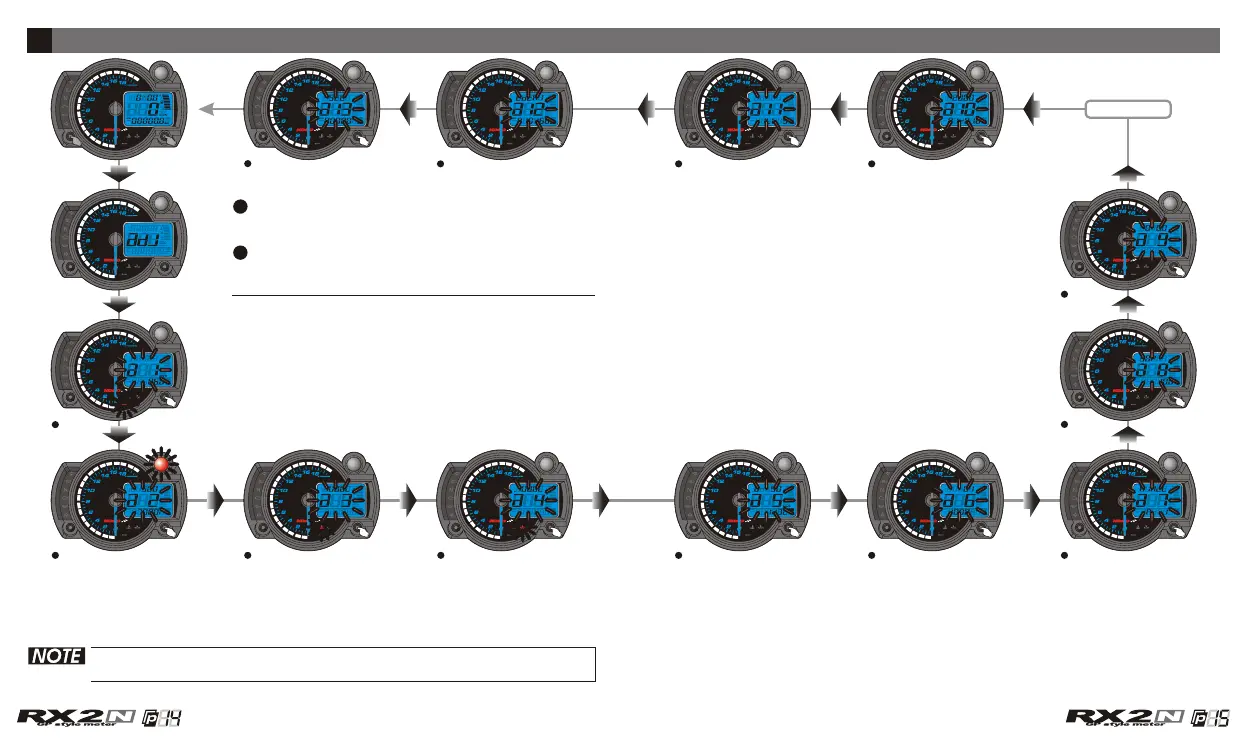
The setting screen instruction
If you enter the setting screen for 30 seconds and don't press the
button, it will back to the main screen automatically.
In main screen, press down the Select & Adjust
button at the same time for 3 seconds to enter
the setting screen.
The setting screen is in order as the following
drawing, please use the setting order for your
reference when you want to set the meter.
5
Speeding warning light setting
The RPM shift light setting Over heat warning light
(Water temperature) setting
Over heat warning light
(Oil temperature) setting
The target speed timer / target
distance timer setting
Tire circumference and sensor
point setting
RPM input pulse & signal impulse
setting
The fuel gauge resistance and
insufficient fuel warning setting
The clock setting
The perpetual calendar settingThe backlight brightness settingThe real odometer record setting
The displayed odometer setting
Adjust button
CDI & FI CDI & FI


 To Next Page