5-10
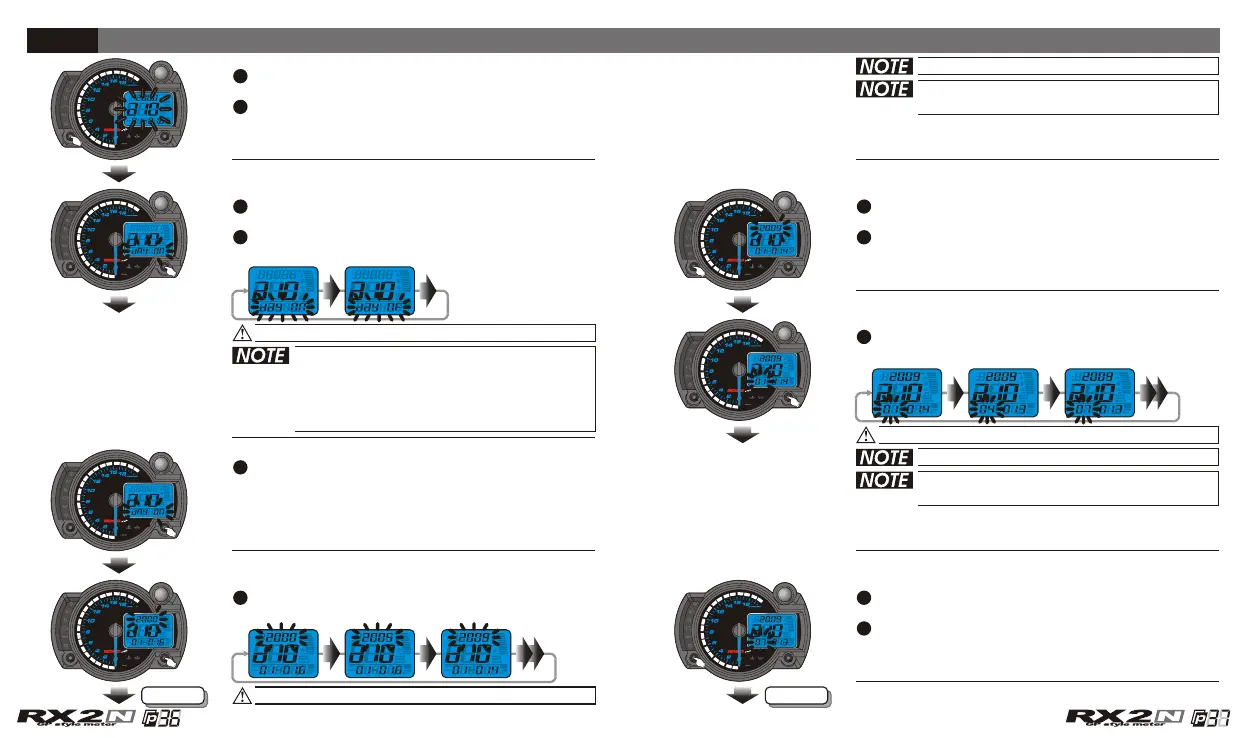
In a 10 screen, press the Select button to enter
the perpetual calendar setting screen.
EX. Now the perpetual calendar setting is
2000/01/01 Saturday.
Press the Select button to enter the year
setting screen.
Press the Select button to enter the month
setting screen.
EX. Now the year setting is changed from 2000
to 2009.
EX. You want to set the perpetual calendar
at 2009/07/17.
Press the Adjust button to choose the setting
value.
Press the Adjust button to choose the setting
value.
Press the Adjust button to choose the setting
value.
Now the setting value is flashing!
Now the setting value is flashing!
Now the setting value is flashing!
The year setting range : 2000~2099.
Next page Next page
The perpetual calendar setting
If you choose to turn off the calendar
function, press the Select button to
return to a 10 screen.
Then you could press the Adjust button
to select other setting screens.
When you adjust the year and date, the
day will adjust automatically.
The month setting range: 1~12.
When you adjust the year and date, the
day will adjust automatically.
Press the Select button to enter the date
setting screen.
EX. Now the month setting is changed from 1
to 7.
CDI & FI CDI & FI


 To Next Page