5-7
The RPM input pulse setting range is :
0.5, 1, 1.5, 2, 2.5, 3, 4, 5, 6.
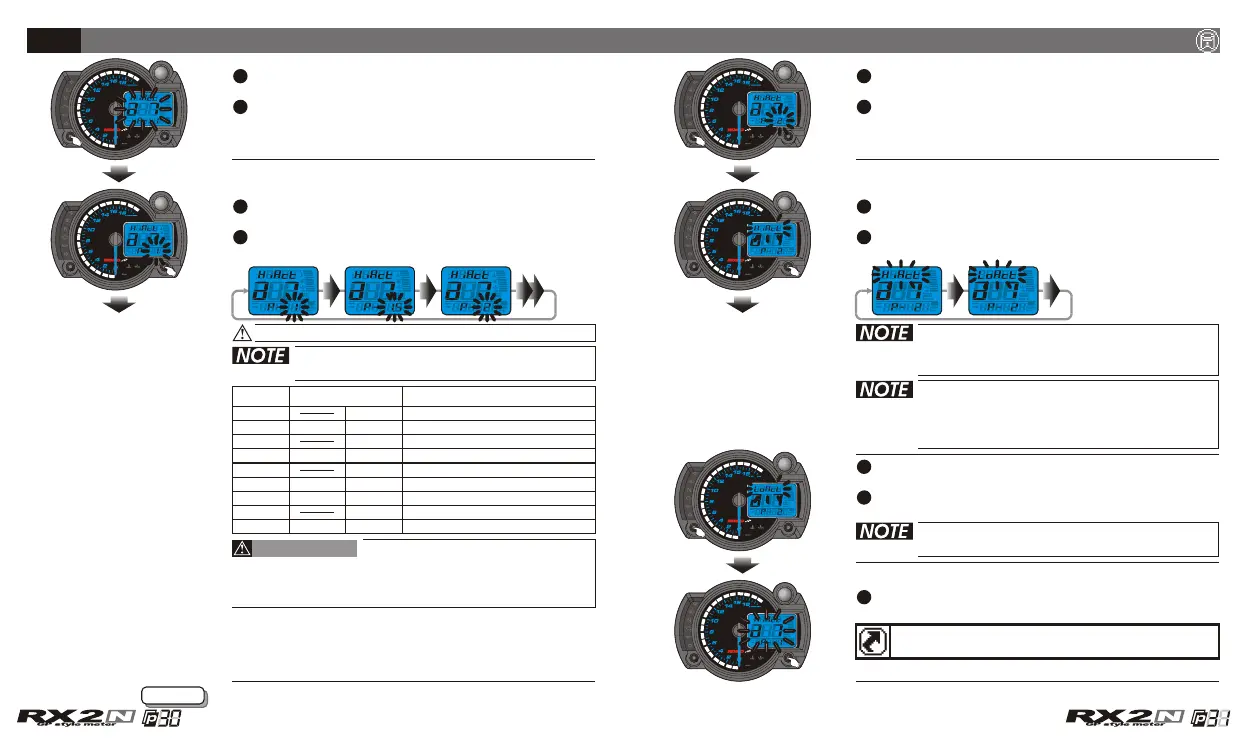
In a 7 screen, press the Select button to enter
the RPM input pulse setting screen.
EX. Now the RPM input pulse setting is 1 (4 Stroke,
2 piston) and the signal impulse setting is Hi
(The positive impulse).
EX. You want to set the RPM input pulse at 2
(4 Stroke, 4 piston) .
Press the Adjust button to choose the setting
value.
EX. The signal impulse you want to set is Lo
(The negative impulse) .
Press the Adjust button to choose the setting
value.
The corresponding
stroke and pistons number.
The corresponding RPM signal
number per ignition.
2 RPM signals per 1 ignition.
2 RPM signals per 3 ignition.
2 RPM signals per 5 ignition.
2 RPM signals per 10 ignition.
1 RPM signal per 1 ignition.
1 RPM signal per 2 ignition.
1 RPM signal per 3 ignition.
1 RPM signal per 4 ignition.
1 RPM signal per 6 ignition.
The setting
value
0.5
1
1.5
2
3
2.5
4
5
6
2C-1P
2C-2P
2C-3P
2C-4P
2C-6P
4C-1P
4C-4P
4C-6P
4C-5P
4C-8P
4C-10P
4C-12P
4C-2P
4C-3P
Most of the 4-cycle bikes with
one single piston are igniting every 360 degree
once, so the setting should be the same as the
bike with 2-cycle and one piston engine.
CAUTION!
Press the Select button to enter the signal
impulse setting screen.
EX. Now the RPM input pulse setting is changed
from 1 (4 Stroke, 2 piston) to 2 (4 Stroke,
4 piston).
If the tachometer can't detect the
signal (No RPM is displayed on the
screen), you could choose another
setting, and check it again.
The impulse setting range is between Hi
(The positive impulse) & Lo (The
negative impulse).
Press the Select button to return to a 7 setting
screen.
EX. Now the signal impulse setting is
changed from Hi P to Lo.
When you leave this screen, the setting
is finished.
Now the setting number is flashing!
Next page
RPM input pulse & signal impulse setting
Press the Adjust button to select the other
setting screens.
If you just want to make this function setting, you could
press down the Select button for 3 seconds to back to
the main screen.
CDI & FI CDI & FI


 To Next Page