6-2
WARNING!
Please use this function at racetrack to avoid
traffic accidents.
Please start the test when the bike stops.
If you have the power test record, it will
display the record first. You must clear the
record before starting a new test.
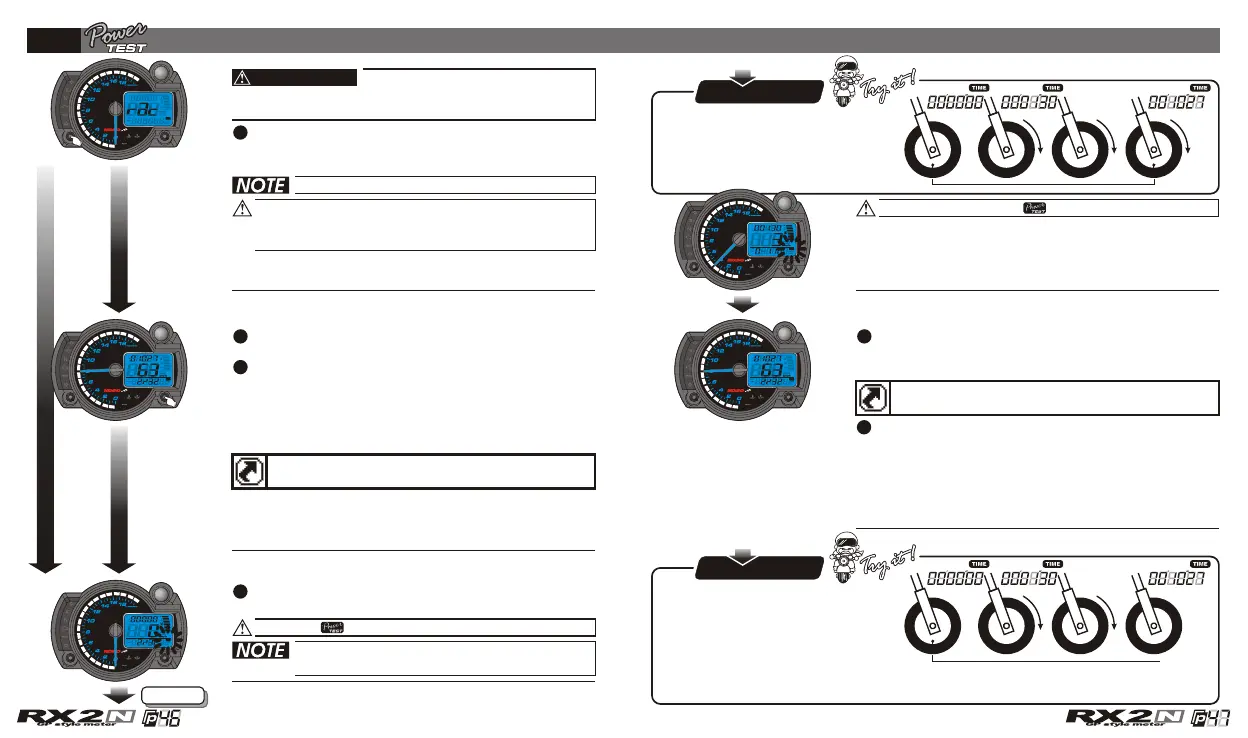
Target distance timer test
In power test screen, press the Select button
2 times to enter the target distance timer test
screen.
Press the Adjust button to clear the record
and enter the target distance timer test screen.
EX. Now you could see the record you have
before. It displays the target speed timer
setting as 2/32 mile (100 M), the test result:
10"27 seconds. The top speed is 63 km/h during
the test., The Max. RPM is 8,000 RPM during the
test.
When the bike moves, the timer will start
automatically.
Now the is flashing!
About the power test setting, please
check 5-5.
The record display screen
Enter the testing screen if no record
Enter the testing screen
Next page
If you just want to check the record, you could press down
the Select button for 3 seconds to back to the main screen.
P.S.P.S.
The timer is automatic, so when
your bike start to move the
timer will start to count the time
and stop automatically after you
stops the bike.
When you reach the target distance you set
, the timer will stop counting
(10"27 second).
(100 M . 2/32 mile)
If you want to test it again, press the Adjust
button to clear the record and enter the
target speed timer test screen again.
Speed up
0 M 100 m
If you don't finish the target
distance test or stop
accelerating during the test,
you could press the Adjust
button to stop the timer.
Then you could press the Adjust button one time to clear the record and
enter the target distance timer test screen.
P.S.P.S.
Speed up
Test
failure
0 M
During the test, the will keep flashing!
If you just want to use the function one time, press down
the Select button for 3 seconds to save the records and
back to the main screen.
CDI & FI CDI & FI


 To Next Page