P.S.P.S.
5-1
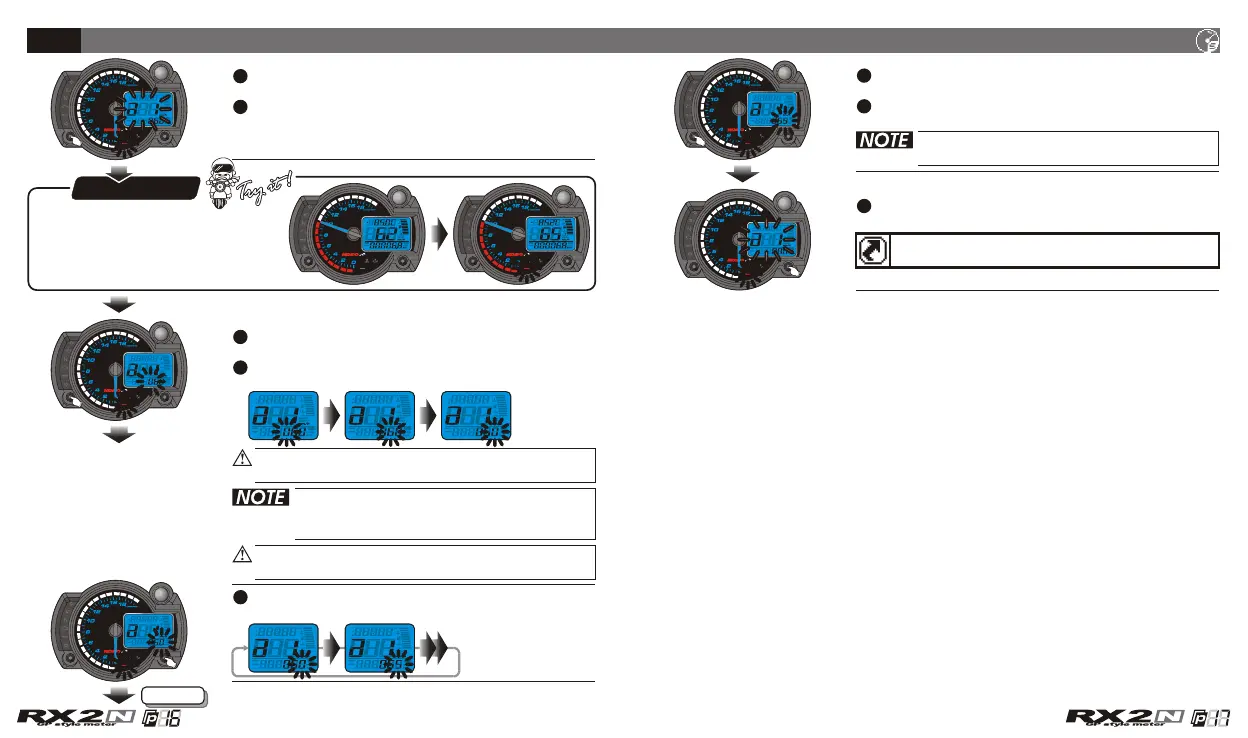
Speeding warning light setting
In a 1 screen, press the Select button to enter
the speeding warning light setting screen.
EX. Now the speeding warning light setting is
60 km/h.
EX. The speeding warning light you want to
set is 65 km/h.
Press the Select button to move to the digit
you want to set.
The speeding light will
light on when the speed reaches
your speeding warning setting.
The speeding warning light setting
range: 30~360km/h (20~225 MPH).
Setting unit: 1 km/h (MPH).
Press the Adjust button to choose the setting
value.
Press the Adjust button to select the other
setting screens.
Press the Select button to return to a 1 setting
screen.
EX. Now the setting is changed from 60 km/h
to 65 km/h.
Now the speeding warning light and the
setting value is flashing!
When you leave this screen, the setting
is finished.
If you just want to make this function setting, you could
press down the Select button for 3 seconds to back to
the main screen.
The setting unit will change together with the
unit setting (4-4).
Next page
CDI & FI CDI & FI


 To Next Page