Since the main difference between VS-211XS and VS-411XS are the number of inputs, from
this section on, any description of VS-411XS applies also to VS-211XS, unless stated
otherwise.
Always switch off the power to each device before connecting it to your VS-411XS. After
connecting your VS-411XS, connect its power and then switch on the power to each device.
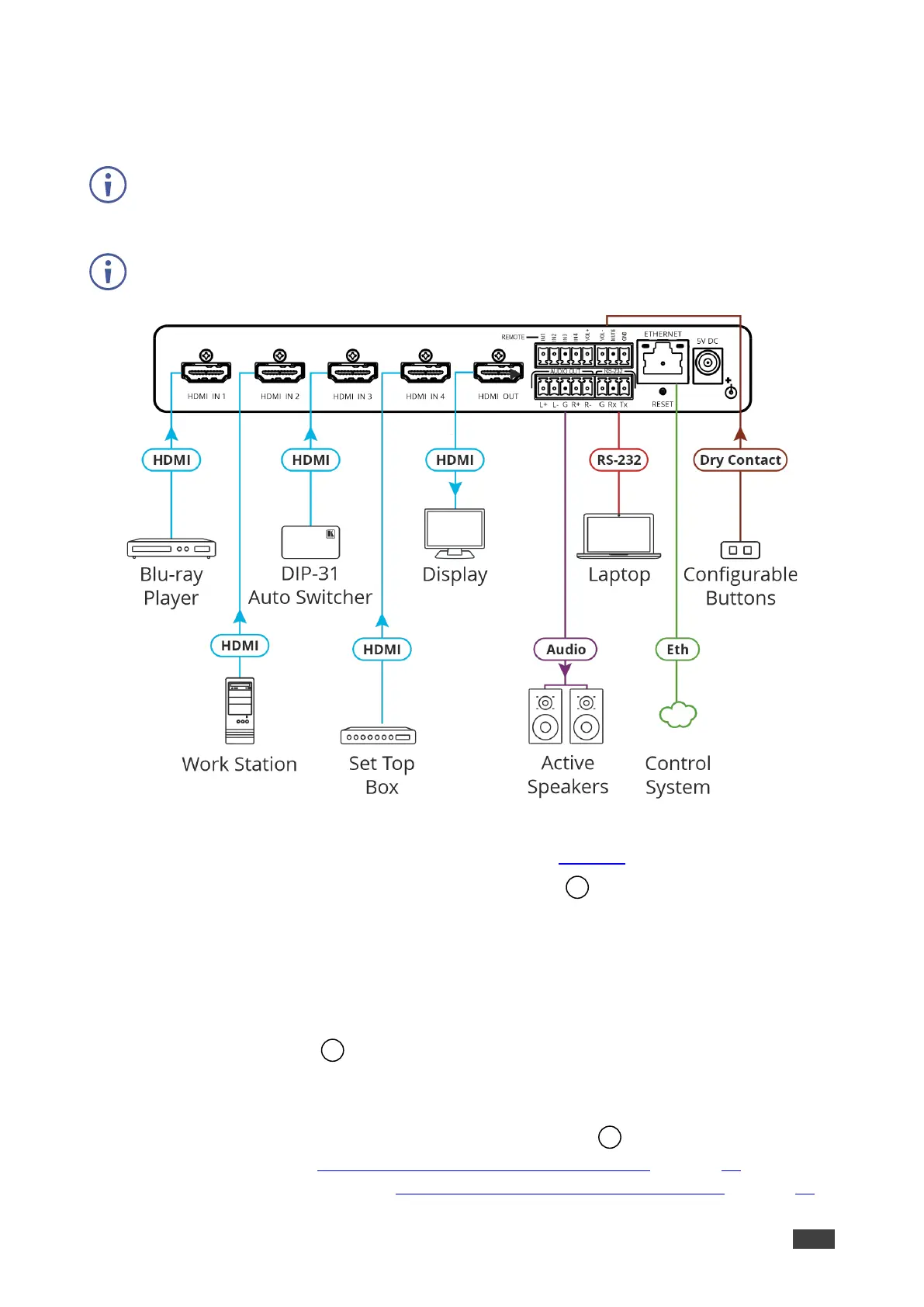
Figure 5: Connecting to the VS-411XS Rear Panel
To connect VS-411XS as illustrated in the example in Figure 5:
1. Connect an HDMI source to the HDMI IN connectors , for example, Connect:
▪ A Blu-ray player to HDMI IN 1.
▪ A work Station to HDMI IN 2.
▪ Kramer DIP-31 Auto Switcher to HDMI IN 3.
▪ A Set top box to HDMI IN 4.
2. Connect HDMI OUT to an HDMI acceptor (for example, a display).
3. Connect AUDIO OUT to a balanced stereo audio acceptor (for example,
Kramer Tavor 5-O active speakers).
4. Connect REMOTE dry-contact terminal block connectors
to configurable buttons to
select an input (see Using Contact Closure Remote Control Pins on page 16) or activate
a custom Maestro trigger (see Configuring Device Control and Automation on page 41).



 To Next Page