VS-211XS, VS-411XS – Operating and Controlling VS-411XS
Using Contact Closure Remote Control Pins
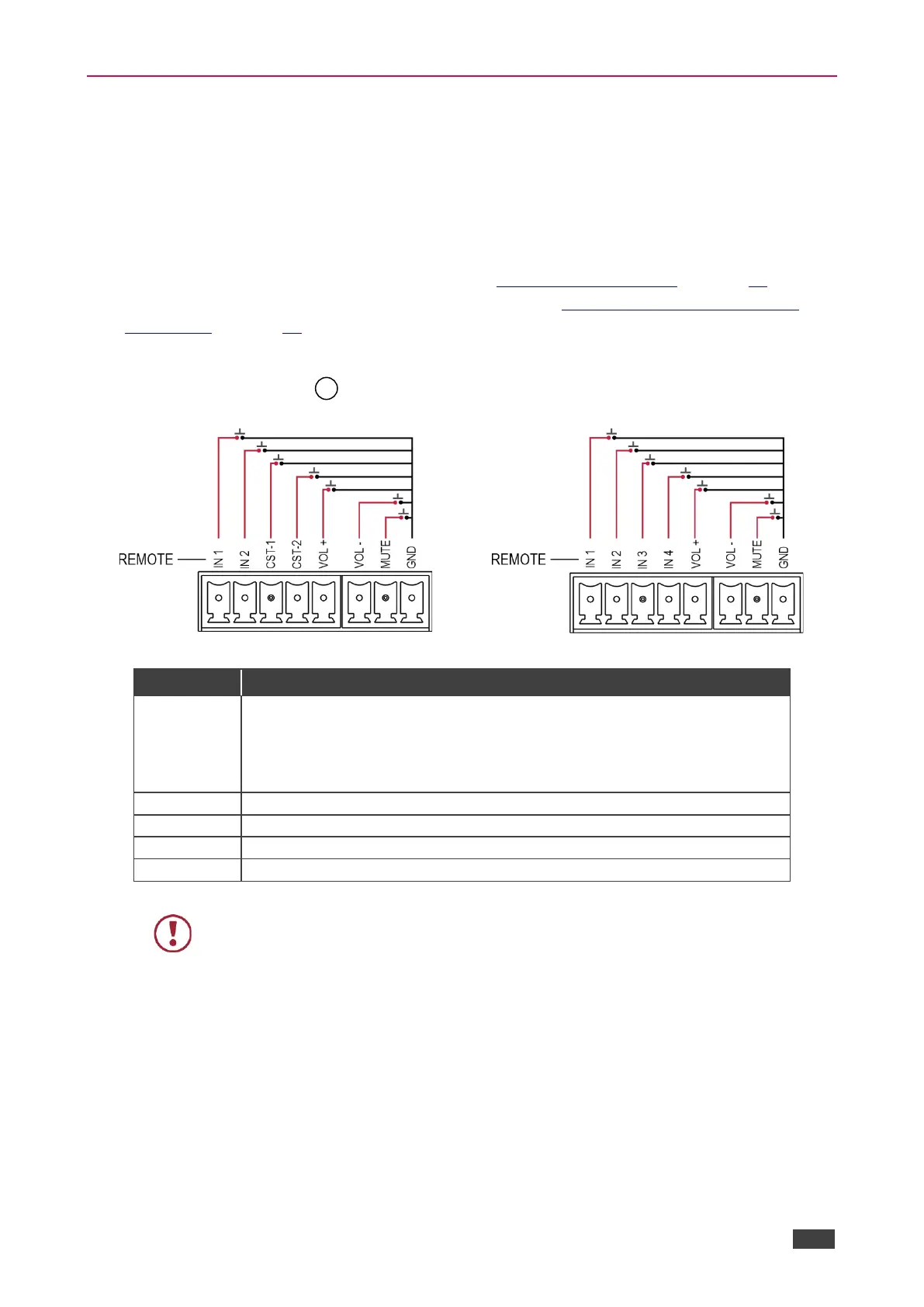
The REMOTE terminal block connector includes input, volume and mute pins.
The contact closure remote control pins operate in a similar way to the front panel push
buttons. Using the contact closure remote control (also known as push-to-make momentary
contact) you can select an input, set the volume or mute the audio output.
If contact closure buttons are set to Custom (see Setting Remote Buttons on page 25) they
are used to activate triggers that are set via Maestro (see Configuring Device Control and
Automation on page 41).
You can connect remote, momentary-contact contact closure switches to the Remote 8-pin
terminal block connector to control the unit.
Figure 12: VS-211XS Remote Switches
Figure 13: VS-411XS Remote Switches
Select an input or alternatively activate custom triggers set up in Maestro:
VS-211XS: by momentarily connecting IN 1, IN 2, CST-1 and CST-2 to GND.
(Configured via the embedded web pages).
VS-411XS: by momentarily connecting IN 1, IN 2, IN 3 and IN 4 to GND.
(Configured via the embedded web pages).
Increase audio output volume.
Decrease audio output volume.
Do not connect more than one input pin to the G pin at the same time.



 To Next Page