Page 58
5.5 DHW Set Point Change Mode
DHW Set Point Change Modes
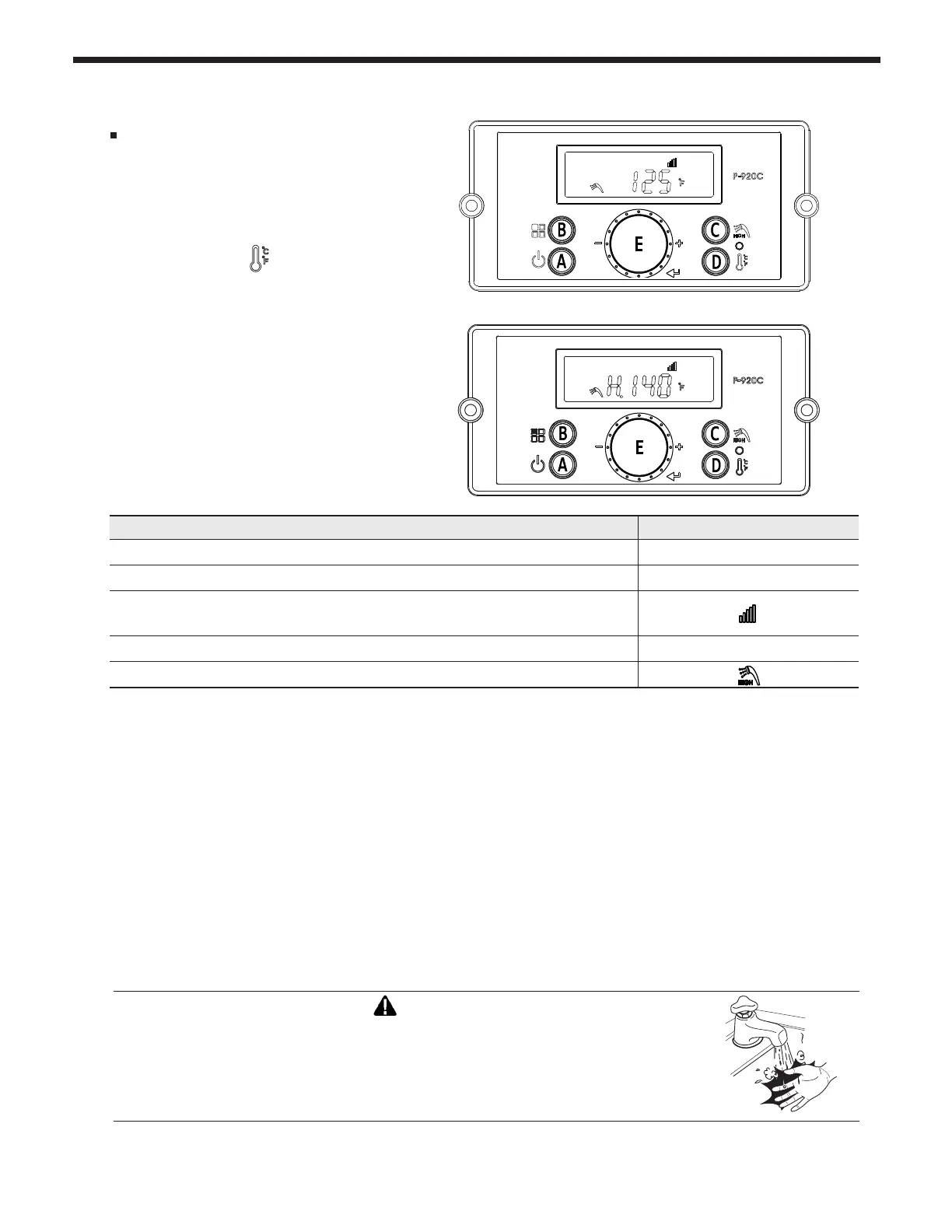
The display shows the following
information when changing water heating
temperature set points.
* Default DHW set-point is 125°F (51°C)
• DHW 95-120°F (35 - 49°C) LOW range (Default)
-To change LOW range, press the C Button. The DHW icon and current DHW LOW will ash (a
ashing value means it can be changed).
-Turn dial E clockwise to increase and counterclockwise to decrease until desired temperature is reached.
-Press dial E to save setpoint changes.
• DHW 121 - 140°F (49.5 - 60°C) HIGH range
-To change HIGH range, press and HOLD the C button for more than 5 seconds. The DHW icon
and current DHW HIGH will ash (a ashing value means it can be changed).
-Turn dial E clockwise to increase and counterclockwise to decrease until desired temperature is reached.
-Press dial E to save setpoint changes and to Exit.
Indicate Example
Current DHW set-point temperature
125°F
Temperature sign Celsius or Fahrenheit letter
°C or °F
If display is communicating with the main controller normally, the
communication icon will be indicated.
When DHW set-point range is high : from 121°F (49.5°C) to 140°F (60.0°C)
H . 140°F
When changing DHW setpoint, the DHW icon will ash
S24
Changing between Celsius and Fahrenheit
When the button D is pressed (for more
than 5 seconds), temperature unit will toggle
between °C and °F.
DANGER
Scalding may occur within 5 seconds at a setting of 140°F (60°C). Water temperatures
over 125°F can cause severe burns, or death from scalding. Children, disabled,
and elderly are at highest risk of being scalded. Read all instructions before setting
temperature at appliance. Feel water before bathing or showering.
AUTODESK � � � � � � � � � �
AUTODESK � � � � � � � � � �
AUTODESK � � � � � � � � � �
AUTODESK � � � � � � � � � �



 To Next Page