The FT Series Floor Standing, Combination Boiler
Page 61
5.8 Installer Mode
AUTODESK � � � � � � � � � �
AUTODESK � � � � � � � � � �
AUTODESK � � � � � � � � � �
AUTODESK � � � � � � � � � �
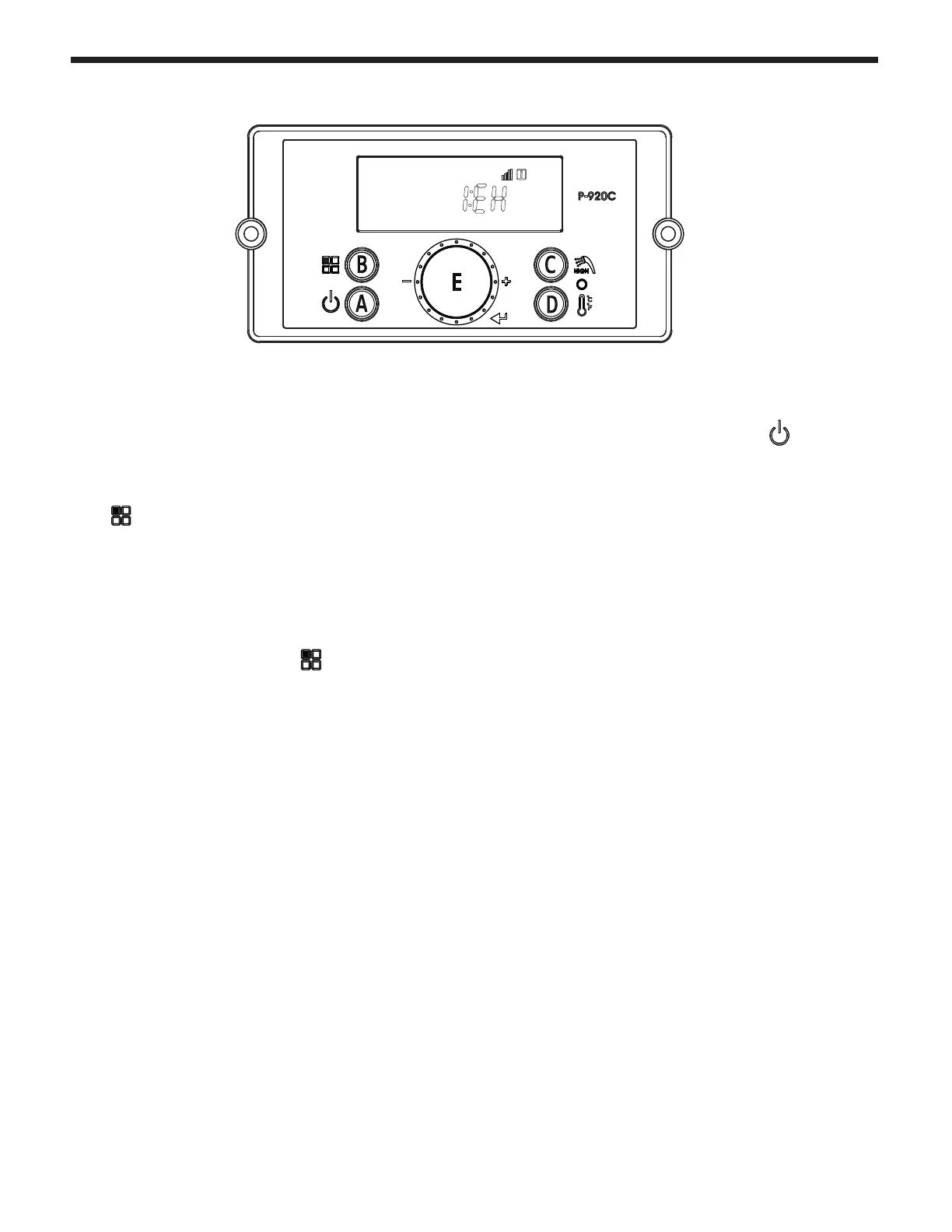
These changes are to be made only by a qualied technician.
To c hange any of the Installer Parameters,
Start by turning OFF the Power
to the Display Control.
Then, with the power to the Display Control OFF, Press and HOLD (more than 5 seconds) the Button B
to get into the Installer Mode.
Rotate Dial E until you nd the Installer Parameter (full list on facing page) that you wish to change.
Tap Dial E to enter that Parameter.
Adjust to the setting that you require and then press (tap) Dial E to save and to Exit.
Finish by pressing button B



 To Next Page