55
USER GUIDE
REFRIGERATOR
11.2.3 Thetford refrigerator
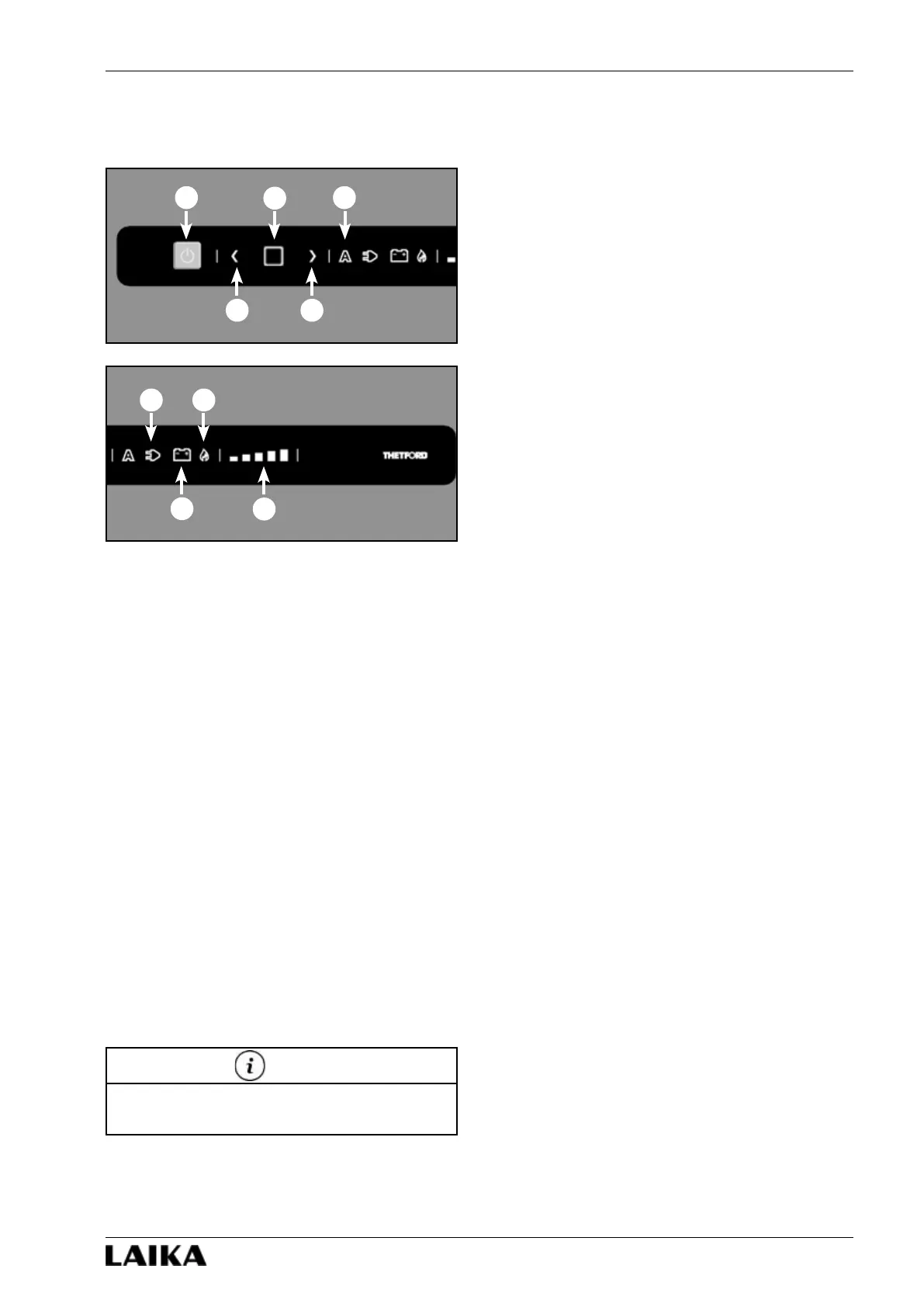
Control panel
1) ON/OFF button.
2) Arrow buttons.
3) Confirm button.
4) Automatic mode pilot lamp.
5) 230 V power supply pilot lamp.
6) 12 V power supply pilot lamp.
7) Gas power supply pilot lamp.
8) Cooling level indicator.
Operation
To choose a type of power supply, keep the confirm
button (3) pressed for two seconds: the pilot lamps
that indicate the type of supply (automatic, 230 V,
12 V, gas) will start to flash. Choose the desired type
using the arrow buttons (2). Confirm your choice with
the confirm button (3).
To select the cooling level, keep the confirm button
(3) pressed for two seconds: the pilot lamps that
indicate the sources (automatic, 230 V, 12 V, gas) will
start to flash. Press the confirm button once again.
The cooling level indicator (8) will start to flash.
Choose the desired level using the arrow buttons (2).
Confirm your choice with the confirm button (3).
Refer to the manufacturer’s handbook for further
information on the refrigerator.
NOTE
1
2 2
3
4
5
6
7
8





 To Next Page