PLMNL0286 REV. B, Effective Date: 06/06/19 5 FiberMINI
®
with Auto Focus (AF) Operation Manual
2.4.1 Inserting the Fiber
It is the responsibility of the end user to
verify correct fiber type and installation
according to the manufacturer
specifications.
Take great care to ensure the
optics remain clean. Wipe any
excess debris from the head
according to Section 5.1 before
servicing.
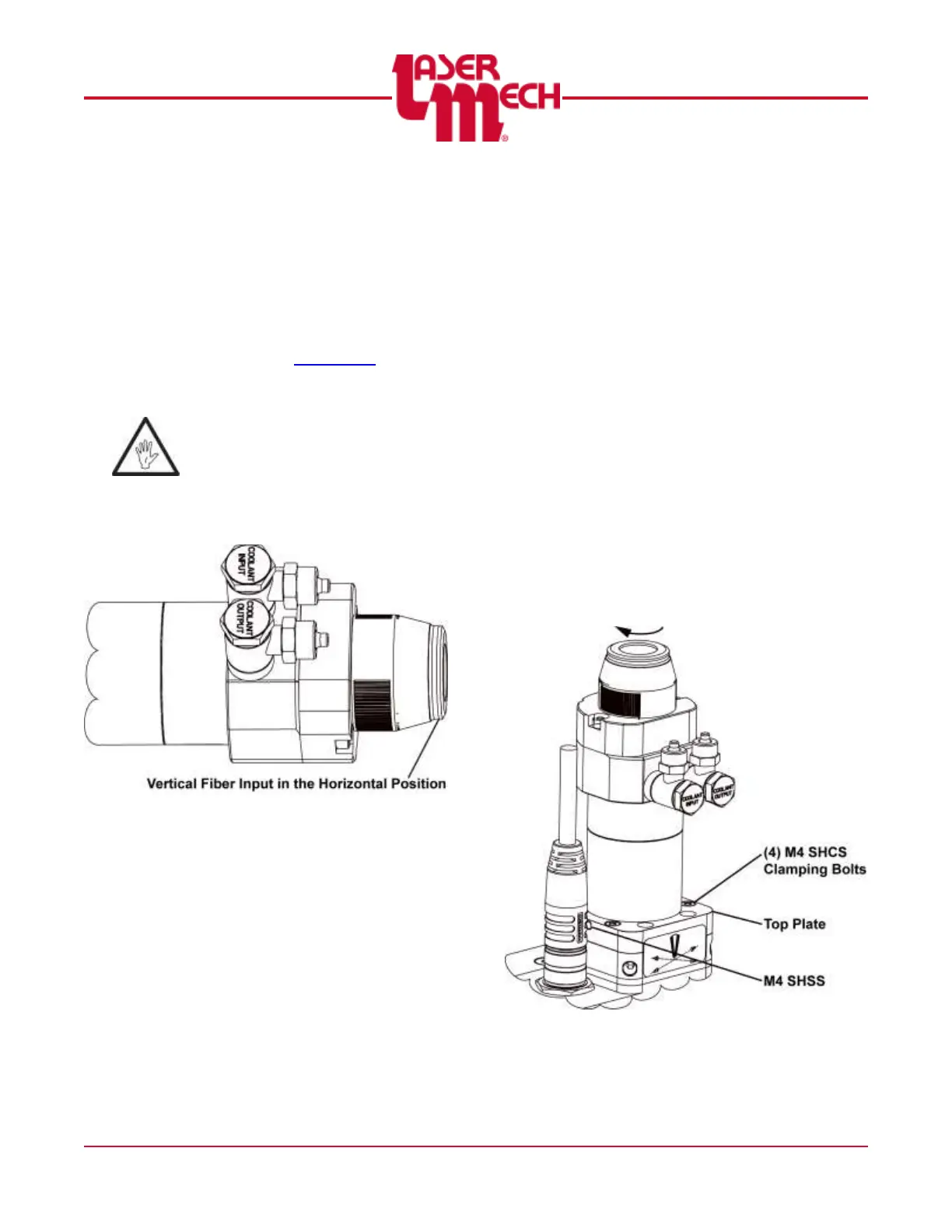
The head is orientated with
vertical beam input. Whenever it
is possible, rotate the head to
HORIZONTAL to prevent debris
from falling onto the optics.
See Figure 5.
Figure 5
2.4.2 Adjusting the Fiber Input Adapter
Orientation
Many fiber optic cables have a key and
only fit into the fiber input adapter (FIA)
in one orientation. You can rotate the
FIA to match the orientation of the fiber
end and reduce twisting of the fiber optic
cable.
To reorient the FIA on the FiberMINI
®
AF (see Figure 6):
1. Loosen, but do not remove, the M4
SHSS by 1/4 turn.
2. Loosen, but do not remove, the (4)
M4 clamping bolts by 1/4 turn.
3. Rotate the FIA clockwise to match
the orientation of the fiber optic
cable.
4. Once the FIA is orientated correctly
tighten the (4) M4 SHCS clamping
bolts and the M4 SHSS.
Figure 6


 To Next Page