PLMNL0286 REV. B, Effective Date: 06/06/19 32 FiberMINI
®
with Auto Focus (AF) Operation Manual
4. If necessary, click Cancel to exit
the screen.
5. If a height sensing tip is selected,
perform steps 3 in Section 4.5.4.
4.5.8 EtherNet/IP (If Equipped)
FiberMINI
®
controllers are set by
default to use DHCP for EtherNet/IP
communications. A static IP address
can be set using FiberMINI
®
Monitor.
1. Click the Settings button ( ) in
the toolbar and select Industrial
Network.
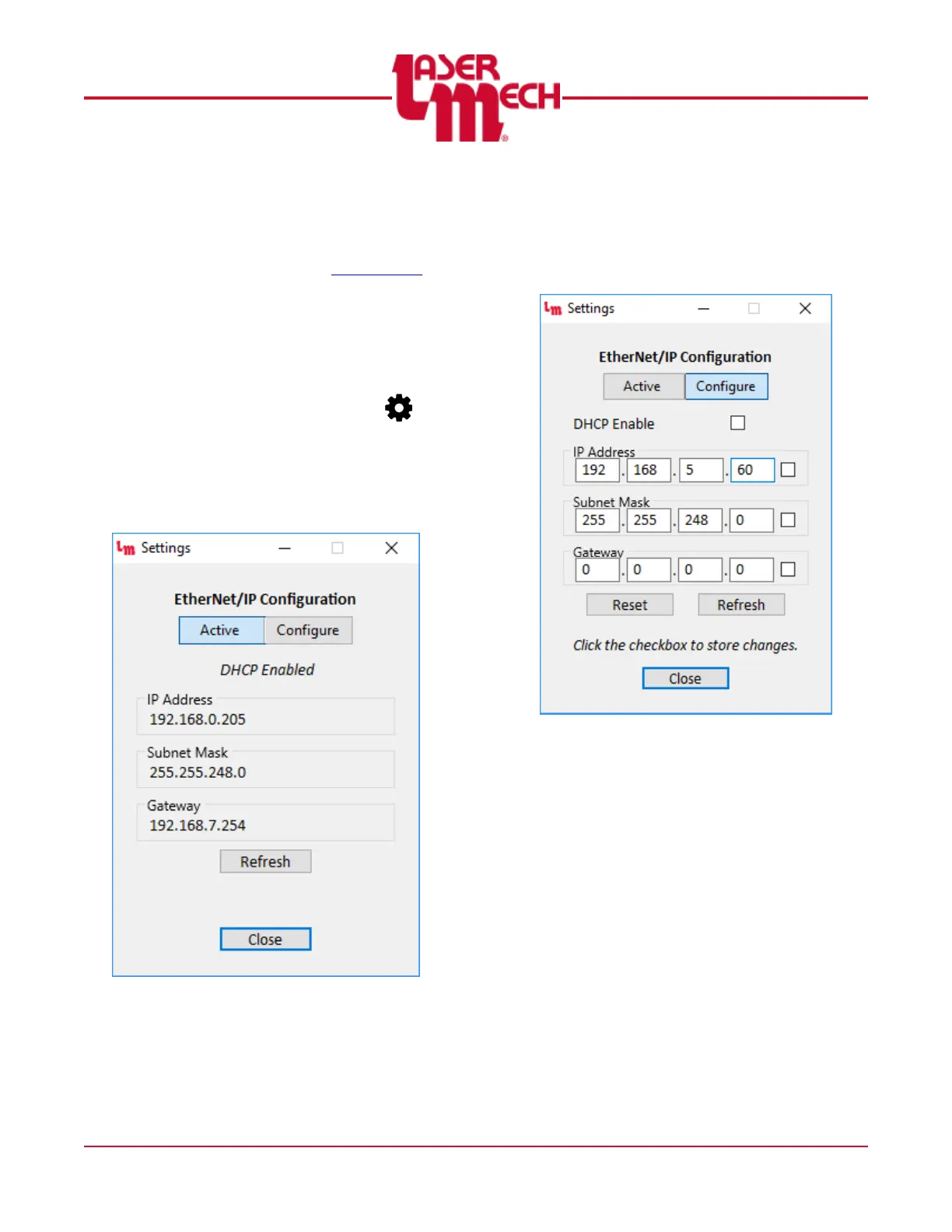
The EtherNet/IP Configuration screen
appears showing the active network
settings. See Figure 37.
Figure 37
2. To modify the configuration, click
on the Configure tab and update
the DHCP, IP Address, Subnet
Mask, and Gateway settings as
desired. See Figure 38.
Figure 38
3. If desired, click the check box next
to each set of values to save the
changes to the network module.
To cancel changes that have
not yet been saved, click
Refresh.


 To Next Page