PLMNL0286 REV. B, Effective Date: 06/06/19 29 FiberMINI
®
with Auto Focus (AF) Operation Manual
4.5 FiberMINI
®
Monitor Settings
The FiberMINI
®
Monitor software is
available for download. See Section
4.1 for details.
You MUST specify the settings listed
in this section before operating
FiberMINI
®
Monitor.
Before adjusting any settings:
You MUST install the software on your
PC. See Section 4.1 for more details.
You MUST connect the head and
control interface properly. See Section
3 for more details.
4.5.1 Unlock Settings
1. Click the Unlock Settings button
( ) in the toolbar.
In the pop up that appears,
enter the password:
minisetup
4.5.2 Temperatures
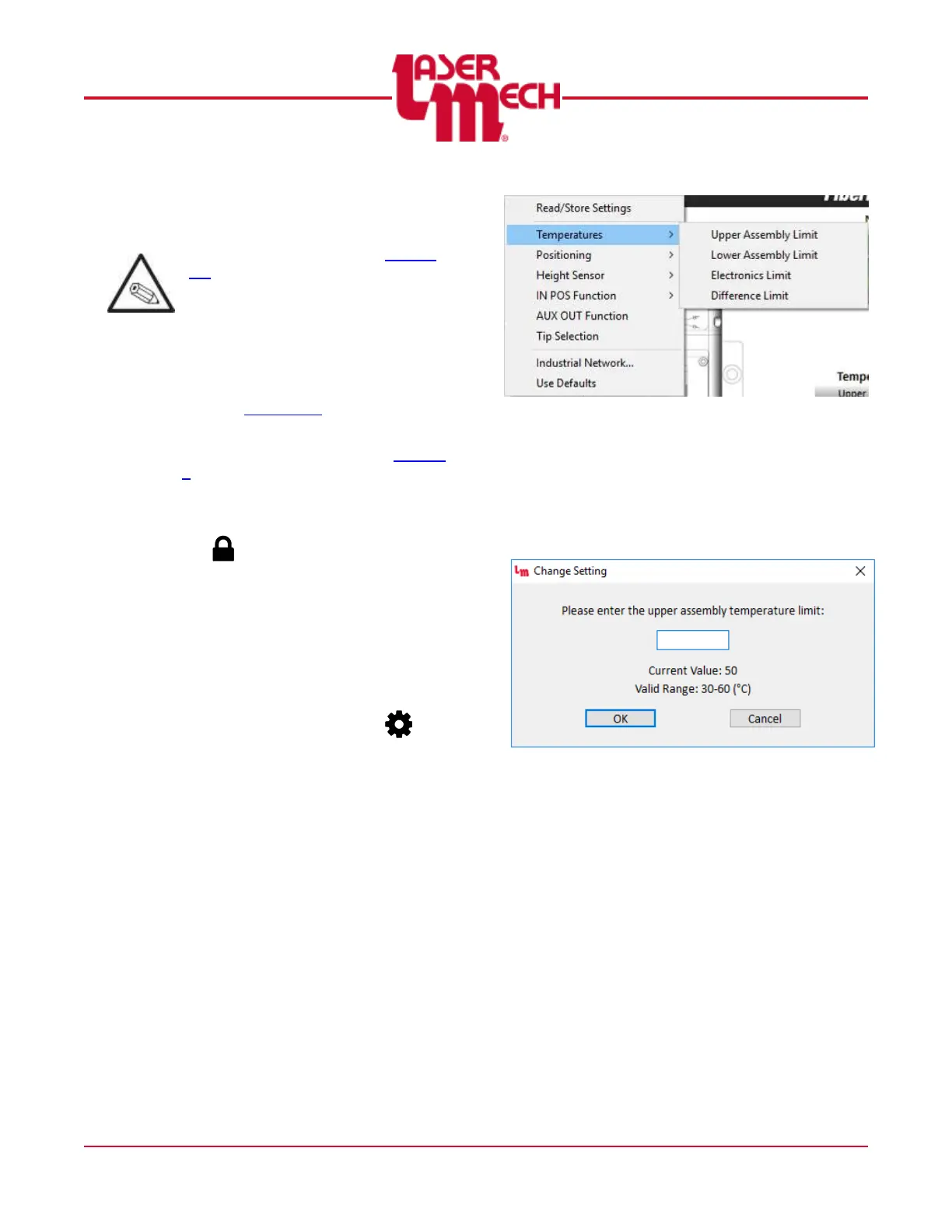
For steps 1 and 2, see Figure 29.
1. Click the Settings button ( ) in
the toolbar and hover over
Temperatures.
2. Click Upper Assembly Limit, Lower
Assembly Limit, Electronics Limit,
or Difference Limit, as desired.
Figure 29
For steps 3 to 6, see Figure 30.
3. A dialog box will appear with a field
to enter the new limit.
The current value and valid
range are also displayed.
Figure 30
4. Enter a valid new limit value in the
provided field.
5. Click OK to store the value and
update the thermometer or meter.
6. If necessary, click Cancel to exit
the screen.


 To Next Page