PLMNL0286 REV. B, Effective Date: 06/06/19 36 FiberMINI
®
with Auto Focus (AF) Operation Manual
7. Remove the cover glass from the
drawer by applying pressure with your
fingers to the surface of the cover
glass, opposite the seal.
The seal and cover glass will pop
out.
Save the seal and clean it using a
dry wipe (PLTLS0037), see
Section 5.1 for more details.
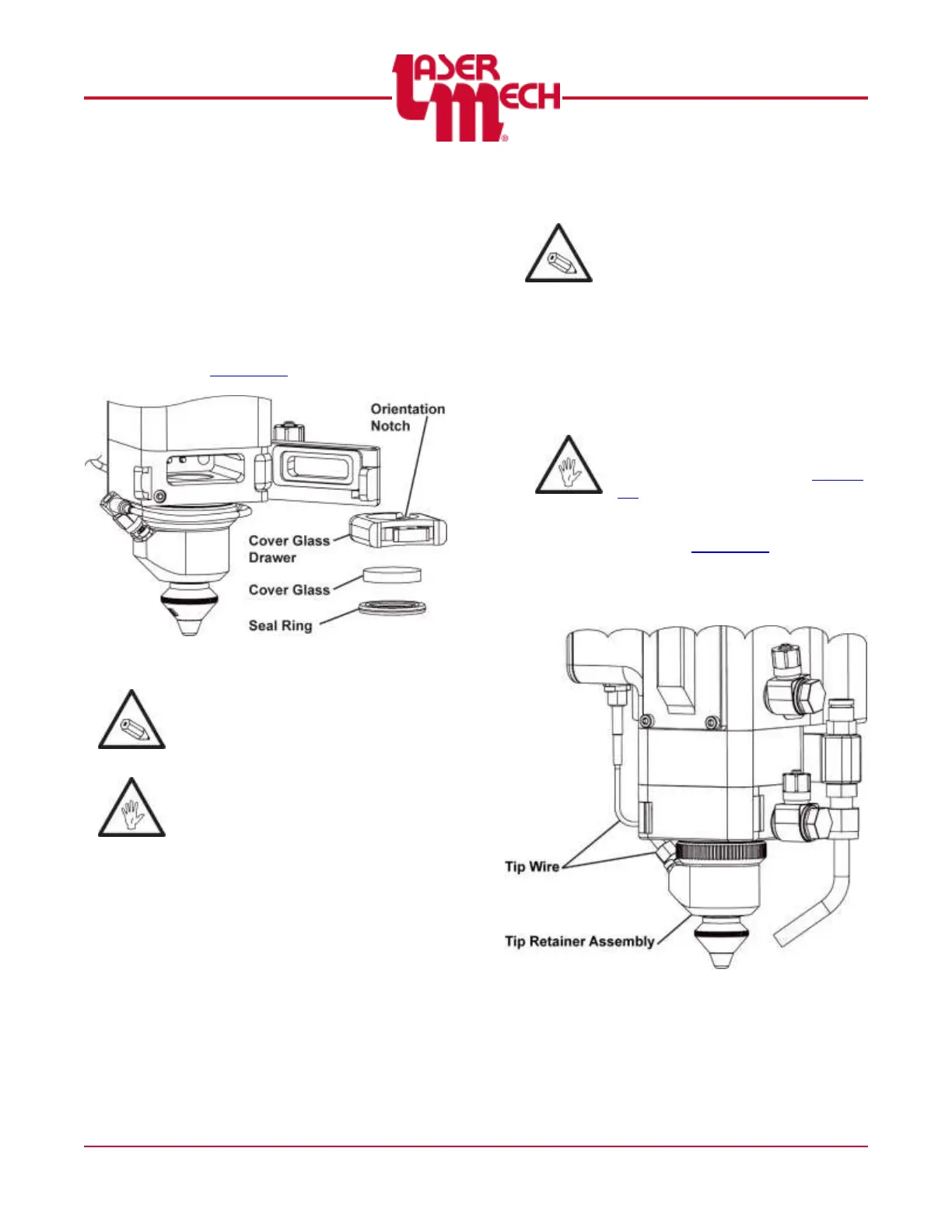
Figure 45
Laser Mechanisms recommends
replacing the optic if it is
contaminated or if cutting quality is
unacceptable.
Take care not to touch or
contaminate the flat surfaces of the
cover glass.
8. Install a new cover glass by placing it
into the holder.
9. Press the seal ring into the holder to
retain the cover slide.
The seal is bi-directional, so you
can insert it in either direction.
Replace the existing seal with a
new one if it appears damaged.
10. Open the cover glass door.
The cover glass holder orientation
notch and each component MUST
match Figure 45.
11. Reinsert the cover glass holder into
the head.
12. Close the cover glass door.
5.4 Servicing the Tip Retainer
Assembly
Before opening any part of the
head, clean off the dust and/or
process debris according to Section
5.1.
1. Clean the outside of the head
according to Section 5.1.
2. Unthread the tip wire (PLTTW0003)
from the tip retainer assembly. See
Figure 46.
Figure 46


 To Next Page