PLMNL0286 REV. B, Effective Date: 06/06/19 30 FiberMINI
®
with Auto Focus (AF) Operation Manual
4.5.3 Positioning
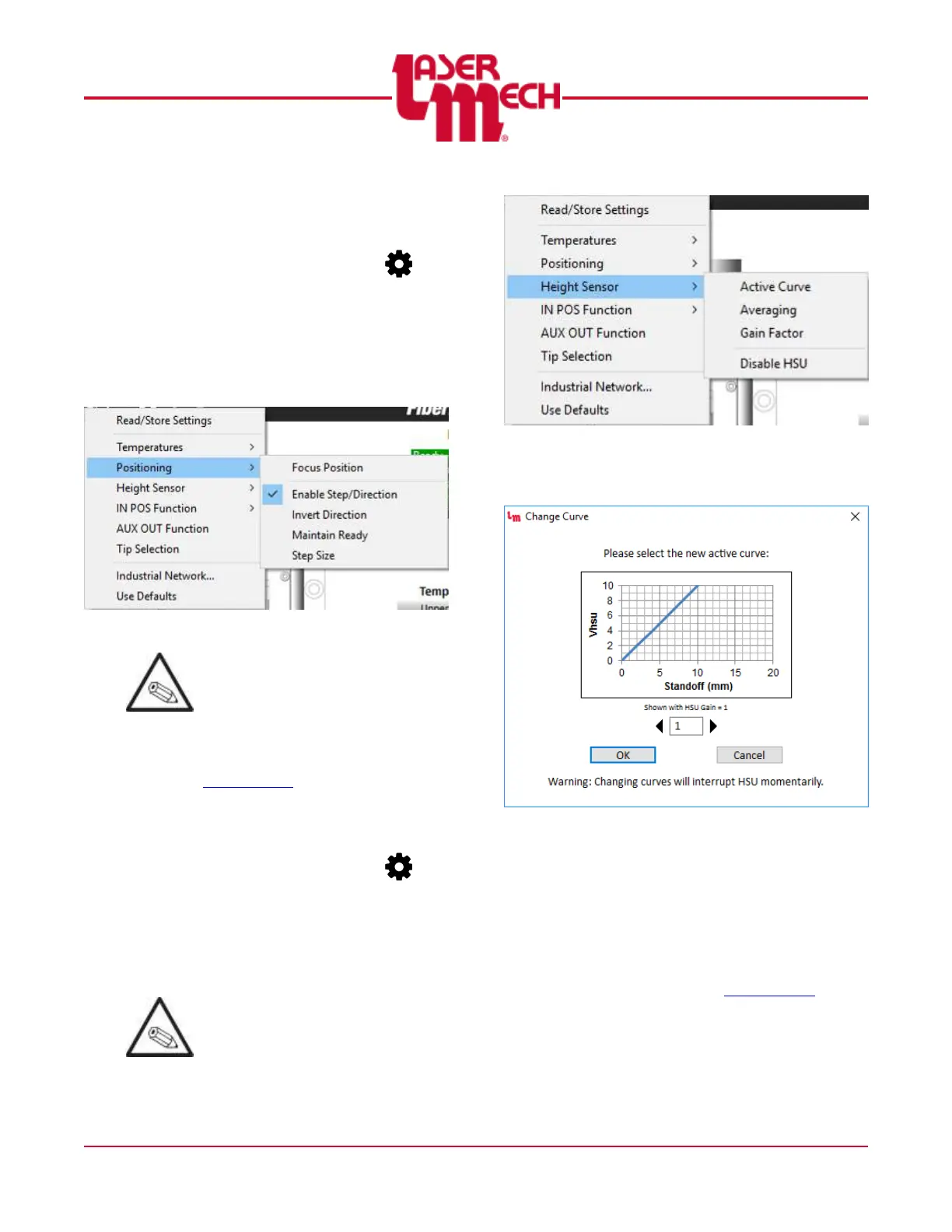
For steps 1 and 2, see Figure 31.
1. Click the Settings button ( ) in
the toolbar and hover over
Positioning.
2. Click Focus Position, Enable
Step/Direction, Invert Direction*,
Maintain Ready* or Step Size*, as
desired.
Figure 31
Items noted by an asterisk (*) only
appear when Step/Direction is
enabled.
3. If you select Focus Position or Step
Size, perform steps 3 to 6 in
Section 4.5.2.
4.5.4 Height Sensor
For steps 1 and 2, see Figure 32.
1. Click the Settings button ( ) in
the toolbar and hover over Height
Sensor.
2. Click Active Curve, Averaging,
Gain Factor or Disable HSU, as
desired.
The choices in step 2 only appear
when the height sensor is
enabled.
Figure 32
3. If you select Active Curve, a dialog
box will appear, see Figure 33.
Figure 33
a. Click the left or right arrows to
select the desired curve.
b. Click OK.
c. If necessary, click Cancel to
exit the screen.
4. For other parameters, perform
steps 3 to 6 in Section 4.5.2.


 To Next Page