PLMNL0286 REV. B, Effective Date: 06/06/19 35 FiberMINI
®
with Auto Focus (AF) Operation Manual
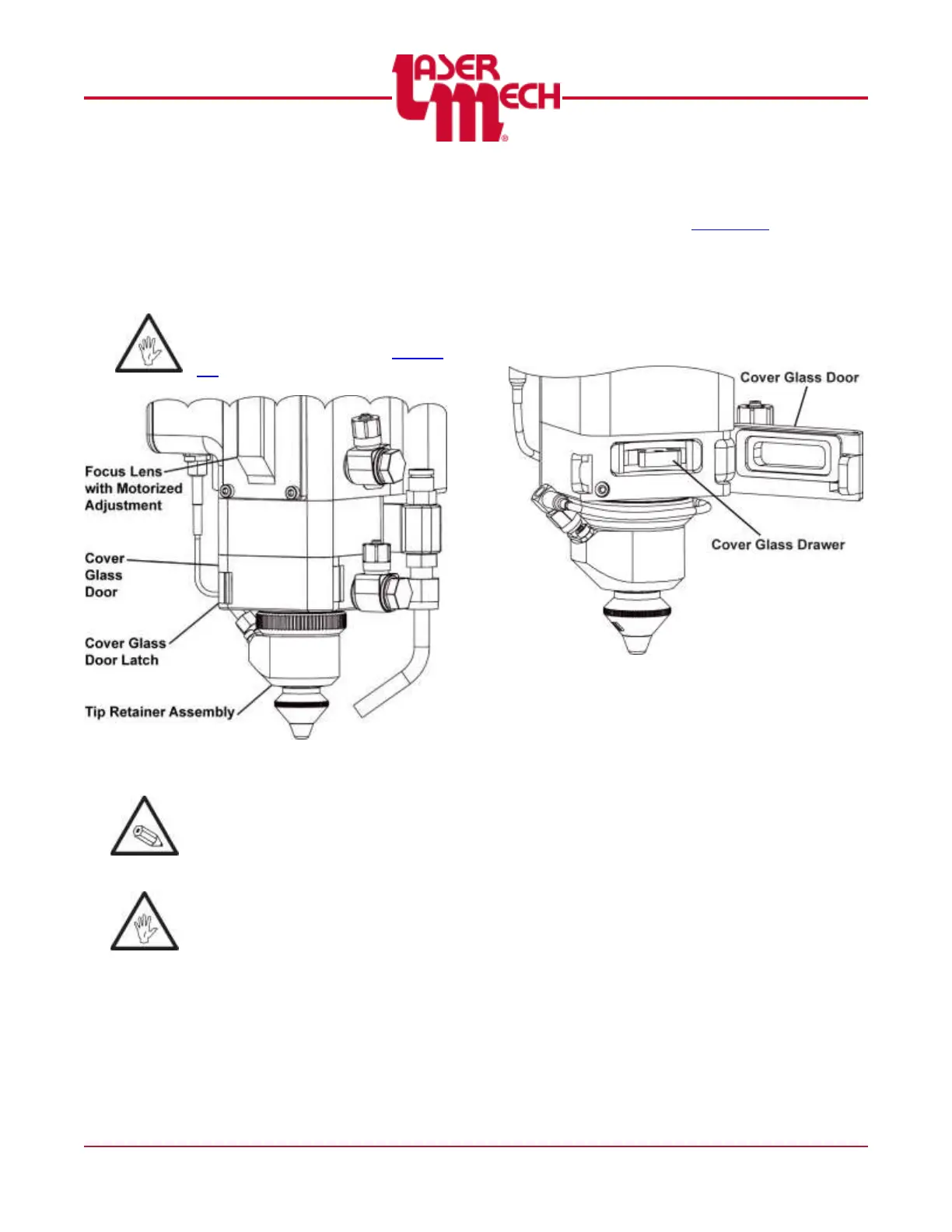
5.3 Servicing the Cover Glass
The cover glass for the FiberMINI
®
AF is
located between the focus lens with
motorized adjustment and the tip retainer
assembly. See Figure 43.
Before opening any part of the
head, clean off the dust and/or
process debris according to Section
5.1.
Figure 43
It is possible to change the cover
glass with the head mounted to the
machine by using the procedure that
follows.
Always wear powder free gloves or
finger cots when handling optics and
optic holders.
1. Clean the outside of the head
according to Section 5.1.
2. Release the cover glass door by
pushing the latch. See Figure 43.
3. Swing the cover slide door open by
pulling it. The spring in the door latch
will help push it open. See Figure 44.
Figure 44
For steps 4 to 12, see Figure 45.
4. Grasp the handle on the cover glass
drawer and pull straight out to remove
the cover glass drawer from the head.
5. Close the sealed cover glass door
during service to keep contaminants
out.
6. Take the cover glass drawer to a
clean area.


 To Next Page