PLMNL0286 REV. B, Effective Date: 06/06/19 26 FiberMINI
®
with Auto Focus (AF) Operation Manual
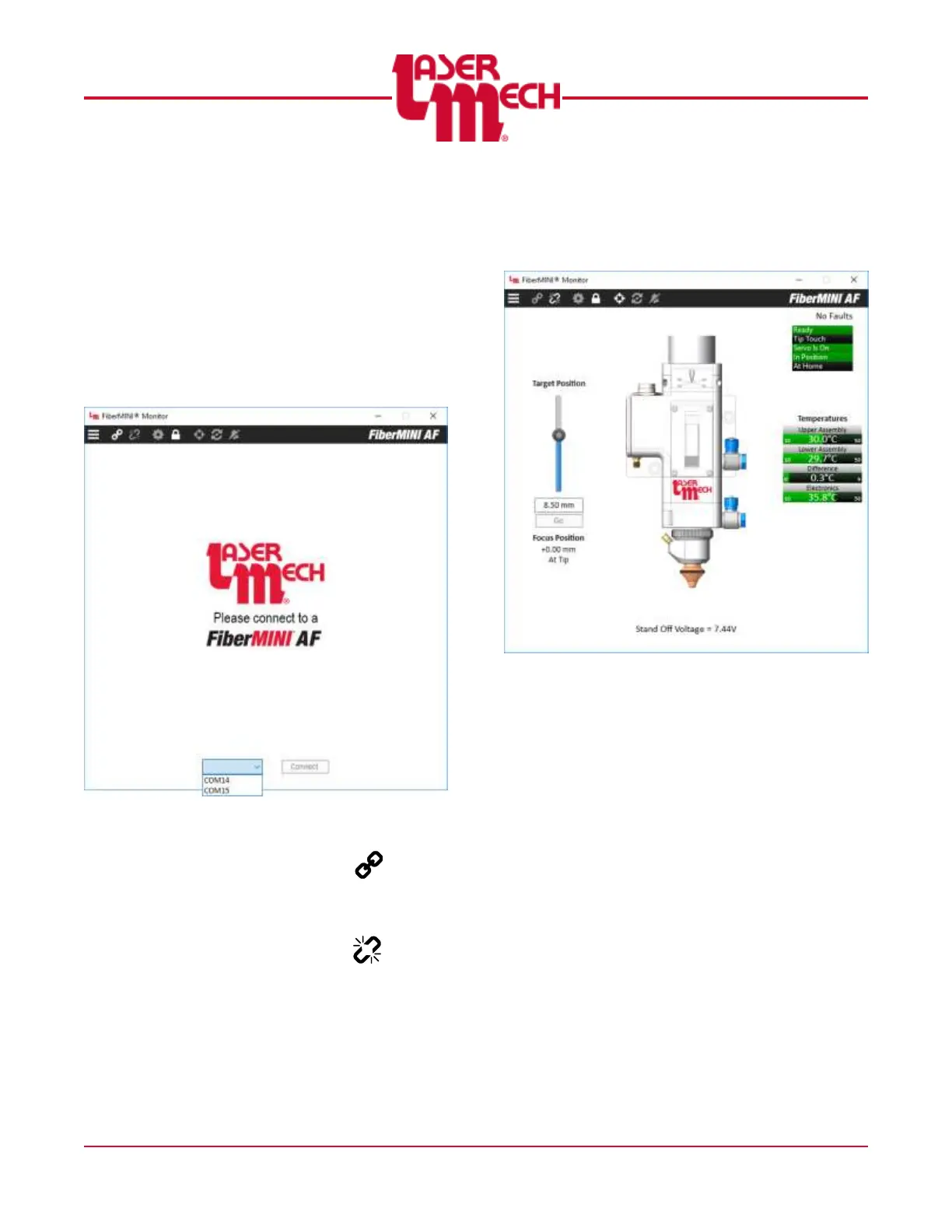
4.3 Connecting
To connect a FiberMINI
®
(see Figure 24):
1. Click on the Port drop down menu
near the bottom of the window and
choose the appropriate port.
2. Click Connect.
The Device Manager also lists the
port number of the cable as “USB
Serial Port.”
Figure 24
Alternately, you can also connect by
clicking the Connect button ( ) in the
toolbar then selecting the appropriate port
from the menu. The main screen will
appear. See Figure 23. To disconnect,
click the Disconnect button ( ) in the
toolbar.
4.4 Monitor
After you connect FiberMINI
®
Monitor a
series of meters appears. See Figure 25.
Figure 25
The settings are based on
temperature ranges. Each meter
displays the upper and lower limits in
small digits, along with the current
value and a scale representing the
current value. See Figure 25.
o If the sensor is within the normal
operating range, the scale is
displayed in green.
o If the sensor is in a faulted state,
the scale is displayed in red.
o If the sensor has recovered from a
fault, the scale is displayed in
amber.


 To Next Page