PLMNL0286 REV. B, Effective Date: 06/06/19 33 FiberMINI
®
with Auto Focus (AF) Operation Manual
4. If desired, click the Reset button to
reset the network module and
implement the new configuration.
Wait 5 seconds for the network
module to initialize, then verify
the new configuration by
clicking on the Active tab then
clicking Refresh.
Otherwise, you must cycle
power in order for new settings
to take effect.
5. Click Close to exit the screen.
4.5.9 DeviceNet (If Equipped)
To configure a DeviceNet module,
follow the procedure found in the
EtherNet/IP instruction, see Section
4.5.8.
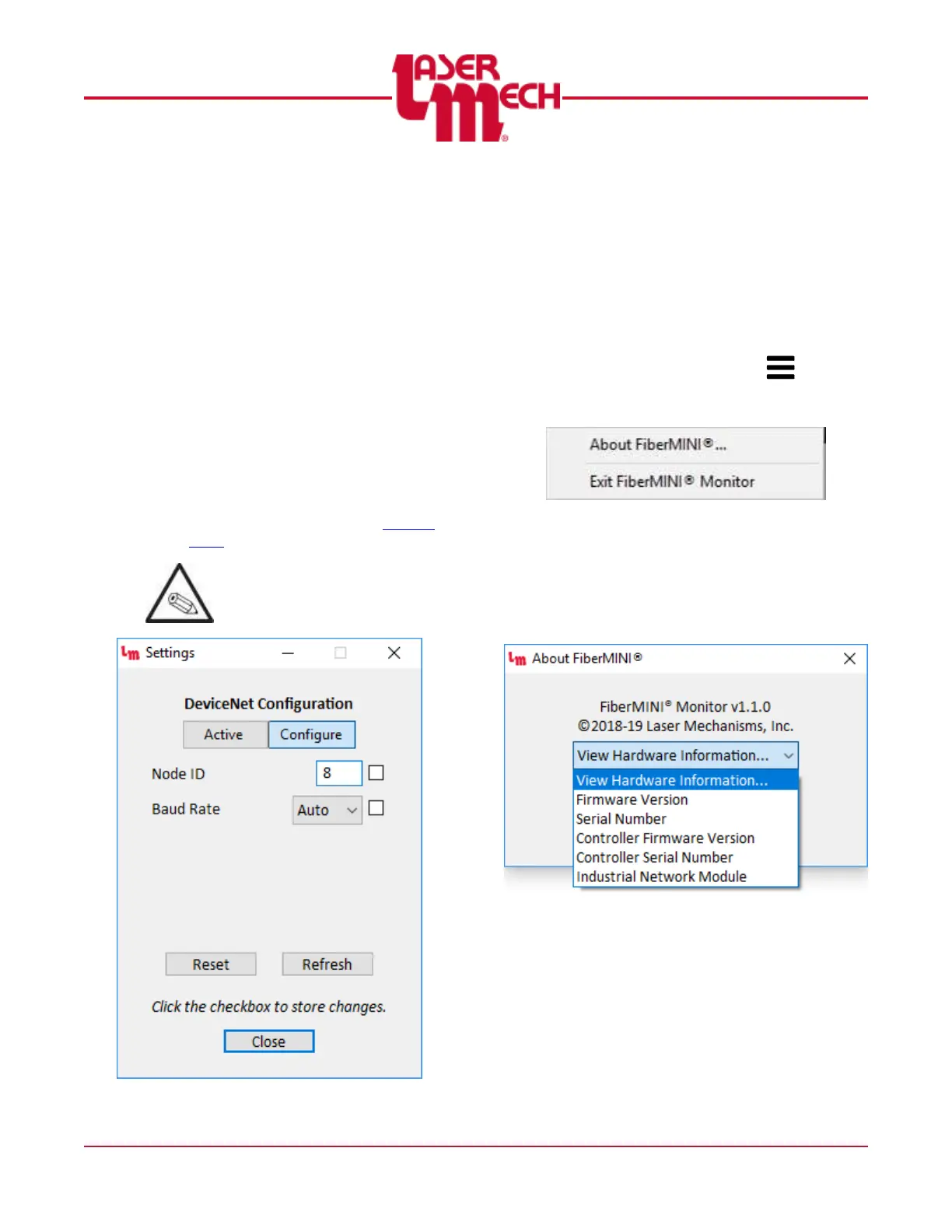
The available configuration
parameters are replaced with
Node ID and Baud Rate. See
Figure 39.
Figure 39
4.6 FiberMINI
®
Monitor System
Identification Information
The hardware and interface are specific to
your system. Therefore, version and serial
numbers are critical in order for Laser
Mechanisms to provide support.
To display system information:
1. Click the Menu button ( ) in the
toolbar and select System Information.
See Figure 40.
Figure 40
For steps 2 to 5, see Figure 41.
2. Click on the View Hardware
Information drop down menu in the
pop up box that appears and the
image shown in Figure 41 will appear.
Figure 41
3. Click on the appropriate line to view
the identifying information for the
desired item.
4. Repeat steps 2 and 3 as needed.
5. Click OK to exit the System
Information screen.


 To Next Page