PLMNL0286 REV. B, Effective Date: 06/06/19 31 FiberMINI
®
with Auto Focus (AF) Operation Manual
4.5.5 IN POS Function
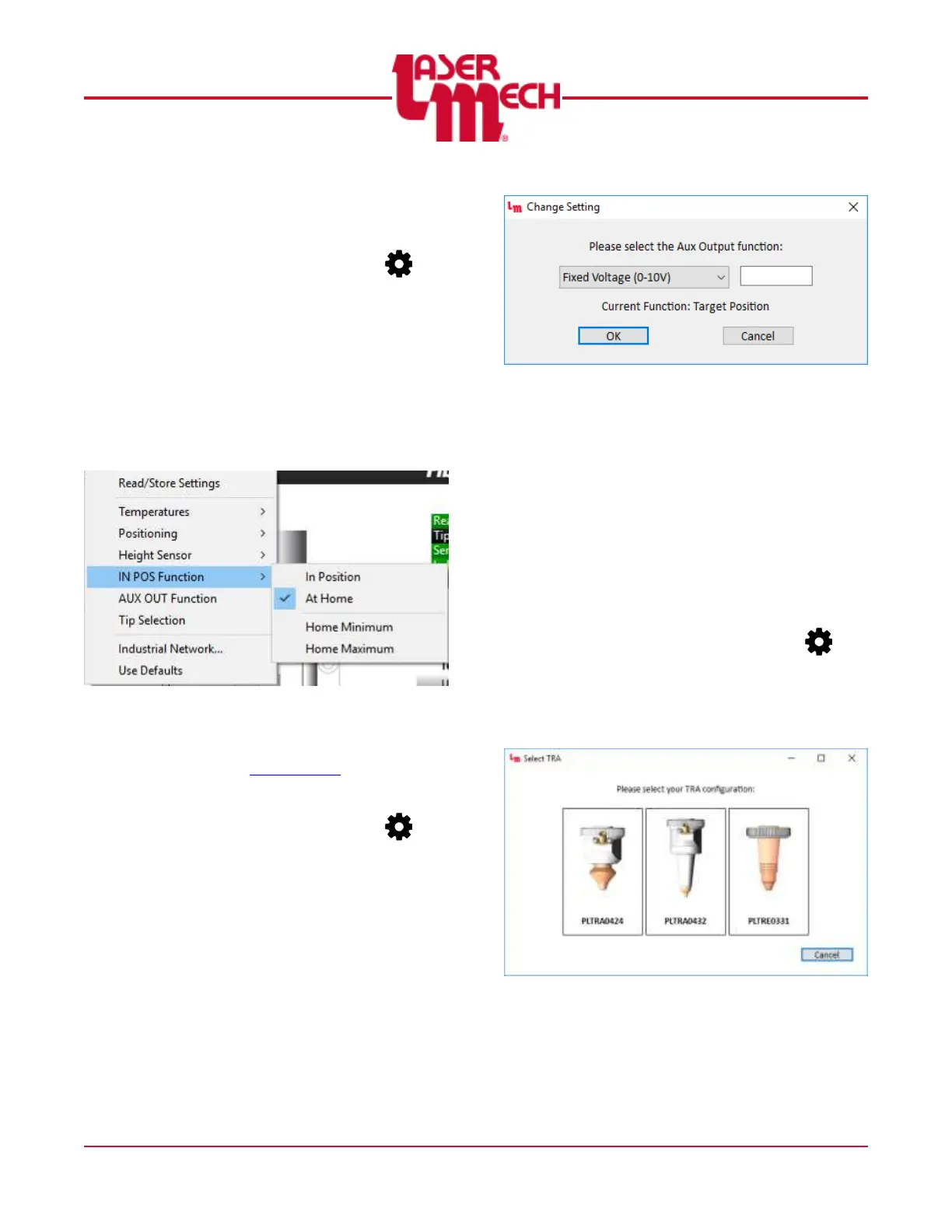
For steps 1 and 2, see Figure 34.
1. Click the Settings button ( ) in
the toolbar and hover over IN POS
Output.
2. Click In Position or At Home as
desired to select the function of the
IN POS output.
When you select At Home, the
Home Minimum and Home
Maximum settings are also
available.
Figure 34
3. If you select Home Minimum or
Home Maximum, perform steps 3
to 6 in Section 4.5.2.
4.5.6 AUX OUT Function
1. Click the Settings button ( ) in
the toolbar and select AUX OUT
Function.
2. A dialog box will appear with a
drop-down list to select the desired
function, see Figure 35.
The current function is also
displayed.
Figure 35
3. Select the desired function from the
drop-down list.
If you select Fixed Voltage,
also enter the desired voltage
in the provided field.
4. Click OK to store the new function
and update the output.
5. If necessary, click Cancel to exit
the screen.
4.5.7 Tip Selection
1. Click the Settings button ( ) in
the toolbar and select Tip
Selection.
2. A dialog box will appear, see
Figure 36.
Figure 36
3. Click on the desired tip assembly to
store the configuration and update
the display.


 To Next Page