PLMNL0286 REV. B, Effective Date: 06/06/19 28 FiberMINI
®
with Auto Focus (AF) Operation Manual
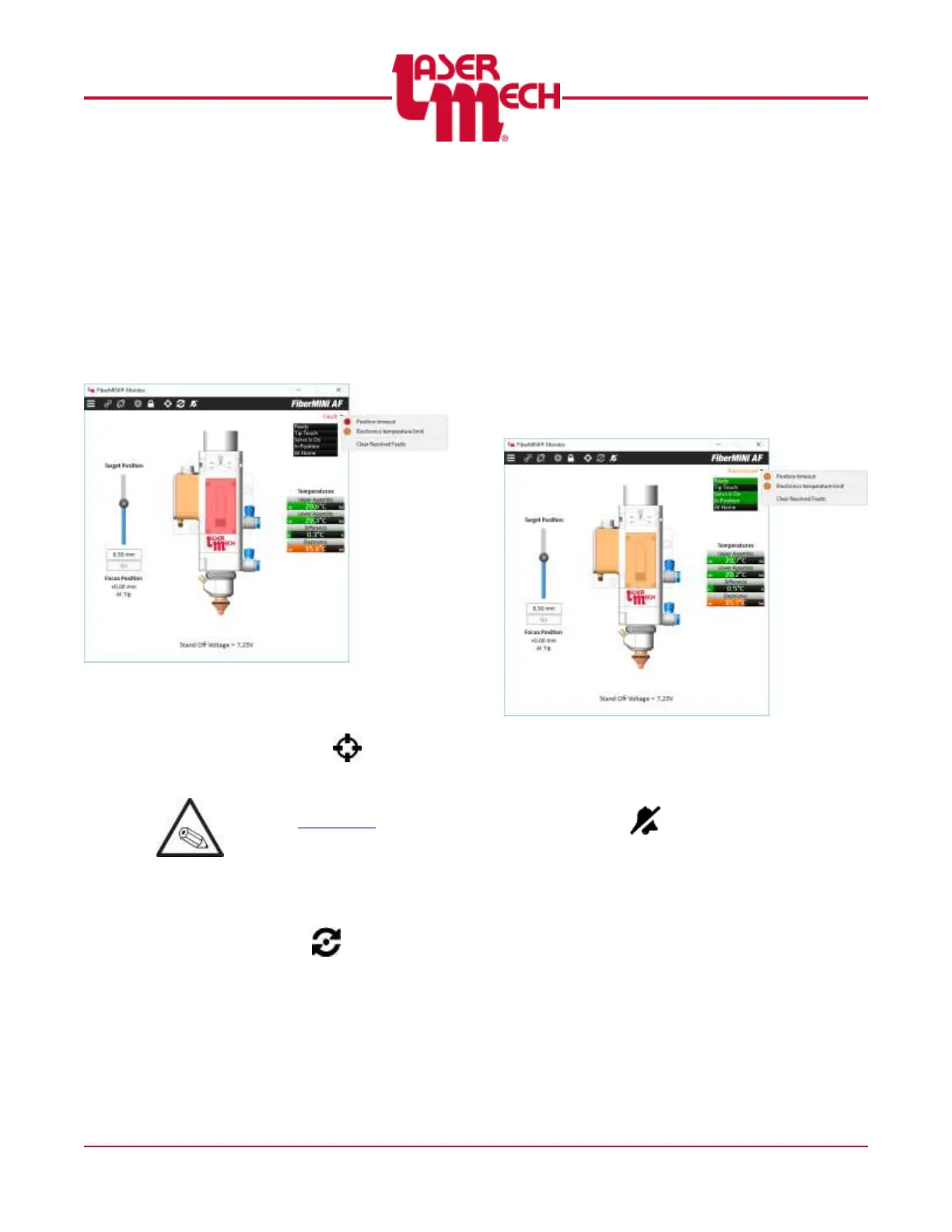
o Click on the arrow to the right of
the FAULT indicator to display a
list of faults present in the system.
See Figure 27.
Active faults are identified
using a red indicator.
Recovered faults are
identified using an amber
indicator.
Figure 27
o Height sensor faults can usually
be cleared by clicking the
Calibrate button ( ) in the
toolbar.
Refer to Section 3.8 for the
manual HSU calibration
procedure.
o Position faults can usually be
cleared by clicking the Reset
Servo button ( ) in the
toolbar.
o Once all fault conditions are
cleared, the indicator will change
states to RECOVERED. See
Figure 28.
The system is ready while in
this state, but the fault list is
still available to advise you of
previous faults.
It is often helpful with
troubleshooting to record the
faults, for example using the
Print Screen command.
Figure 28
To acknowledge the fault(s) and
remove the highlighting, click on
the Clear Resolved Faults button (
) in the toolbar, or from the
fault list and select “Clear
Resolved Faults”. See Figure 28.


 To Next Page