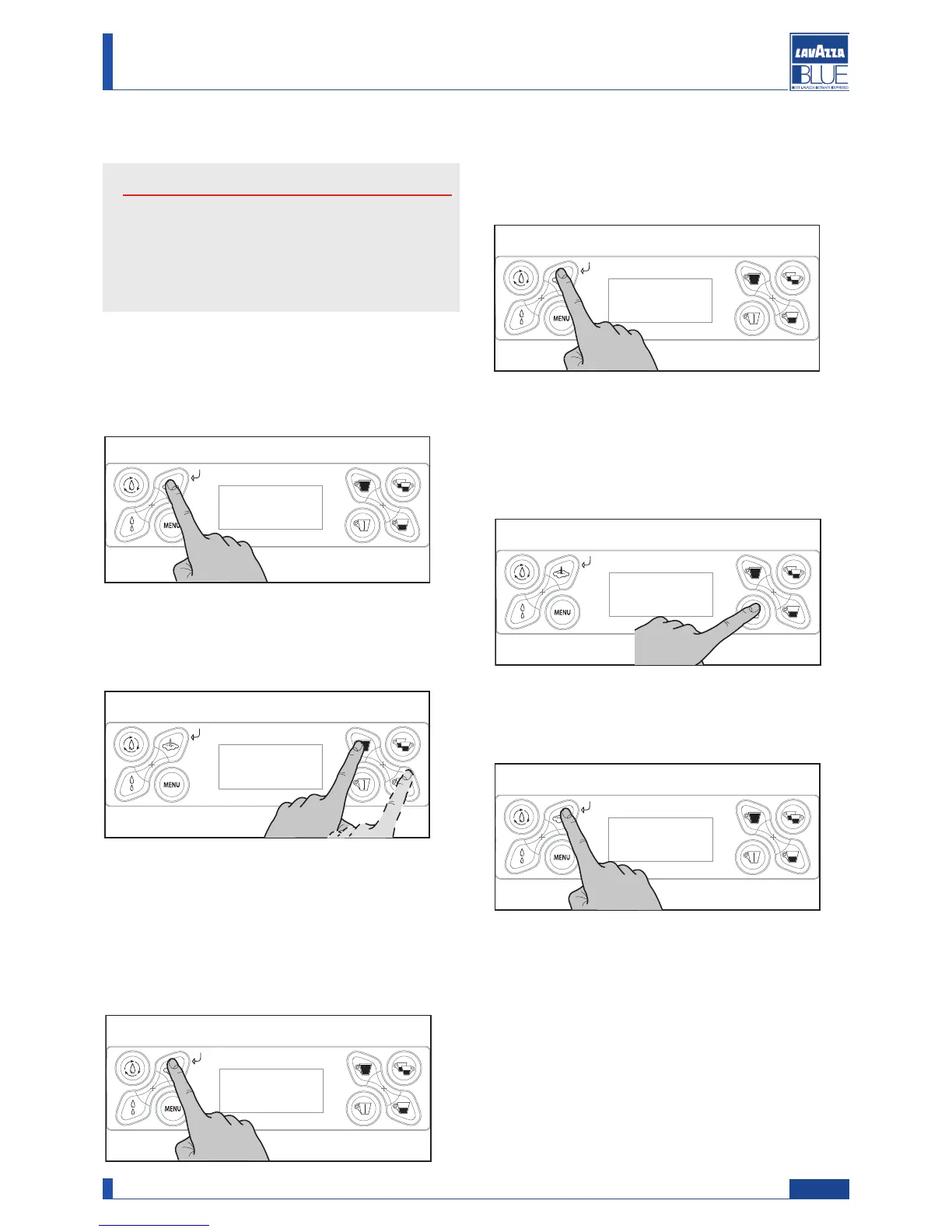
When the desired value is shown, press “OK” to con-
firm it.
The value is stored and the next digit is made editable,
change the digit by " " or " " if necessary.
Press “OK” to confirm.
6.6. Parameter change
Attention
W
hen one of the machine’s operational parameter
i
s changed, consider that you are changing the
p
arameters set by the manufacturer for the opti-
mal performance of the machine.
All the editable parameters can be changed in the fol-
lowing way.
When the page showing the parameter to be changed
is displayed press the “OK” button.
VC
V
1.2.1.
Temperatura std
100
VC
V
1.2.1.
Temperatura std
100
^
VC
V
1.2.1.
Temperatura std
100
^
VC
V
1.2.1.
Temperatura std
100
^
VC
V
1.2.1.
Temperatura std
100
VC
V
1.2.1.
Temperatura std
100
^
VC
V
1.2.1.
Temperatura std
100
^
VC
V
1.2.1.
Temperatura std
100
^
The value is made editable and under the digit to be
changed the “ ” symbol appears..
Press one of the two buttons to change the value.
VC
V
1.2.1.
Temperatura std
100
VC
V
1.2.1.
Temperatura std
100
^
VC
V
1.2.1.
Temperatura std
100
^
VC
V
1.2.1.
Temperatura std
100
^
When the last digit is changed, press “OK” to confirm.
T
he " " symbol disappears and the parameters
become active only upon exit the programming mode.
VC
V
1.2.1.
Temperatura std
100
VC
V
1.2.1.
Temperatura std
100
^
VC
V
1.2.1.
Temperatura std
100
^
VC
V
1.2.1.
Temperatura std
100
^
6.7. Exiting programming mode
To exit the programming mode the following screen
should be displayed by pressing the “ESC” button.
When the exit screen is displayed press the “OK” button.
21
Manual code 10083445 / Rel. 0.00 / April 2010
Maintenance manual for technical assistance LB 2300-2301-2302-2311-2312




 To Next Page