6300 Rev H User’s Manual
125-9106A Page 25
Lower screen appears as in Figure 3.7 above, pressing the Up-Arrow key will make the screen appear as
shown in Figure 3.8 below.
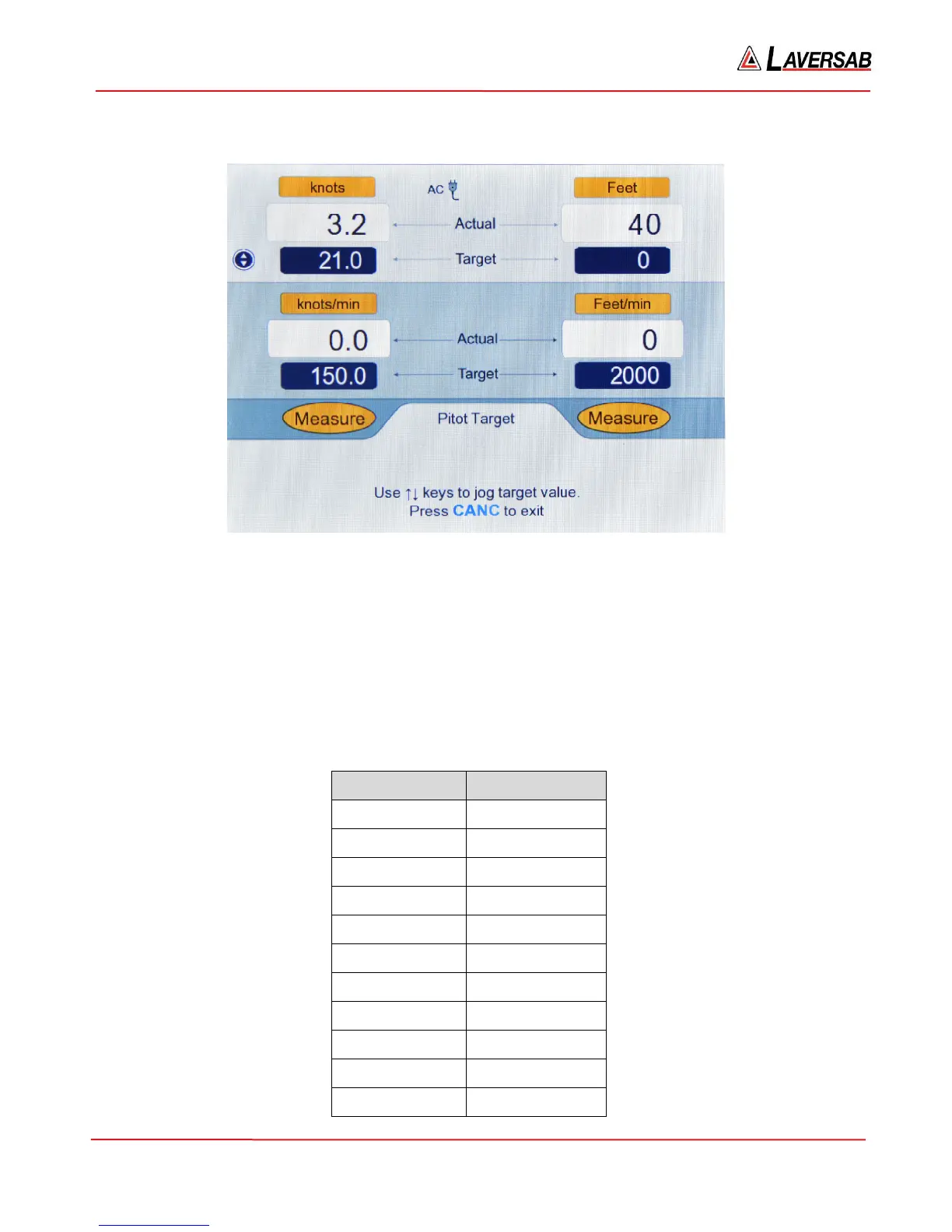
Figure 3.8 : Jog the Pitot Target value
In this screen, the Upper section has a new symbol (with Up & Down arrows) to the left of the Pitot
Target value field. This indicates that the Pitot Target value can be jogged up or down repeatedly, in
steps of 1 knot, using the Arrow keys, until CANC is pressed. In this case, since the Up-Arrow key was
pressed, the Pitot Target value was incremented to 21.0 knots. Press Up-Arrow one more time and the
value will change to 22.0. Press Down-Arrow two times and the value decrements to 20.0.
Note: It is not possible to Jog a Target value if it is blinking.
The incremental value for the Jog feature varies depending on Pitot units and is shown in the table below.
Pitot units Jog increment
knots 1.0
Mach 0.001
km/hr 1.0
mph 1.0
Pt inHg 0.001
Qc inHg 0.001
Pt mbar 0.01
Qc mbar 0.01
Pt psi 0.001
Qc psi 0.001
Pt mmHg 0.01



 To Next Page