6300 Rev H User’s Manual
125-9106A Page 46
Profile number 15 is factory-installed. It is a short, modified version of the FAR 91.411. To run this
profile, press ‘4’ while in the Functions menu. The following will appear.
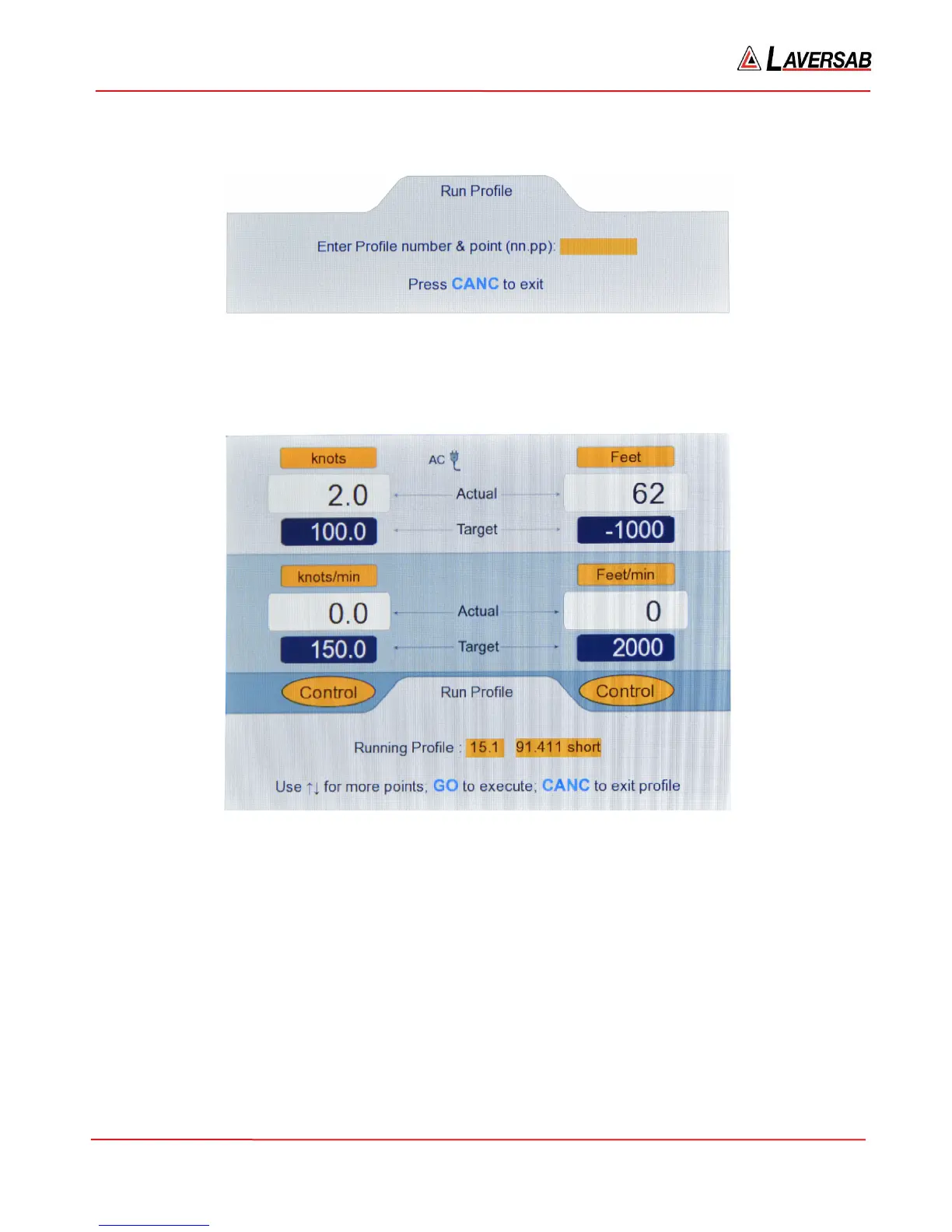
Figure 3.40 : Run Profile (enter profile number)
Enter the Profile number. In this case, enter ’15.1’ followed by ENTER. This will bring up point 1 of
profile 15. (To run profile number 1, starting at point 1, you would enter ‘1.1’. So, an entry format of ‘n.p’
instead of ‘nn.pp’ is also valid.). The screen will appear as follows.
Figure 3.41 : Run Profile (15.1 Blinking)
As shown in Figure 3.41, the following changes have been made to the Upper section of the screen:
a. Units have been set to knots & Feet
b. Targets have been set to 100.0 knots and -1000 Feet
c. Target-Rates have been set to 150.0 knots/min and 2000 Feet/min
d. Modes have been set to Control on both outputs
In the Lower section, the profile number (15.1) will be blinking (waiting for GO or CANC). The name of
the profile ’91.411 short’ is displayed to the right of the profile number. Do NOT press GO or CANC.
Instead, press the Up-Arrow key to move to point number 2 of the profile. The screen will appear as
follows.



 To Next Page