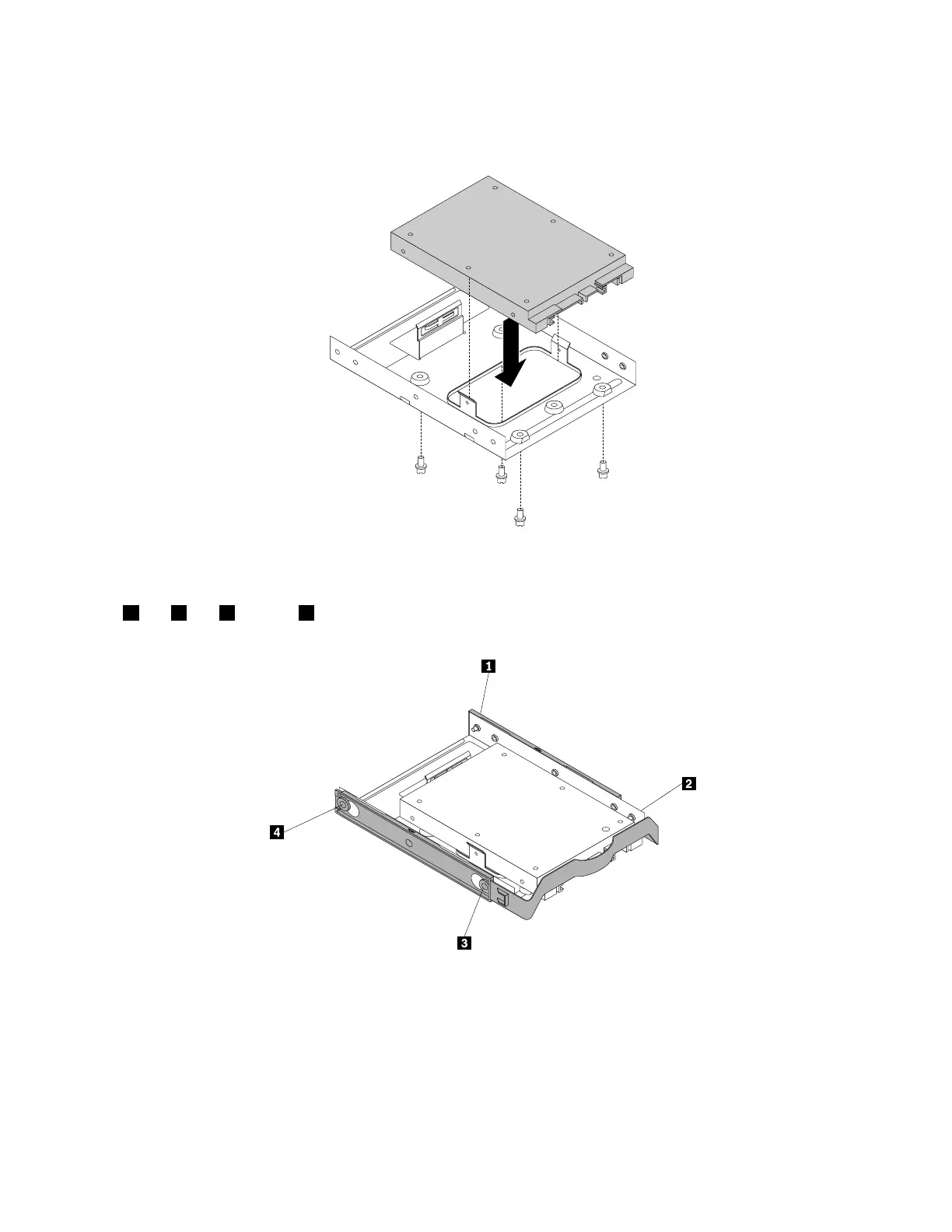
8.Installanewsolid-statedriveintothestorageconverter.Theninstallthefourscrewstosecurethe
newsolid-statedrivetothestorageconverter.
Figure64.Installingthenewsolid-statedriveintothestorageconverter
9.Toinstallthestorageconverterintothe3.5-inchhard-disk-drivebracket,flexthebracketandalignpin
1,pin2,pin3,andpin4onthebracketwiththecorrespondingholesinthestorageconverter.
Figure65.Installingthestorageconverterwiththenewsolid-statedriveintothehard-disk-drivebracket
10.Installthestorageconverterwiththebracketintothehard-disk-drivebay.See“Replacingtheprimary
harddiskdrive”onpage91
or“Replacingthesecondaryharddiskdrive”onpage92.
11.Connectthesignalcableandthepowercabletothesolid-statedrive.
Whattodonext:
•Toworkwithanotherpieceofhardware,gototheappropriatesection.
90ThinkStationP310UserGuide













 To Next Page