29PCIExpressx1cardslot130PCIExpressx16cardslot(graphiccardavailableon
somemodels)
31Systemfanconnector32Coverpresenceswitchconnector(intrusionswitch
connector)
Internaldrives
Internaldrivesaredevicesthatyourcomputerusestoreadandstoredata.Youcanadddrivestoyour
computertoincreasestoragecapacityandenableyourcomputertoreadothertypesofmedia.Internal
drivesareinstalledinbays.
Wheninstallingorreplacinganinternaldrive,itisimportanttonotethetypeandsizeofthedrivethatyou
caninstallorreplaceineachbayandcorrectlyconnectthecablestothedriveinstalled.Refertothe
appropriatesectioninChapter7“Installingorreplacinghardware”onpage57
forinstructionsonhowto
installorreplaceinternaldrivesforyourcomputer.
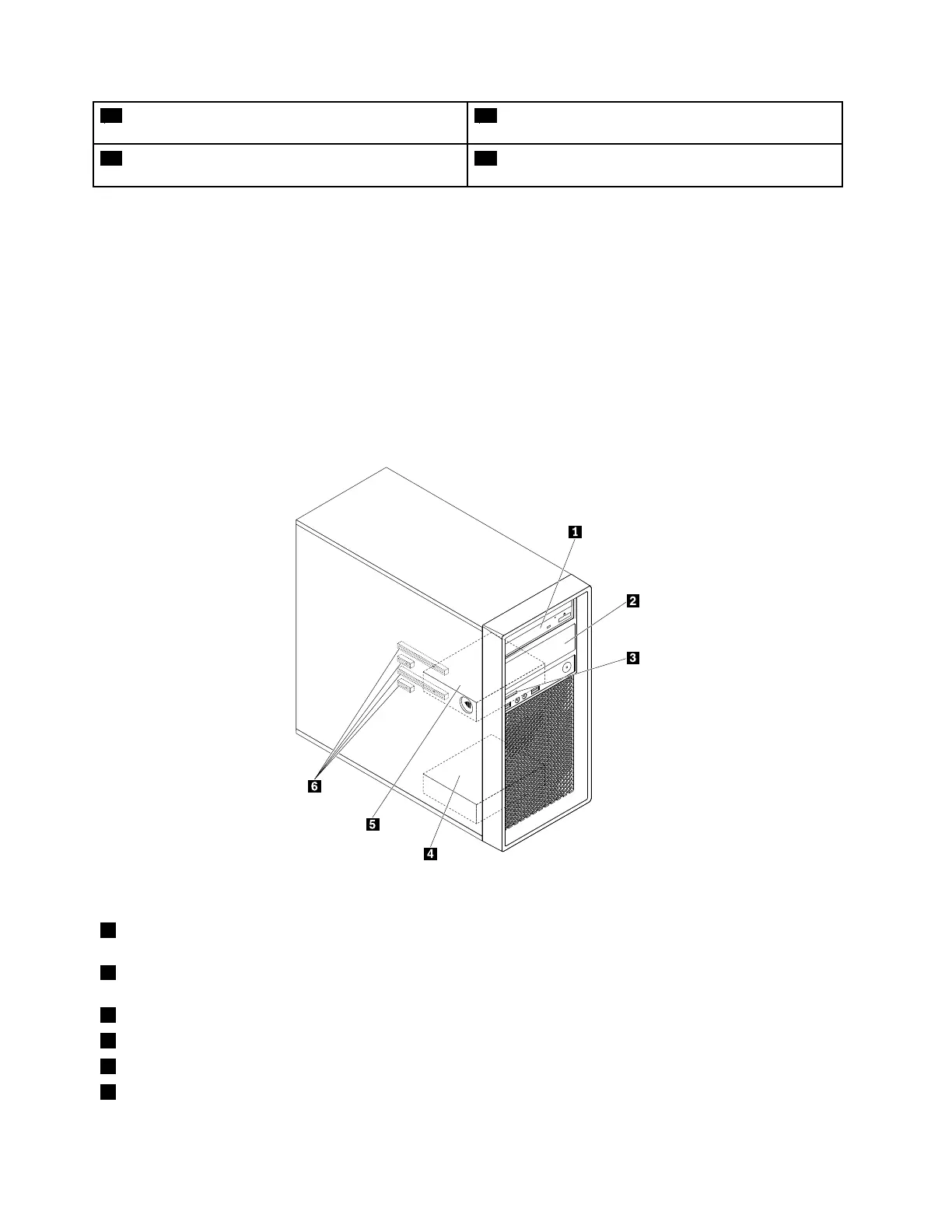
Thefollowingillustrationshowsthelocationsofthedrivebays.
Figure5.Drive-baylocations
1Primaryoptical-drivebay(withanopticaldrive,aflexmodule,afront-accessstorageenclosure,aflexstorage
enclosure,oranoptical/storagecombinationenclosureinstalledinsomemodels)
2Secondaryoptical-drivebay(withanopticaldrive,aflexmodule,afront-accessstorageenclosure,aflexstorage
enclosure,oranoptical/storagecombinationenclosureinstalledinsomemodels)
3Cardreader
4Secondaryhard-disk-drivebay(withaharddiskdrive,solid-statedrive,orhybriddriveinstalledinsomemodels)
5Primaryhard-disk-drivebay(withaharddiskdrive,solid-statedrive,orhybriddriveinstalledinsomemodels)
6PCIExpresscardslots(withPCIExpresssolid-statedrivesorotherPCIcardsinstalledinsomemodels)
8ThinkStationP310UserGuide













 To Next Page