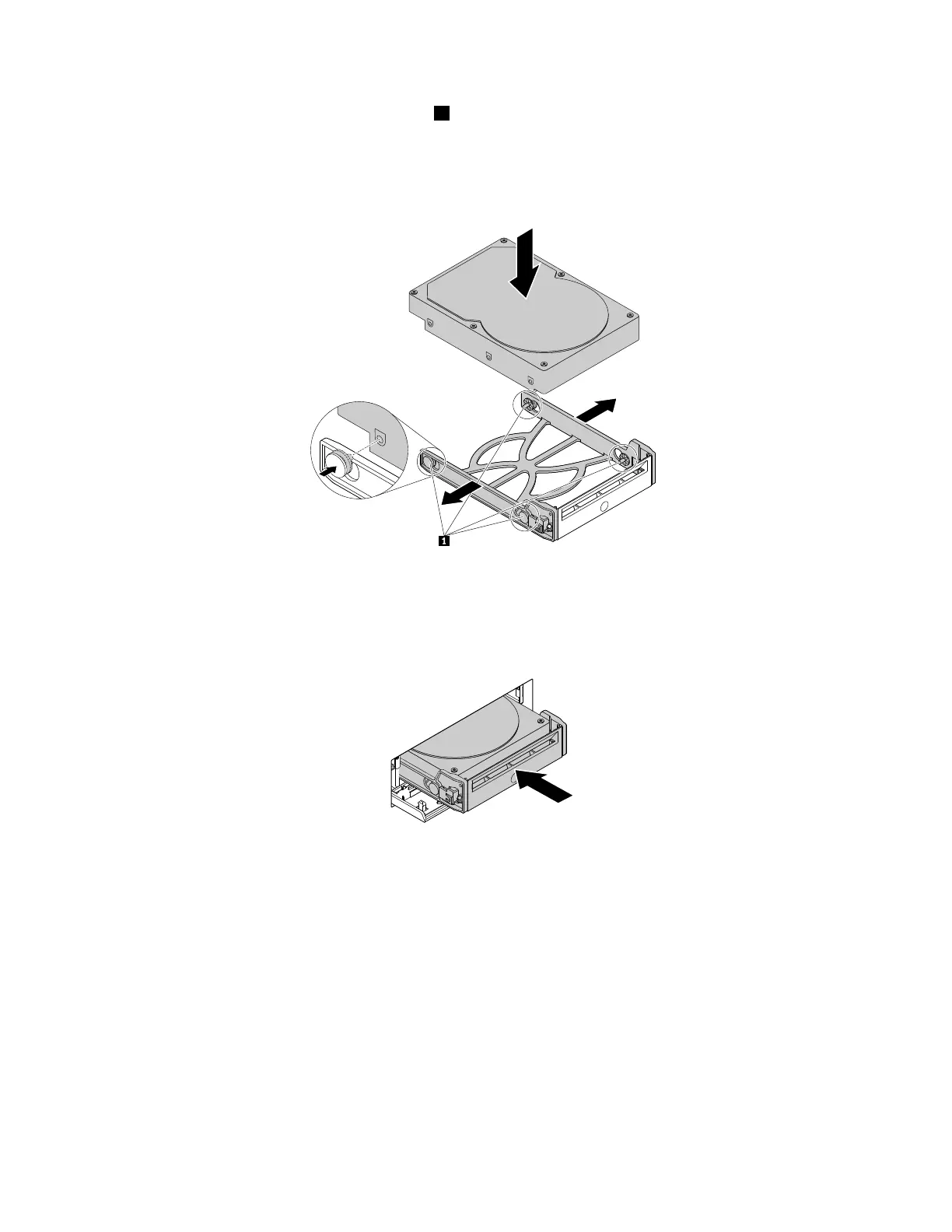
5.Flexbothsidesofthebracketandalignpins1onthebracketwiththecorrespondingholesinthenew
harddiskdrive.Donottouchthecircuitboardontheharddiskdrive.
Note:Ensurethatthecircuitboardfacesdownwardandtheconnectorsfacetowardtherearofthe
bracket.
Figure47.Installingtheharddiskdriveintothebracket
6.Slidethebracketwiththenewharddiskdriveintothefront-accessstorageenclosureuntilitsnapsinto
position.Pressthenotchtosecuretheenclosurecoverandlocktheenclosurecoverwiththekey.
Figure48.Installingthehard-disk-drivebracket
Whattodonext:
•Toworkwithanotherpieceofhardware,gototheappropriatesection.
•Tocompletetheinstallationorreplacement,goto“Completingthepartsreplacement”onpage105.
Installingorreplacingadeviceintheoptical/storagecombination
enclosure
Attention:Donotopenyourcomputerorattemptanyrepairbeforereadingandunderstandingthe“Read
thisfirst:Importantsafetyinformation”onpagev
.
Anoptical/storagecombinationenclosuremightbeequippedwithoneorbothofthefollowingcomponents:
•Slimopticaldrive
78ThinkStationP310UserGuide













 To Next Page