Chapter4.Security
Thischaptercontainsthefollowingtopics:
•“Lockingyourcomputer”onpage29
•“ViewingandchangingsecuritysettingsintheSetupUtilityprogram”onpage31
•“UsingpasswordsandWindowsaccounts”onpage31
•“Usingfingerprintauthentication”onpage32
•“Usingfirewalls”onpage32
•“Protectingdataagainstviruses”onpage32
•“ComputraceAgentsoftwareembeddedinfirmware”onpage33
•“TrustedPlatformModule(TPM)”onpage33
Lockingyourcomputer
Thissectionprovidesinformationaboutlockingyourcomputerwiththelockingdevicestokeepyour
computersafe.
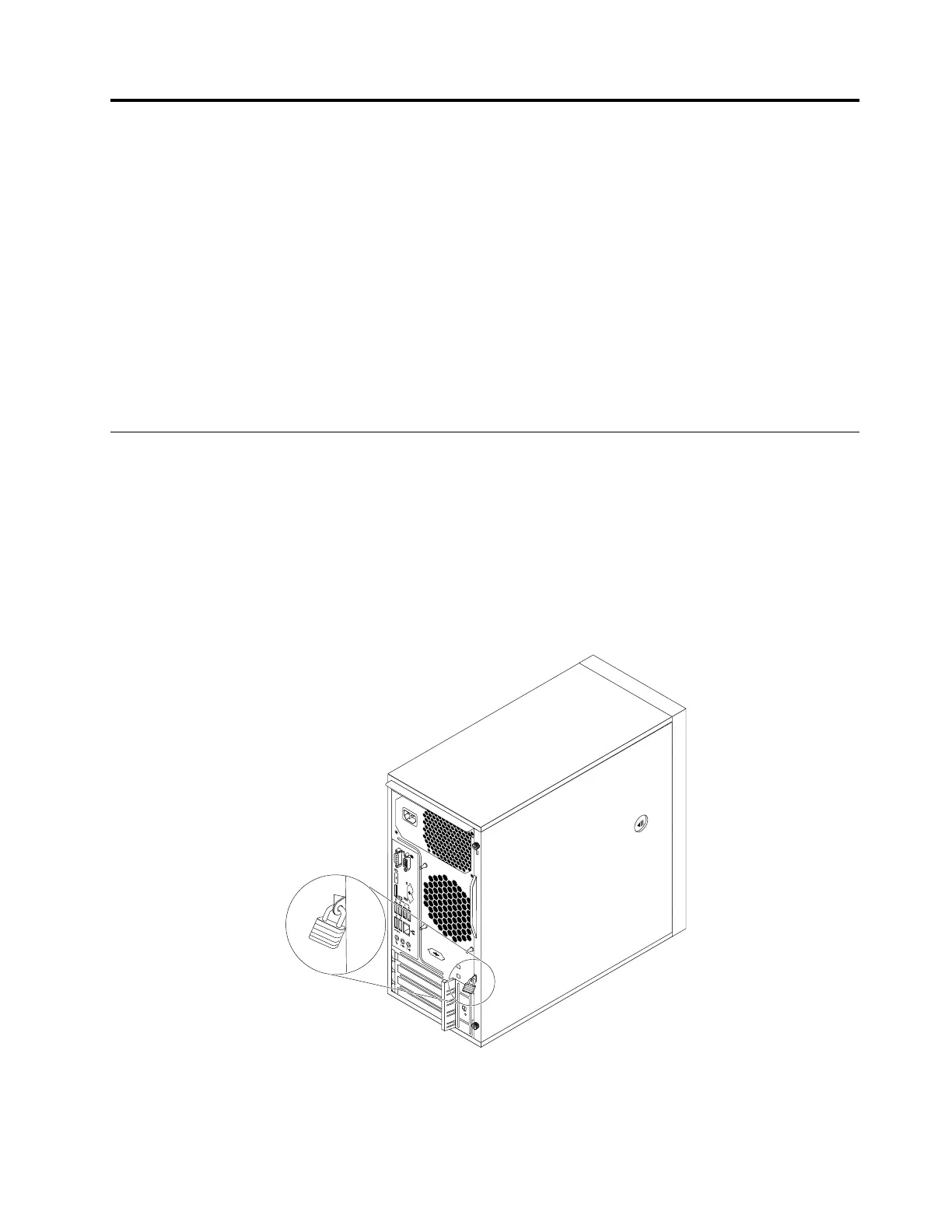
Attachingapadlock
Lockingthecomputercoverhelpspreventunauthorizedpeoplefromgainingaccesstotheinsideofyour
computer.Yourcomputercomeswithapadlockloopsothatthecomputercovercannotberemoved
whenapadlockisinstalled.
Figure7.Installingapadlock
©CopyrightLenovo2016
29













 To Next Page