Chapter1.Productoverview
Thischapterprovidesinformationaboutthefollowingtopics:
•“Hardwarelocations”onpage1
•“Computerfeatures”onpage9
•“Computerspecifications”onpage13
•“Programs”onpage13
Hardwarelocations
Thissectionprovidesinformationaboutthelocationsofyourcomputerhardware.
Note:Thecomputerhardwaremightlookslightlydifferentfromtheillustrations.
Frontview
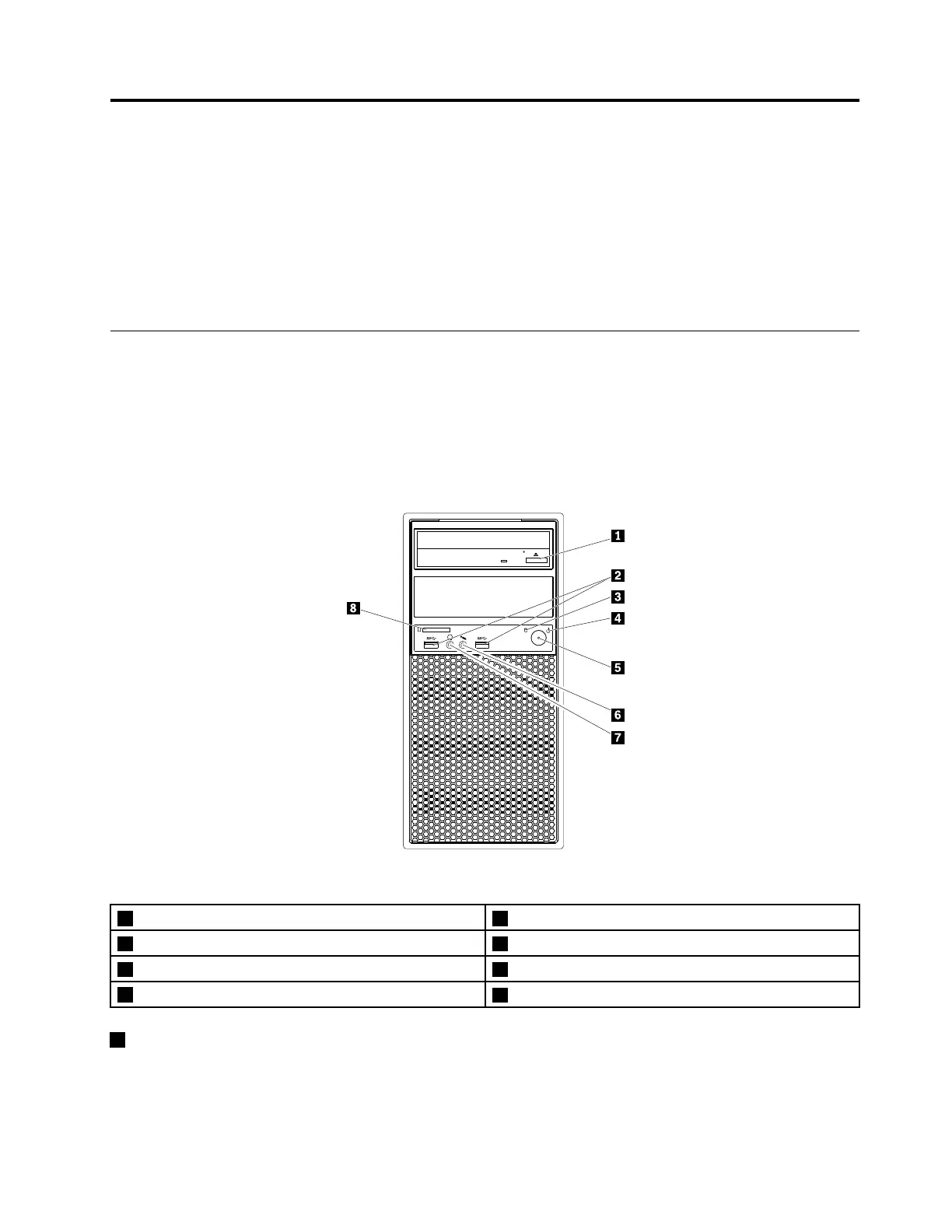
Figure1.Frontview
1Opticaldriveeject/closebutton2USB3.0connectors(2)
3Hard-disk-driveactivityindicator4Powerindicator
5Powerbutton6Microphoneconnector
7Headphoneconnector
8Cardreader
1Opticaldriveeject/closebutton
Usedtoejectthetrayoftheopticaldrivefromthedrive.Afteryouinsertadiscintothetray,pressthe
eject/closebuttontoclosethetray.
©CopyrightLenovo2016
1













 To Next Page