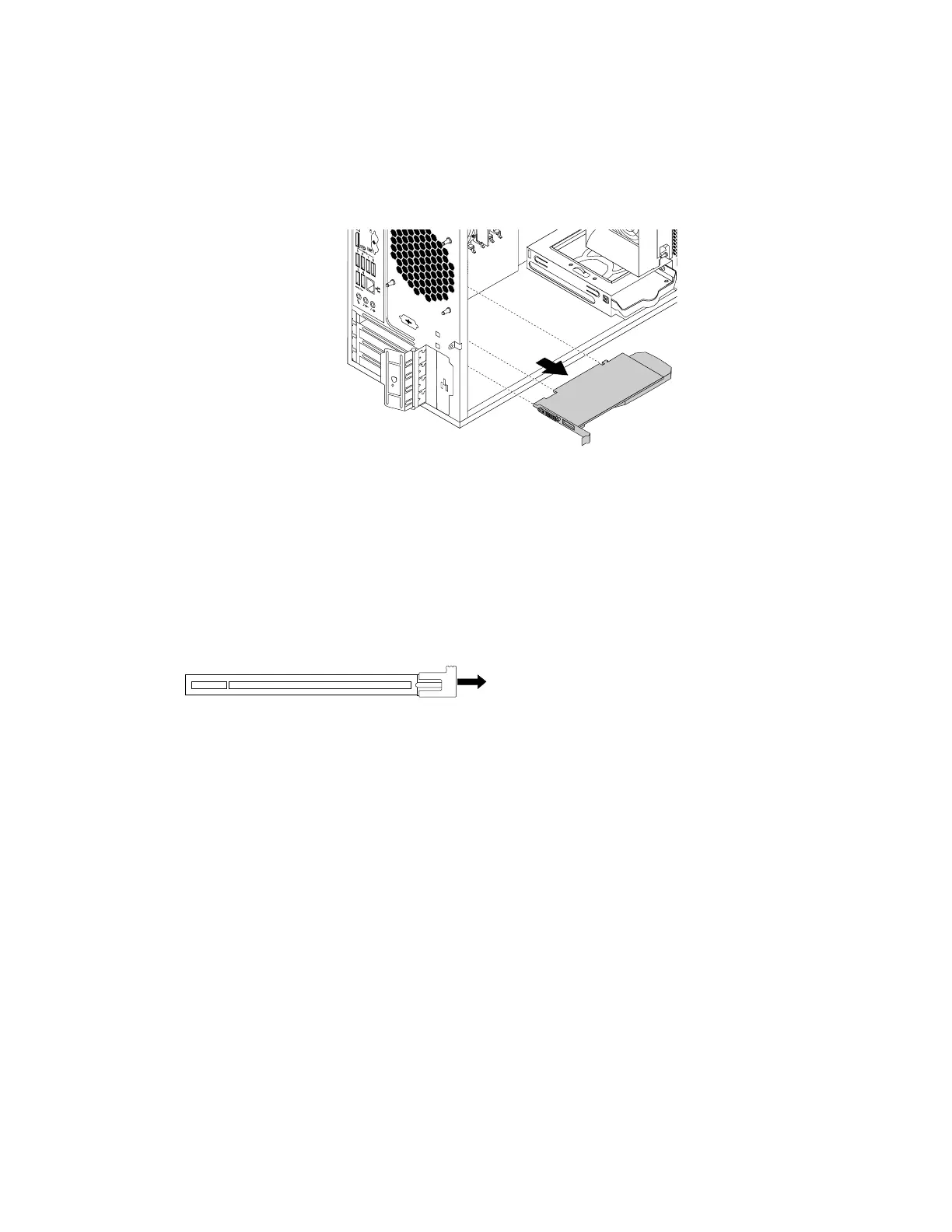
4.DependingonwhetheryouareinstallingorreplacingaPCIcard,dooneofthefollowing:
•IfyouareinstallingaPCIcard,removetheappropriatemetalslotcover.
•IfyouarereplacinganoldPCIcard,grasptheoldcardthatiscurrentlyinstalledandgentlypullit
outoftheslot.
Figure13.RemovingaPCIcard
Notes:
a.Thecardfitstightlyintotheslot.Ifnecessary,alternatelymoveeachsideofthecardasmall
amountuntilthecardisremovedfromtheslot.
b.Ifthecardisheldinplacebyaretaininglatch,disengagethecardretaininglatchonthePCIcard
slot.Thengraspthecardandgentlypullitoutoftheslot.
Figure14.Disengagingthecardretaininglatch
5.RemovethenewPCIcardfromitsstatic-protectivepackage.
6.Installthenewcardintotheappropriateslotonthesystemboard.See“Partsonthesystemboard”
onpage7.
Note:IfyouareinstallingaPCIExpressx16graphicscard,ensurethatthememory-slotretainingclips
areclosedbeforeyouinstallthecardtoavoidanyinterferenceduringtheinstallation.
Chapter7.Installingorreplacinghardware61













 To Next Page