93
Chapter 5: Printer Options
Printer Options
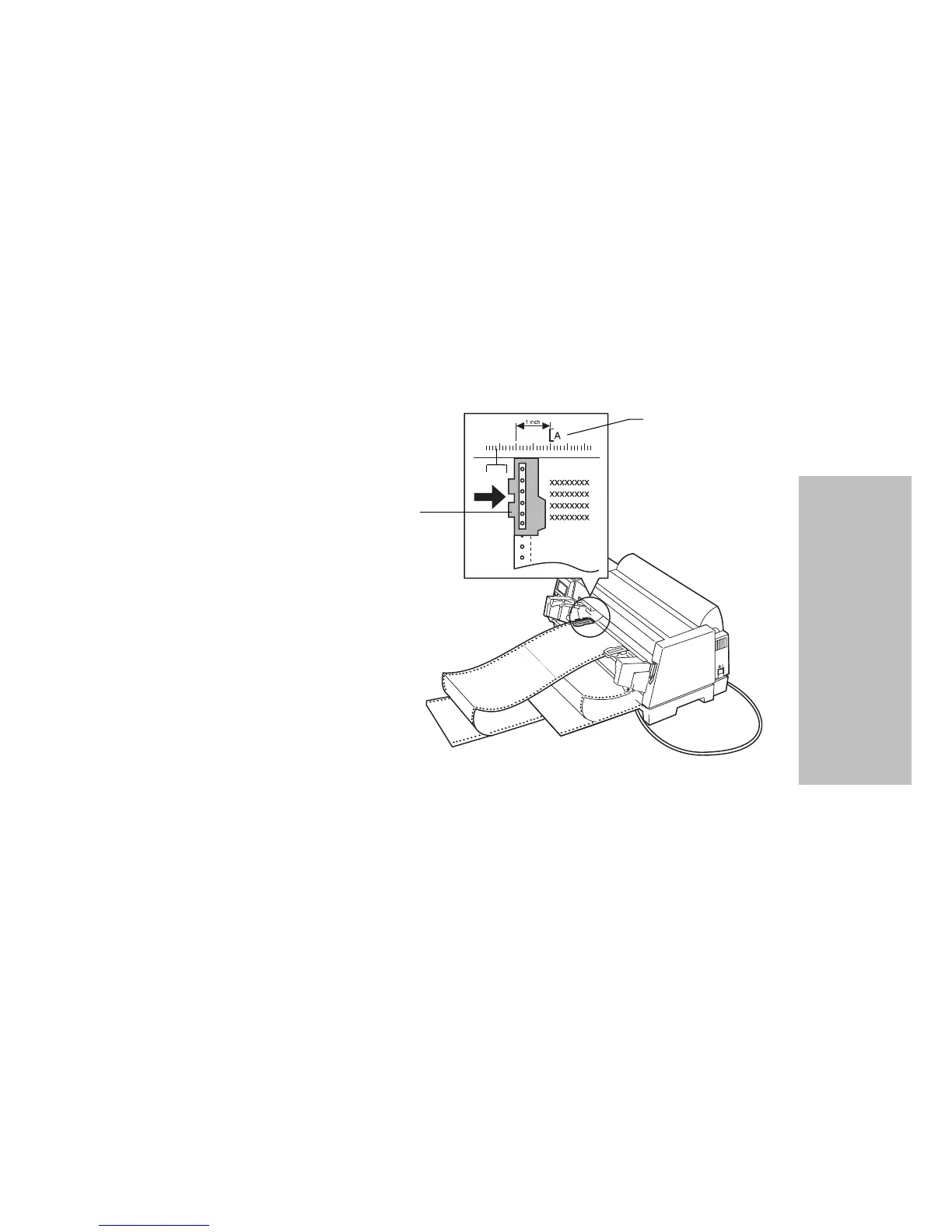
11 Set the left margin.
Move the tractors so the print start position you want aligns with
the symbol [A printed on the margin guide.
Moving the paper all the way to the left creates the widest left mar-
gin. Moving the paper all the way right creates the narrowest left
margin.
Note: If you make a left margin setting in your application software,
it is added to the left margin setting on the printer.
For example, if you set the left margin at 1 inch (2.54 cm) on the
printer, and also have the left margin set at 1 inch (2.54 cm) in
your application software, the printer begins printing 2 inches
(5.08 cm) from the left edge of the page.
12
Push down the left tractor locking lever to lock it in place. Remove
slack from the paper and lock the right lever.
13
Replace the manual feed tray.
Left Tractor
Printing begins at
the
[A
symbol on
the margin guide.
The distance from the
[A
symbol to the left
paper guide determines the left margin.






 To Next Page