WATCHING TV / CHANNEL CONTROL
23
G
If you delete a found channel, it isn’t gone forever.
Simply re-enter the Channel List menu and re-add the
channel to show the check mark.
NOTE
After the channel search, remove unwanted channels.
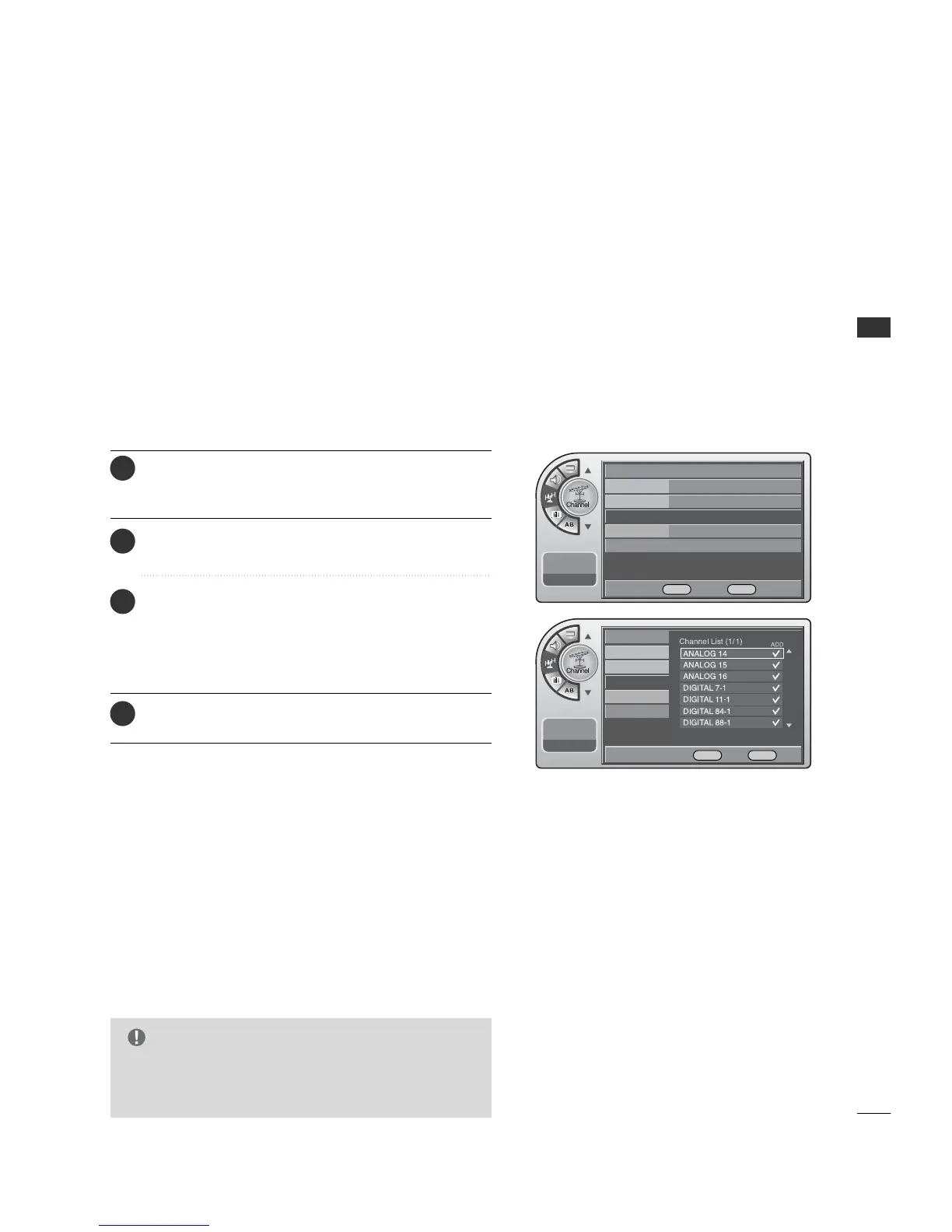
Channel List
Press the MM EENNUU button and then use the AADDJJ D or E
button to highlight the CChhaannnneell menu and press the
OOKK ((EEnntteerr)) button.
1
Use the AADDJJ D or E button to highlight CChhaannnneell LLiisstt
and press the OO KK ((EE nn ttee rr )) button.
2
Use the AADDJJ D or E button to highlight the channel
you wish to delete and press the AA DDJJ G button.
The AA DDJJ G button toggles the check mark on and off.
If the check mark appears next to the channel number,
the channel appears in the channel scan.
3
When finished, press MM EE NNUU repeatedly to remove the
menus.
4
Antenna
Auto Program
Channel Label
Channel List
G
Fine Tune Auto
Signal Strength
--:-- --
--. -- ----
Antenna
Auto Program
Channel Label
Channel List
Fine Tune
Signal Strength
--:-- --
--. -- ----
DE Move OK Select MENU Back
DE Move G Add/Del OK View MENU Back



 To Next Page