Screen Display/Icons
Status Bar
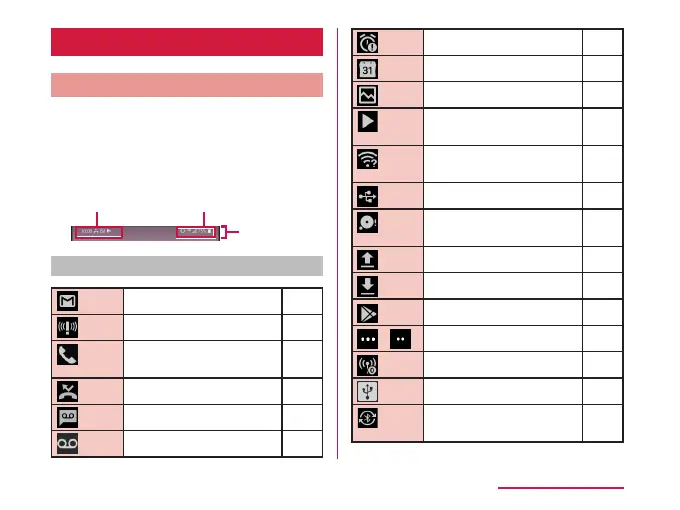
The status bar is displayed at the top of the
screen. The status and notications of this
terminal are displayed on the status bar. On
status bar, notication icons are displayed on
the left side, and status icons are displayed on
the right side.
Notification icon Status icon
Status bar
Main notication icons
New Gmail P130
New Area Mail P131
Incoming call, making a
call, answering a call
P104
Missed call P120
New answering memo P110
New voicemail message ‐
New alarm notication P161
Upcoming calendar event P164
Screenshot P63
Playing music via music
application
P157
Detected an Open Network
(Wi-Fi
®
)
P177
Connecting with USB
P225
Low free space of
memory on this terminal
‐
Data upload completed ‐
Data download completed ‐
Available to update ‐
/ More notications ‐
Wi-Fi
®
tethering available P174
USB tethering is available P179
Bluetooth
®
tethering
available
P181
71
Basic Operations



 To Next Page