18/37
10.5 APT Mode (Default Mode)
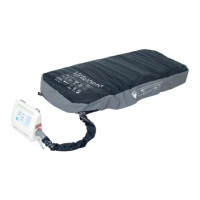
Once the mattress is fully inated, a conrming signal sounds and the mattress switches automatically into APT (alterna-
ting pressure therapy) mode.
To select APT mode:
Press button 5 once or repeatedly until indicator 4 comes on.
When APT mode is switched on:
3-cell mattress units will inate and deate in cycles of 7.5 minutes.
Indicator 4 lights yellow.
Green middle section of indicator 16 ashes.
Once the pre-set pressure is reached, the green middle section of indicator 16 will remain solid on.
10.6 MAX Mode
MAX mode (maximum ination) provides a solid and stable surface for patient treatment.
MAX mode will run for 30 min at most. If no other mode is switched on within these 30 min, a conrmation signal will
sound, and the mattress replacement system will switch back to APT or CLP mode automatically. This mode interrupts
CLP.
To select MAX mode:
Press button 5 once or repeatedly until indicator 3 ashes yellow.
If MAX mode is required for less than 30 min:
Set new mode.
If MAX mode is required for more than 30 min:
Set MAX mode again within the last 5 min.
When MAX mode is selected:
SCU inates all mattress cells to the same pre-set pressure.
Indicator 3 ashes yellow until preset pressure is reached.
Once the set pressure is reached, indicator 3 will remain solid on.
During the last 5 min, an alarm signal will sound every 30 s.
When MAX mode is selected for the second time:
During the last 5 min, a double alarm signal will sound every 30 s to remind the personnel that MAX mode
will soon end automatically.
NOTE It is not possible to select MAX mode a third time. Selecting MAX mode again is only possible when APT mode
has been running for at least 30 min.
10.7 Constant Low Pressure Mode
CLP (constant low pressure) mode keeps the mattress pressure at the level selected. The pressure is checked every 30
seconds, and adjusted if necessary.
To select CLP mode:
Press button 5 once or repeatedly until indicator 2 ashes yellow.
When CLP mode is switched on:
Indicator 2 ashes yellow until pre-set pressure is reached.
Once the pre-set pressure is reached, indicator 2 and 16 will remain solid on.


 To Next Page