Introducing the LU200
11
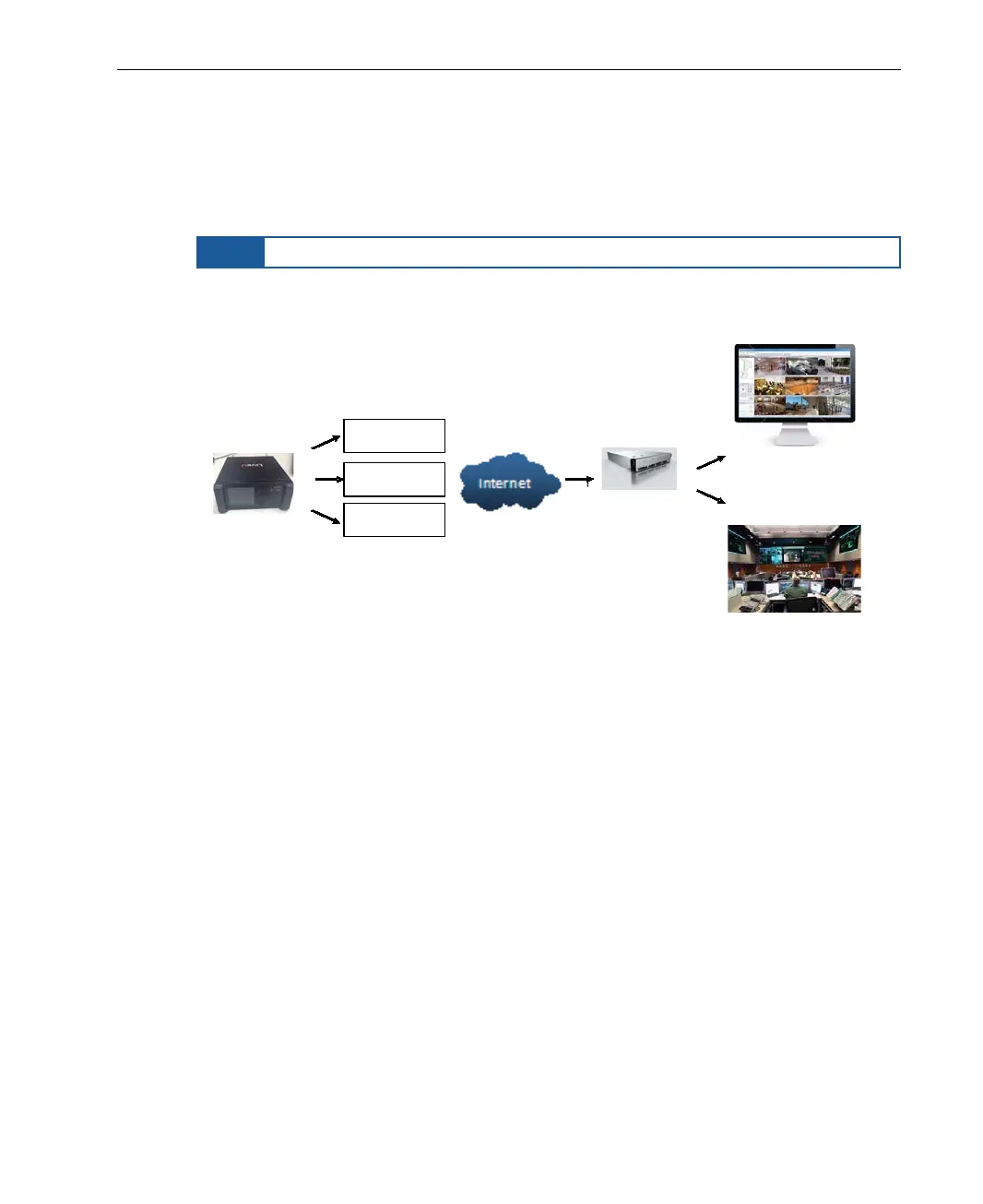
At the receiving end, the LiveU LU2000 receives these various streams of
video via a standard Internet connection. The LU2000 server runs multiple
Multi-Media Hub (MMH) instances. Each LU2000 recombines the streams
received from a specific LU200 into a discrete broadcast-quality video stream
that can be played out over an integrated SDI interface on the LU2000.
NOTE
Most popular SDI output resolutions are supported.
The LU2000 is normally installed at a studio, broadcasting center or in a cloud
server for online media.
Sprint
Vodaphone
Others
...
LU200 Unit
Web Streaming
Broadcast Center
LiveU MMH
Figure 5: Solution Architecture
Each LU2000 can be controlled and configured using a web portal called LiveU
Central, as described on page 13.
LU200 Front Panel
The LU200 front panel contains the unit’s LCD screen, a five-button joystick
and the unit’s power button (see Figure 1).
The LU200 has a color screen that is easily readable from a distance of
approximately one meter when the LU200 is attached to a belt worn around
the waist.



 To Next Page