AT FIRST STARTUP
CALIBRATION
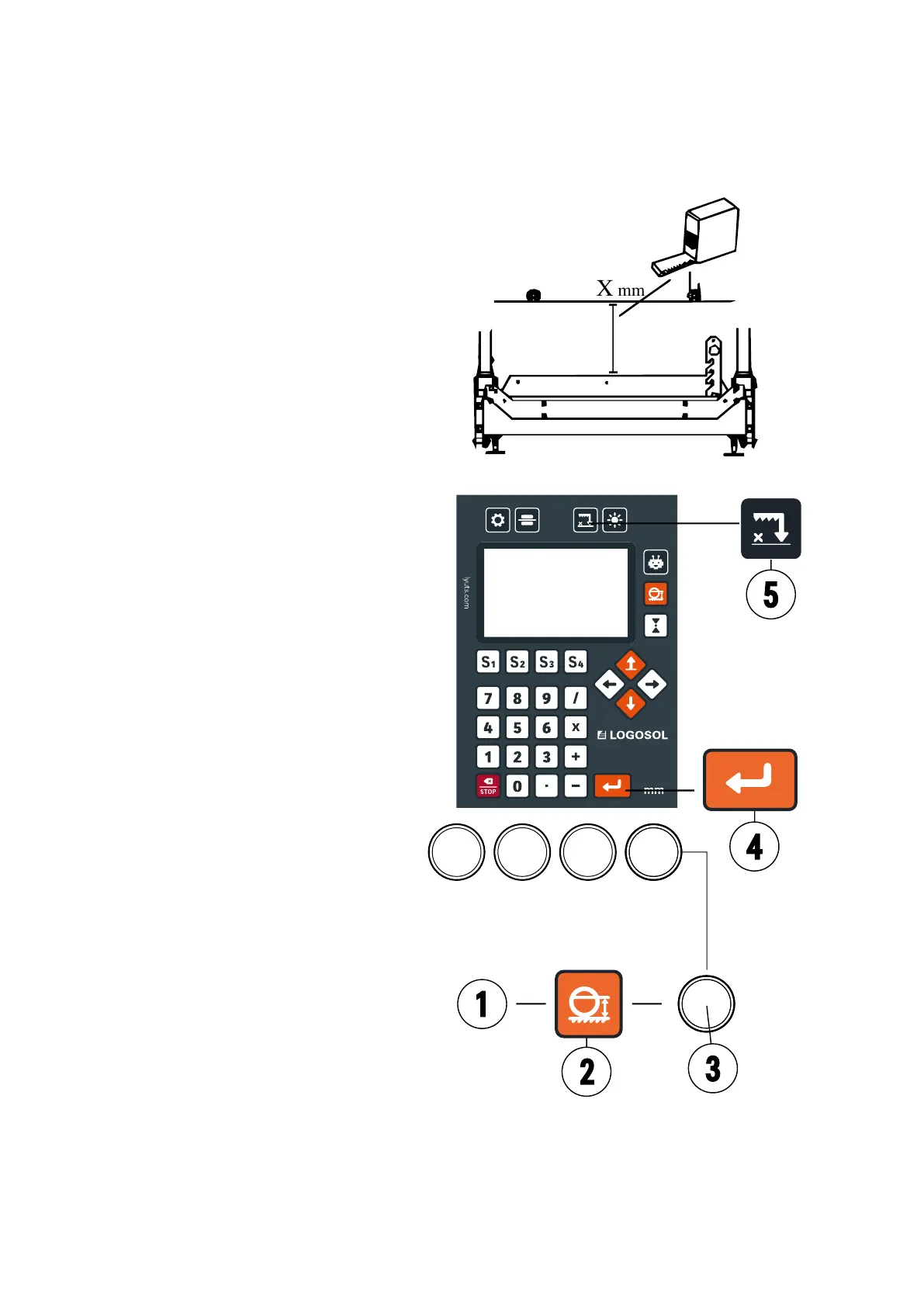
During the initial startup, the value for
the saw blade's height position needs to
be calibrated. The digital measuring device
will display a value upon startup. Measure
the distance between the saw blade, on a
downward-facing tooth, and a log deck.
Hold down the calibration button until the
displayed value disappears, then enter the
measured value. Complete the operation by
pressing the enter button.
Verify the calibration by moving the saw
head 200 mm and check that the actual
movement of the saw head is 200 mm. If
the measurements do not match, repeat
with a 500 mm movement. Measure
from the saw blade to the log deck for
verication. If it still does not match, try
recalibrating.
1. 200mm
2. Absolute movement
3. Constant contact control
4. Enter button
5. Calibration button
Pre-Operation
Ensure the limit switches are functioning.
Proceed as follows: Move the saw head
until the lower switch is activated; proceed
cautiously to avoid collision. Then repeat the
operation with the upper switch.
Listen for unusual noises and ensure that
the chain aligns between the upper and
lower gears.
Check that no physical collision occurs
before the limit switches activate.
USER MANUAL
85


 To Next Page