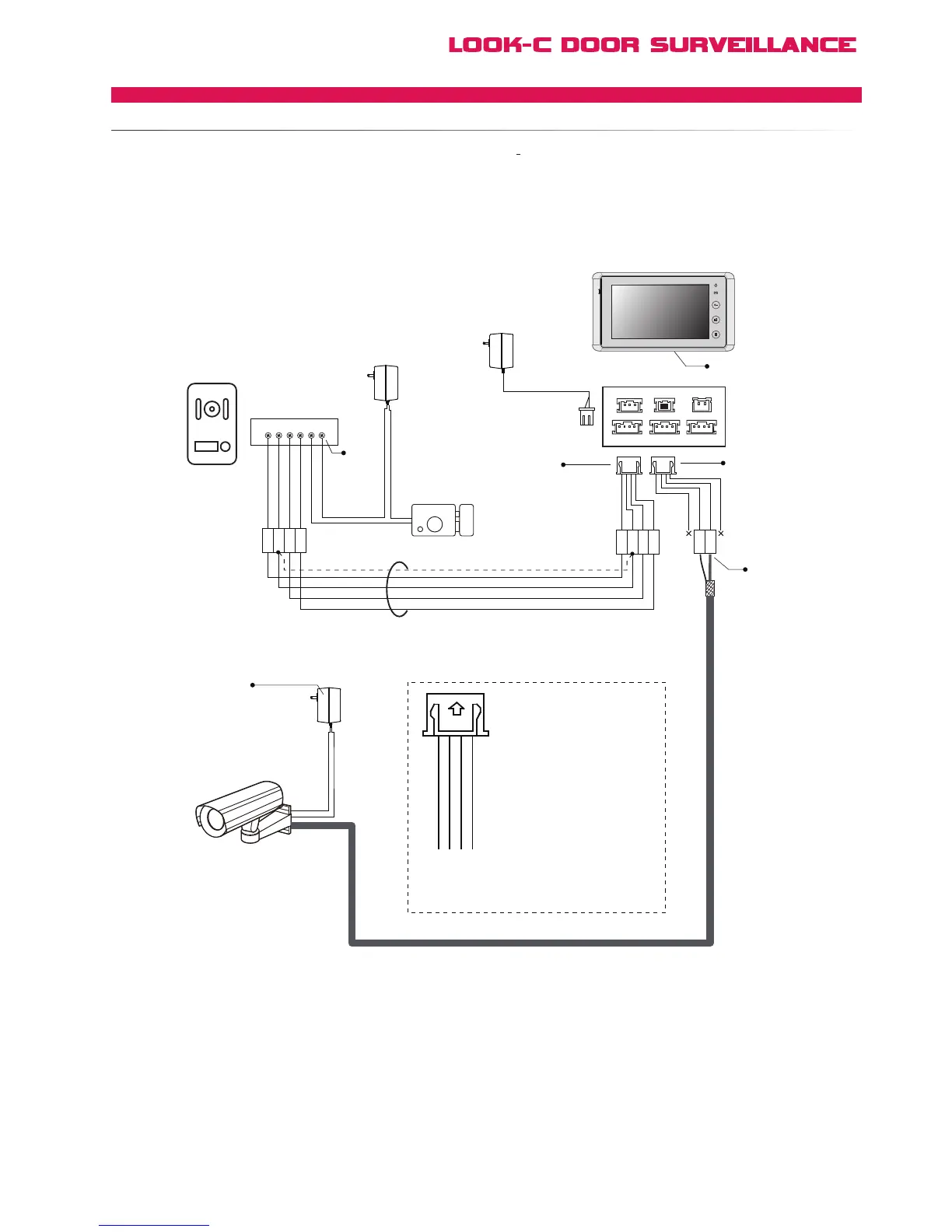
switched between Doorstation and CCTV camera on the Monitor just as switching video from 2
Doorstations.
[1] The power supply for the CCTV camera is not included
in the system, please use an appropriate power supply
which is suitable for the CCTV camera.
[2] Pl ease connec t the wire fi r m l y, iron sold e r i ng is
recommended. Screw terminals can be used, need encasing.
[3] Connect the Doorstation to the JS-OS1 port.
[4] Connect the CCTV camera to the JS-OS2 port.
[5]
When using 2 door stations, the 2 Way Input menu should
be set to 1 on Monitor 1#. On the Monitor Menu system,
go to User Setup > Installer Setup > 2 Way Input and
change the value from 0 to 1.
AC ~
1R
2W
3Y
4B
1R
2W
3Y
4B
1# Electronic Lock
Adapter
Adapter
Door Station
CCTV Camera
CCTV Video Coax Cable
Monitor #1
+
+
-
-
AC ~
Adapter
AC ~
2W
3Y
3Y(Yellow)
4B(Black)
2W(White)
1R(Red)
3Y(Yellow): Connect to the
Core of the Video Cable
4B(Black): Not Connected
2W(White): Connect to the
shielded layer of the Video
Cable
1R(Red): Not Connected
Blac
Black
Yellow
Red
White
Black
Yellow
Red
White
[5]
[3]
[1]
[4]
[2]
Black
Yellow
Red
White
1R 2W 3Y 4B 2 1
Black
Red
[2]
1
2
3
4
JS-OS1
Input 1 Input 2 Output
JS-AP
Handset 75 Ohm
Power
JP-VD DC-IN
DC- DC+
JS-OS2 JS-VD
1R
12V
2W
4B
2W
3Y
4B
1R
2W
3Y
4B
1R
2W
3Y
4B


 To Next Page