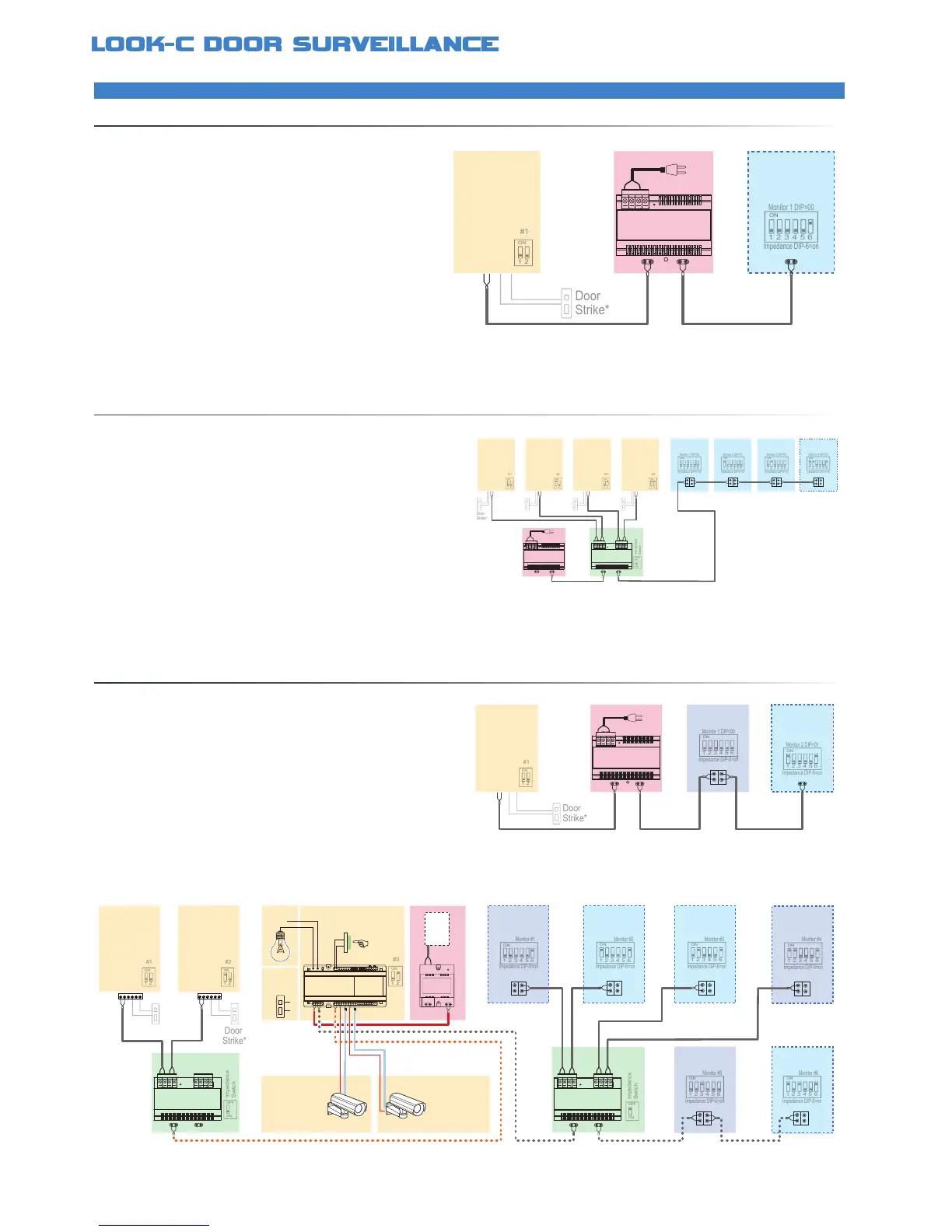
MINIMUMAUDIOSYSTEM
EXPANDEDAUDIOSYSTEM
EXTENDEDVIDEOSYSTEMWITHHANDSETS
The simplest setup involves a Door Station with a Handset
and a Bus Power Supply (PC6) Two wire setup as follows:
The 2-Wire Audio Intercom has the same connection topology as the
Video Intercom 2-Wire system and can be expanded in a similar way
An Audio Only Handset can be used in place of a Video Monitor for
circumstances where audio only communication with the door camera
*Further information available, see Door Strike Info
*Further information available, see Door Strike Info
• No Polarity, twisted pair, easily to wire solution
• Use CAT5 or twin core drop cable or equivalent
• Cable distances can be up to 100M total (CAT5)
• One common power supply to all type solution (PC6)
• PC6 is a Mains 240Vac power to 26Vdc injector
• Each door camera can control a door strike*
• Door Strike connections may vary to that shown*
• System is expandable with additional components
• A maximum of 32 Handsets can be used in one system
• A combination of Daisy-Chain and Star wiring (DBC-4A)
• Set each Door Station & Handset unique ID using the DIP Switches
• End-Of-Line units require termination Set the DIP6=ON
Set all other Handsets in a Daisy-Chain to DIP6=OFF
• PC6 has ample power to supply a fully expanded system
• Each Door Station can control a door strike*
• Door Strike connections may vary to that shown*
• A maximum of 16 Handsets and Monitors can be used in a system
• A combination of Daisy-Chain and Star wiring (DBC-4A) is shown
• Set each Door Station, Monitor & Handset with its own unique ID
• End-Of-Line units require termination Set the DIP6=ON
Set all other Handsets/Monitors in a Daisy-Chain to DIP6=OFF
• DPC with 24Vdc high power to supply a fully expanded system
• Each Door Station can control a door strike*
• Door Strike connections may vary to that shown*
Door
Station


 To Next Page