additional electronic lock(for example, garage door lock).
When control a lamp, there are 2 different control modes can be used, Automatic mode and
Manual mode.
● Automatic Mode: The lamp will be automically turned on when visitors press Call button on
the Doorstation, and it will be turned off automatically after a given time(called Light
on time,
can be set by the DIP switches for 1, 3, 5 or 10 minutes)
● Manual Mode: The lamp will be turned on and off manually on the screen of the Monitor or
by the external button.
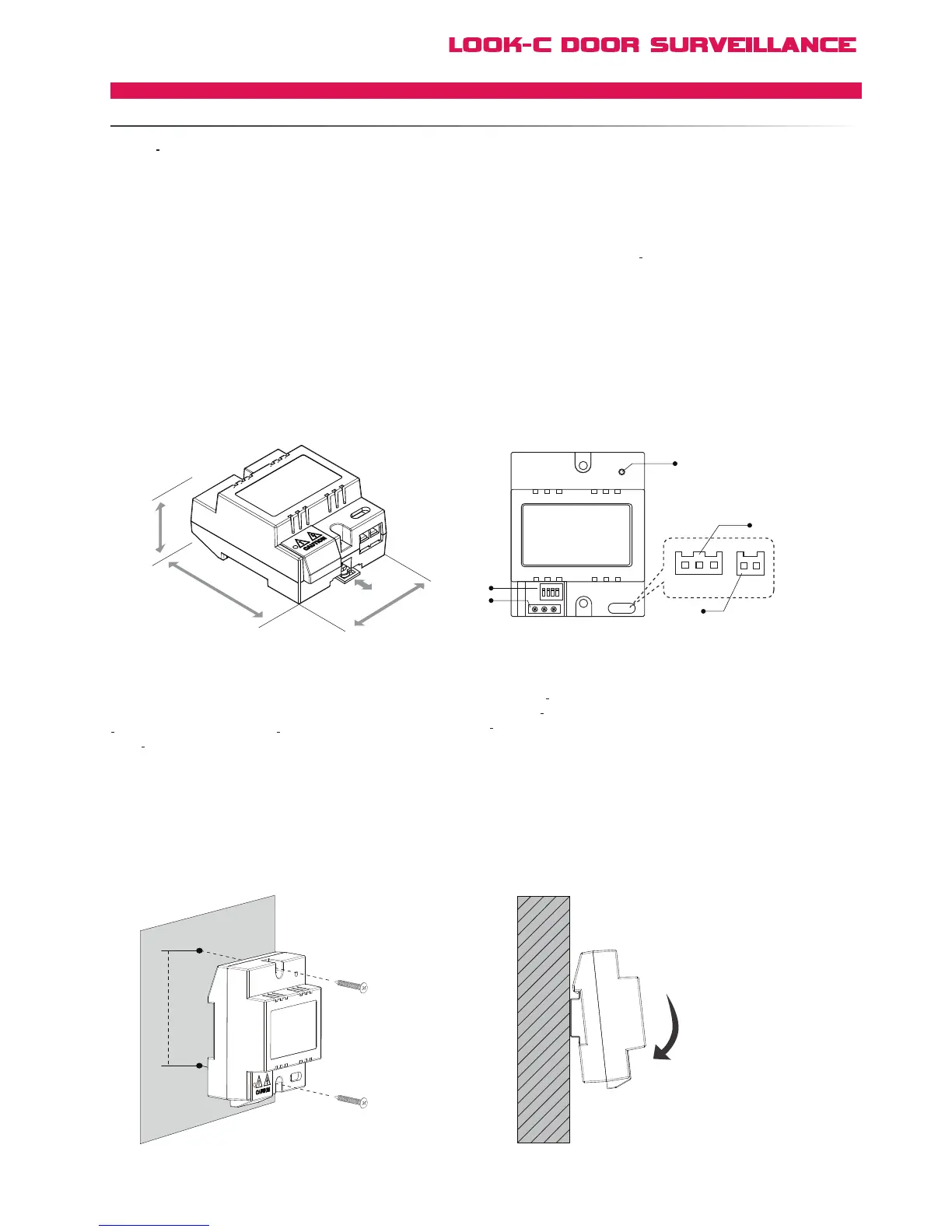
RLC Terminal descriptions
45 mm
89 mm
70 mm
RLC
1 2 3 4
ON
NO NC COM
4B GND 12V BT
[5]
[4]
[3]
[1]
[2]
[1] DIP switches for lamp control or unlock time settings(see
detail information later this section).
[2] Relay contact terminal, connect to lock or lamp. NO
Normally open terminal; NC Normally closed terminal;
COM Common terminal.
[3] External control button port.
[4] Monitor connection port, connect to the JS_AP port
of Monitor. 4B
data transmition line, connect to 4B pin of
Monitor; GND power ground, connect to 2W pin of Monitor;
12V
DC 12V power, connect to +12V of Monitor.
[5] LED indicator, lights in red when power is on, blink in red
when the unit is active.
85mm
Direct wall mounting DIN rail mounting
4 Wire - Accessories
RLCLOCK/LAMPCONTROLUNIT


 To Next Page