16
LOOK-C INSTRUCTIONS
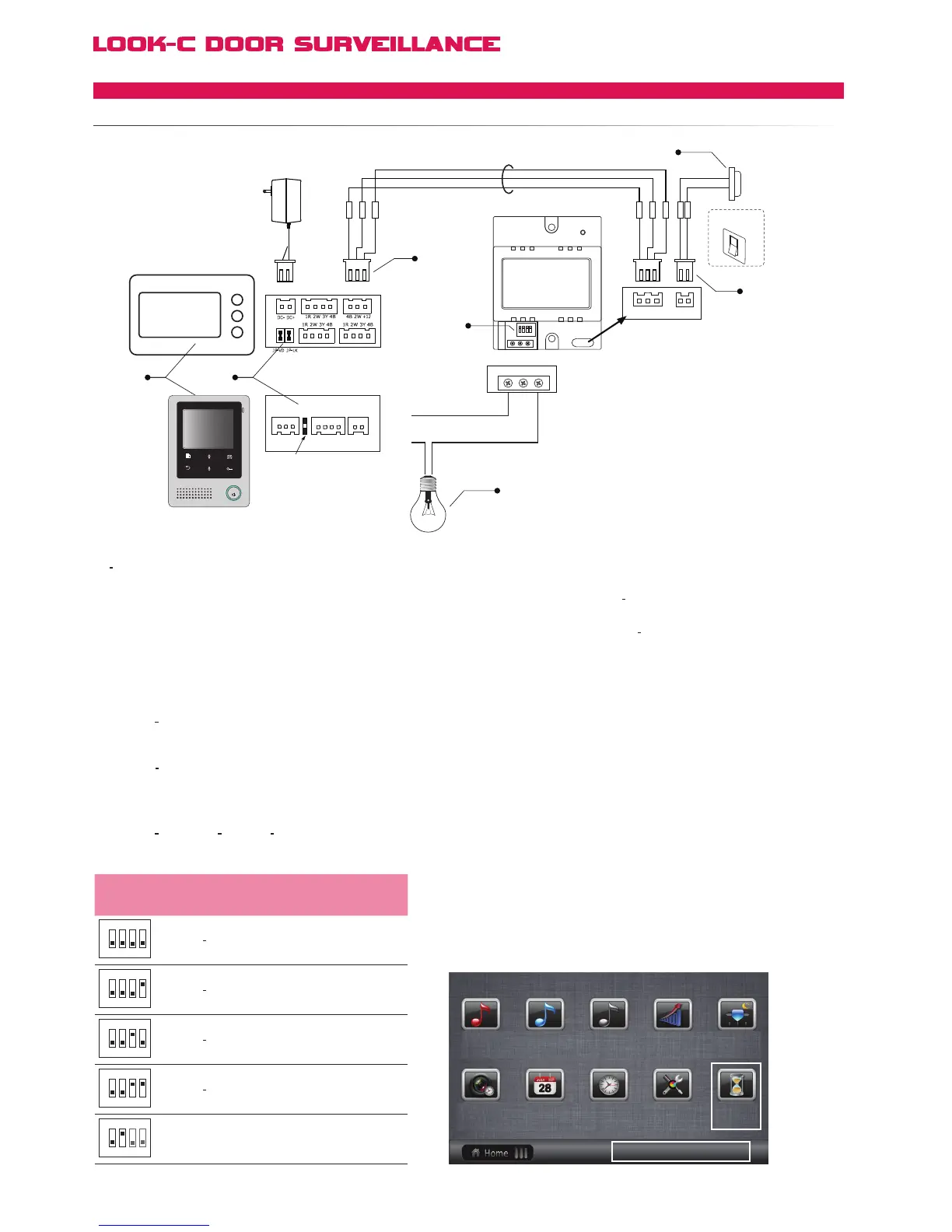
RLC to control lamps
[1] Only the Monitors with a touch screen can support
VT RLC unit, and settings need to be made to enable the
RLC function.
[2] Connecting RLC unit will not afffect the jamper settings.
[3] Connect the RLC unit to the JS_AP port of Monitor. Note
that Audio Phone can not be supported when using RLC.
[4] DIP switches for Lock/Lamp control settings.
[5] Connect the lamp to NO and COM terminal, this lamp
can be any type of AC light(the power rating must less then
700 w), such as a light tube.
[6] The button connection is Non
polarity.
[7] Both button or switch can be connect to the BT port.
Note that if using a switch, the Light
on timing will only work
when the switch is turned off, when the switch is turn on, the
lamp will always be on.
DIP state Function descriptions
1 2 3 4
ON
Automatic Mode;
Light on time=10 min;
Defaut setting
1 2 3 4
ON
Automatic Mode;
Light on time=3 min;
1 2 3 4
ON
Automatic Mode;
Light
on time=5 min;
1 2 3 4
ON
Automatic Mode;
Light on time=1 min;
1 2 3 4
ON
Manual Mode;
Lamp manually control by button or Monitor
DIP settings Monitor settings and operations
● Bit 1: Lamp / Lock select. set to OFF for
lamp control; set to ON for lock control.
● Bit
2: Control mode select. set to ON to
select Manual Mode, set to OFF to select
automatical Mode.
● Bit
3 and Bit 4: Light on time select, see
table below
H427
User Setup ->>Installer Setup ->> Staircase Light
Light on door bell activation can be set as follows:
[0]: don't light on at any time when receive calling
[1]: light on at night only when receive calling
[2]: light on at any time when receive calling.
Note that this item should be set on Monitor #1
for slave monitors, this item is invalid.
Night/Day timing is set by the clock.
H424
Tools ->>Installer Setup(1)/(2) ->> Staircase Light
JS_OS1
CN101 JS_VP JS_AP
JS_OS2
AC ~
Adapter
Lamp
Button
Switch
Bla ck
Red
Whi t e
Black
Red
Whi t e
[7]
[4]
[3]
[6]
[5]
[2][1]
AC
Input
COMNCNO
RLC
1 2 3 4
ON
NO NC COM
4B GND 12V BT
TALK
JS/ PS
JS/ OS1
JVDJS/ AP
P+
1R
2W
3Y
4B
2W
12V
4B
P-
H4.24 Monitor
H4.27 Monitor
Restore To Default ?
Master
Monitor Time Calendar
Day Time Installer Restore
Setup to default
Call tone Call tone Call tone
Slaver Intercom Ring Volume Night Ring
Volume
4 Wire - Accessories
RLCLAMPCONTROL


 To Next Page