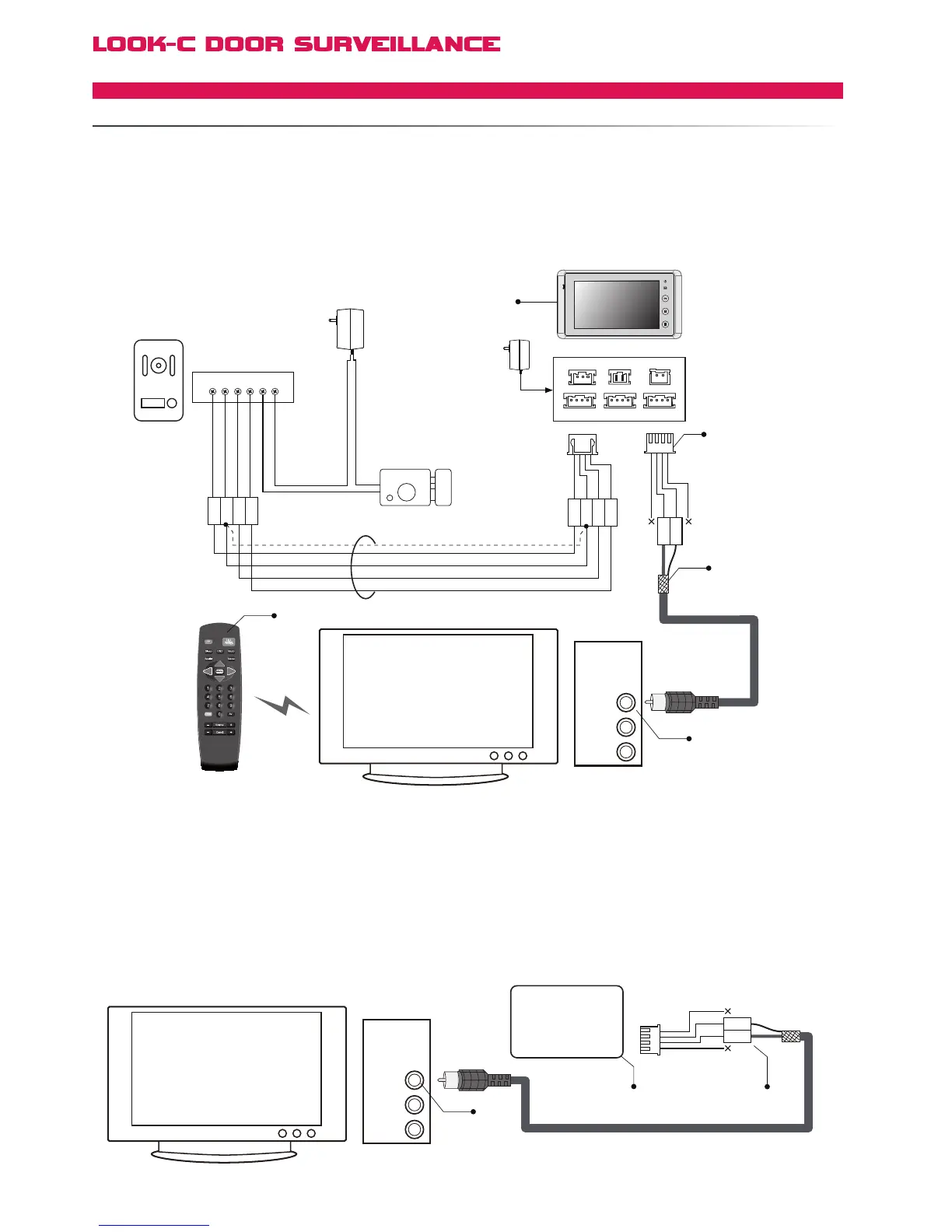
the AV Button on the TV remote to view the video from the Doorstation.
Video Cable
Video
Audio-L
Audio-R
2W
3Y
Black
Yellow
Red
White
[1]
[3]
[4]
[2]
[1] Connect the video cable core to 3Y and the shielded layer to 2W.
[2] The Television can be connect to any H4.27 JS-VD port, even if multiple monitors are installed.
Otherwise, the TV can be connected on a BDU branch. BDU will be required if using H4.24 units.
[3] Connect the video cable to the VIDEO terminal of the Televison, Composite Video Input.
[4] Press the AV Button on the TV remote to switch the picture from TV to Doorstation.
1R
2W
3Y
4B
1R
2W
3Y
4B
Electronic Lock
Adapter
Door Station
1# Monitor
+
+
-
-
AC ~
Black
Yellow
Red
White
[1]
Black
Yellow
Red
White
1R 2W 3Y 4B 2 1
Black
Red
1
2
3
4
JS-OS1
Input 1 Input 2
Output
JS-AP
Handset 75 Ohm
Power
JP-VD DC-IN
DC- DC+
JS-OS2 JS-VD
1R
12V
2W
4B
2W
3Y
4B
1R
2W
3Y
4B
1R
2W
3Y
4B
VIDEO IN
Video Cable
Video
Audio-L
Audio-R
2W
3Y
Black
Yellow
Red
White
[1]
[3]
[2]
VIDEO IN
BDU
4 Wire - Monitor Expanded
EXTENDTOATVMONITOR


 To Next Page