EasyManua.ls Logo

Look-C H424 - Extend Audio Handset

Look-C H424
28 pages
Print Icon
To Next Page IconTo Next Page
To Previous Page IconTo Previous Page
Loading...
11
LOOK-C INSTRUCTIONS
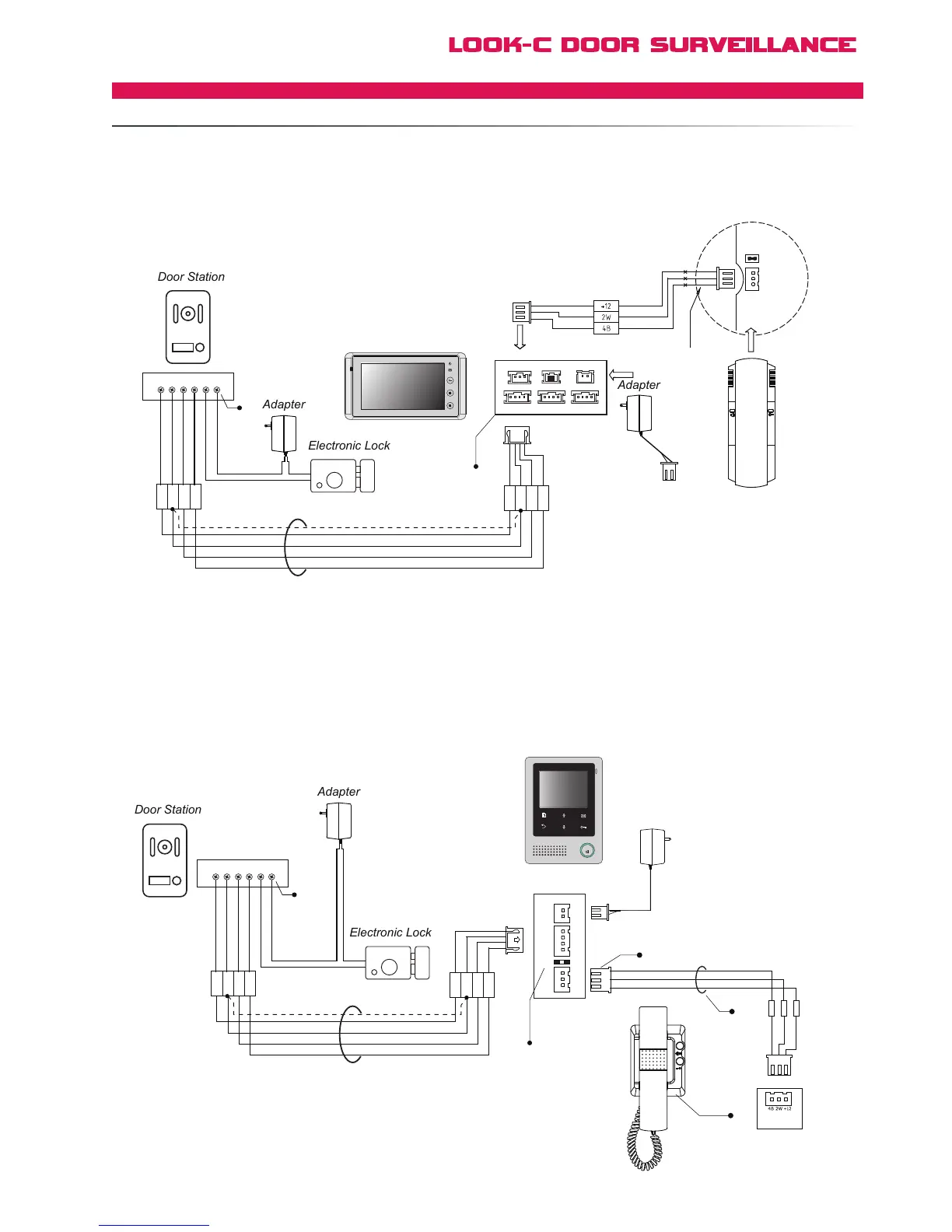
4 Wire - Monitor Expanded
EXTENDAUDIOHANDSET
Audio Phones can be connected to the Monitor system. The Audio Phone can answer the calling
from Doorstation and unlock the door. When visitors call from the Doorstation, Monitor(s) and
Audio Phone(s) will ring at the same time, and any of them answer the call, the other will stop
ringing. The Handset operates similar to a monotor involving conversation and door opening, etc.
[1] The power supply for the Handset is not required. The
4 wire system incorporates 12Vdc to operate the handset.
[2] Please conne ct the wire firml y, ir on weldin g is
recommended. Screw terminals optional, will need enclosure.
[3] Connect the Doorstation to the JS-OS1 port (H427).
[4] Connect the Audio Phone to the JS-AP port (H424).
[5] Audio only handsets have no Video termination,
If Monitor end-of-line then set last monitor JP-VD (JVD) = Closed
[5]
1R
2W
3Y
4B
1R
2W
3Y
4B

Electronic Lock
Adapter
Door Station
+
+
-
-
AC ~
Black
Yellow
Red
White
1R 2W 3Y 4B 2 1
Black
Red
[3]
Black
Red
White
[5]
[4]
[3]
Bac
k
View
AC ~
JS/PS
JS/OS1
JVDJS/AP
P+
1R
2W
3Y
4B
2W
12V
4B
P-
TALK
H4.24 Monitor
1R
2W
3Y
4B
1R
2W
3Y
4B
Electronic Lock
Adapter
Door Station
+
+
-
-
AC ~
Adapter
Black
Yellow
Red
White
Black
Yellow
Red
White
1R 2W 3Y 4B 2 1
Black
Red
[3]
[5]
H4.27 Monitor
JS-OS1
Input 1 Input 2 Output
JS-AP
75 Ohm
Power
JP-VD DC-IN
DC- DC+
JS-OS2 JS-VD
1R
12V
2W
4B
2W
3Y
4B
1R
2W
3Y
4B
1R
2W
3Y
4B
1
2
3
4
Red
White
Black
Black
White
Red
+12
2W
4B
GX-3P
JS-AP
JS-LK