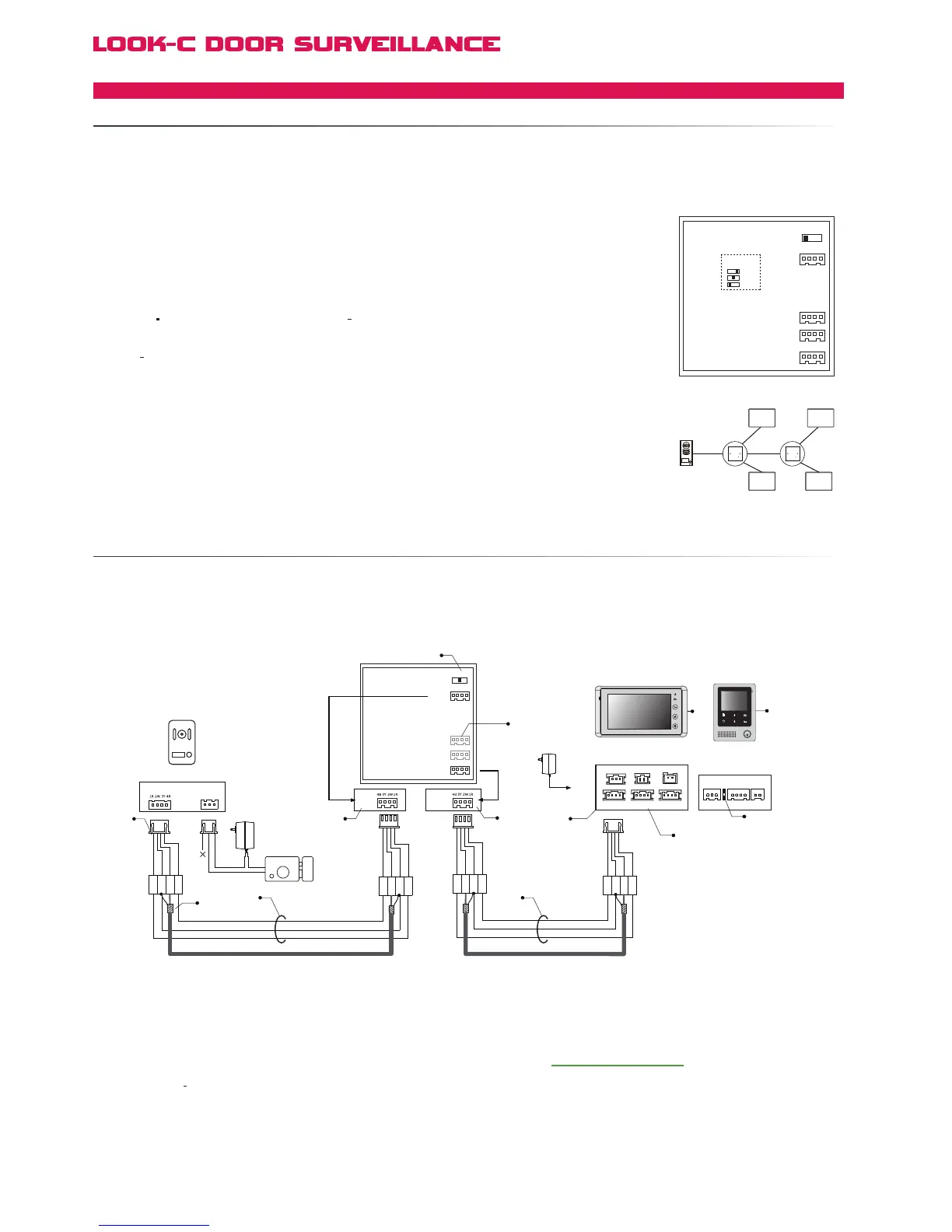
to extend the wiring distance from Doorstation to Monitor or from Monitor to Monitor in a chain.
● Connect the BDU directly between Doorstation and Monitor(s).
Maximum
distance 100 meters.
[1] 75 ohm coax RG59 video cable, connect the video core
to 3Y and connect the shielded layer to 2W.
[2] Connect the Doorstation to the JW-OS port of the BDU.
[3] The use of higher guage cables can help maximise range
[4] Set the SET
3Y to 75R position(middle position)
[5] Illustrated with a Door station as source. Can also be from
another BDU branch line or Output of Monitor #1, etc.
[6] Connect the JW/VP 1 to the Monitor #1.
Optional Multi-Monitor setup. See Multi-Monitor pages.
[7] H427 Requires Set Menu to:
User Setup -> Installer Setup -> BDU Installed = 1
[8] Multiple Monitors can be supported when using the
BDU unit, refer to Extend Multiple Monitors section for
connection
detail).
[9] The JS-OS2 can be connected to the second Doorstation,
only if this H427 is the master Monitor #1.
[10]
H424 is shown for alternative conection Illustration purposes.
More BDU units can be inserted in the chain to further extend.
Please note that a BDU will not fix issues with cable selection.
BDU
SET-3Y
JW-OS
JW-VP3
JW-VP2
JW-VP1
3 2 1
JS_VB LB
1R
2W
3Y
4B
1R
2W
3Y
4B
Electronic Lock
Adapter
Doorstation
+
+
-
-
Black
Yellow
Red
White
Black
Black
Yellow
Red
Red
White
White
JW-OS
1R
2W
3Y
4B
1R
2W
3Y
4B
Black
Yellow
Red
White
Black
Yellow
Red
White
JW-VP1
[6]
[8]
[1]
[9]
[10]
[4]
[5]
[3] [3]
[2] [2]
75 ohm coax RG59 75 ohm coax RG59
TALK
JS/PS
JS/OS1
JVDJS/AP
P+
1R
2W
3Y
4B
2W
12V
4B
P-
H4.24
Monitor
H4.27
Monitor
[2]
The BDU unit is designed as a repeater and distribution amplifier for splitting a Bus into three branches.
● Distribute the 4-Wire system in star topology, for splitting the Audio/Video/Control/Voltage Bus.
● Muitiple BDUs can be used when multiple distributor nodes need to be applied (up to 3 max.).
● BDU can work
● There is a maximum of three BDU’s that can be used in one system, in any configuration.
If the system also uses a MDS Camera splitter, then only two BDU’s can be used.
as a signal repeater in a long wiring distance system (up to 100 meters).
● The Video Signal quality requires 75Ω to be maintained. Please pay attention to the
setting of JP-VD or JVD of the monitors (See Star Wiring Topology) and SET-3Y below:
● SET
3Y: Video impedance setting; 1 When multiple BDU uints are installed in the system,
all the BDU units must be set to HI except the last one of the chain (which is end-of-line).
2
The last BDU unit (or only one*)
*If there is only one BDU installed, the settings are the
same as being the end-of-line unit.
it should be set to 75R or 150R according the following:
when
the distance from the door station to the BDU is over 50 meters, set to 150R,
other wise set
to 75R.
● JW/OS: Input port; Connect to the door station, or previous BDU unit.
● JW/VP1/2/3:
● H427 Requires Set Menu to: User Setup -> Installer Setup -> BDU Installed = 1
Output port; connect to indoor monitors or next BDU unit.
SET-3Y
SET-3Y
JW/OS
150R
75R
HI
JW/VP1
JW/VP2
JW/VP3
BDU
1
2
3
4
JS-OS1
Input 1 Input 2 Output
JS-AP
Handset
75 Ohm
Power
JP-VD
DC-IN
DC- DC+
JS-OS2 JS-VD
1R
12V
2W
4B
2W
3Y
4B
1R
2W
3Y
4B
1R
2W
3Y
4B
BDU BDU
4 Wire - Connection Expanded
BDUBRANCHDISTRIBUTIONUNIT
BDUDISTANCEEXTENDING


 To Next Page