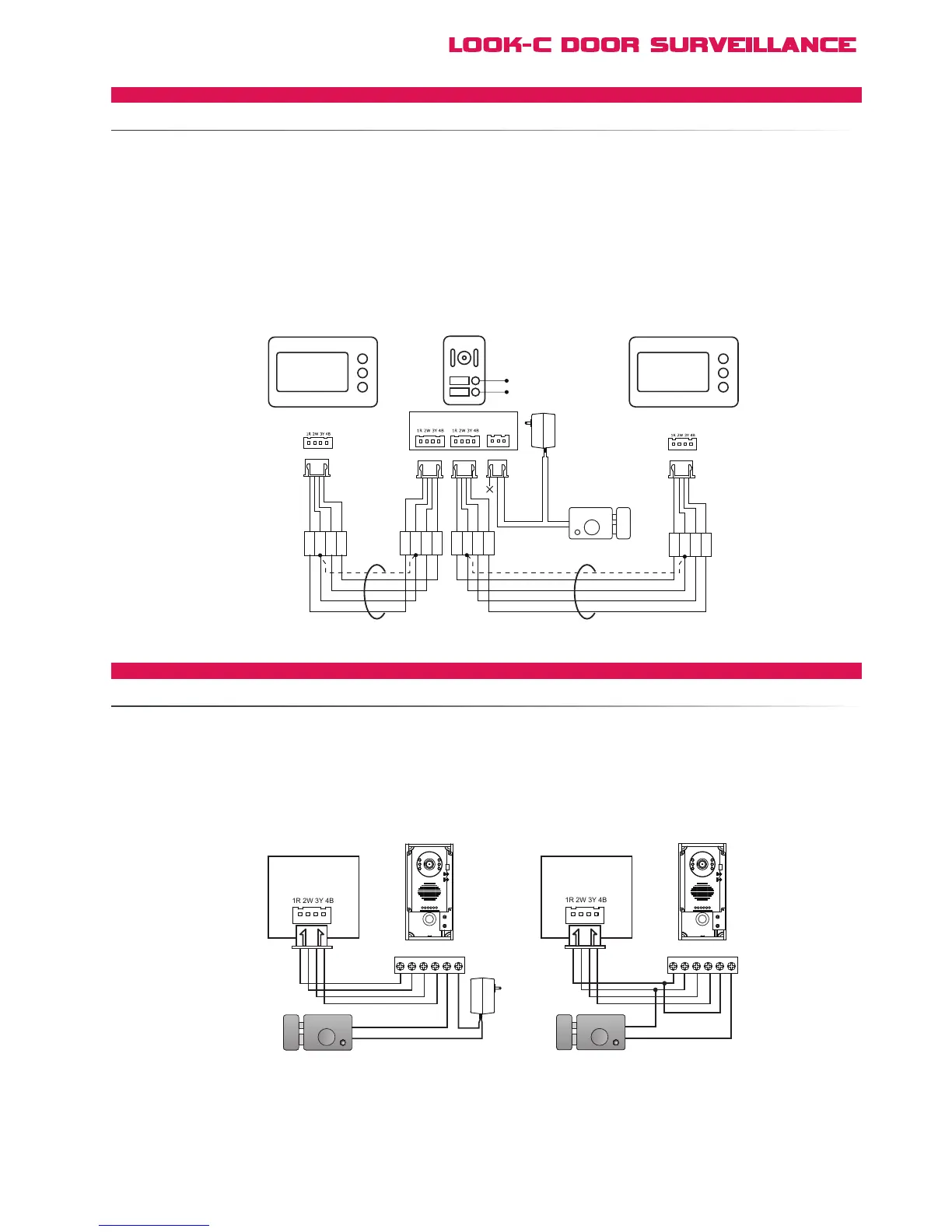
The H492RH Door Camera Station is a single camera with two door-bell buttons Monitors are connected on
either A or B branch line and ring only on one of the button presses A or B
The door strike is shared and monitors can intercom between each other This makes the H492RH suitable for
Duplex Units with a common door, or share situations in a common dwelling, Dual occupancy, Grannie Flats,
Teenagers, Private/Ofce, Business A or B, etc
Fail-SecureisPower-On-To-Release
The Door Station Camera has a Dry Relay Contact Connection, Normally Open
Connect using internal power is 12V at 200mA max hold current with a lead from station to strike of no more that 2 metres
For higher power door strike or a longer wire, it is recommended to add an external power pack for the door strike
Fail-SafetyisPower-Off-To-Release
The Door Station Camera is NOT compatible with power always on type systems For this feature there is an optional extra
module for Fail-Safety door lock control See RLC Relay Lock Control module for more information This module is Fail-Secure
compatible too and also offers an Exit-Button with programmable time delay
More monitors can be added to either branch line, see multi-monitor topology
Only one monitor can be set as monitor #1 for intercom feature to function and Monitors can intercom between each other
If only two monitors total are used and both are set as Monitor #1, then the intercom feature will not function


 To Next Page