101
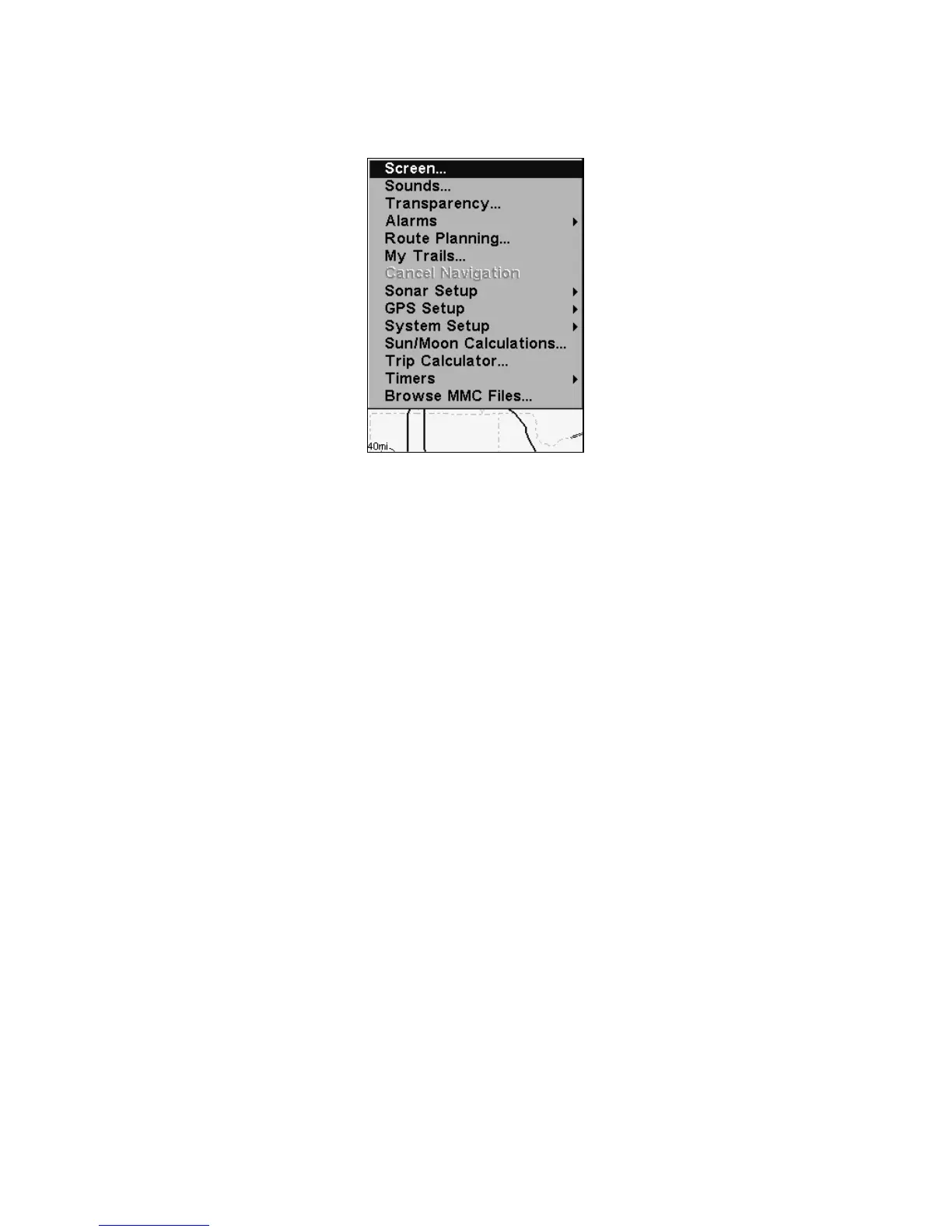
You can access the Main Menu from any of the four Page screens by
pressing
MENU|MENU. To clear the menu screen and return to the page
display, press
EXIT.
Main Menu.
The Main Menu commands and their functions are:
Screen command: changes the contrast or brightness of the display
screen.
Sounds command: enables or disables the sounds for key strokes and
alarms and sets the alarm style.
Transparency command: adjust the level of transparency for menus.
Alarms command: turns GPS or sonar alarms on or off and changes
alarm thresholds.
Route Planning command: used to plan, view or navigate a route.
My Trails command: shows, hides, creates and deletes plot trails. Also
used to navigate or backtrack a trail.
Cancel Navigation command: turns off the various navigation com-
mands. Used to stop navigating after you have reached your destina-
tion waypoint, Point of Interest or map cursor location; or after you
reach the end of a route or trail.
Sonar Setup command: sets various sonar options.
GPS Setup command: sets various GPS receiver options.
System Setup command: sets general configuration options.
Sun/Moon Calculations command: finds the rising and setting time
of the sun and the moon.
Trip Calculator command: shows trip status and statistics.








 To Next Page