118
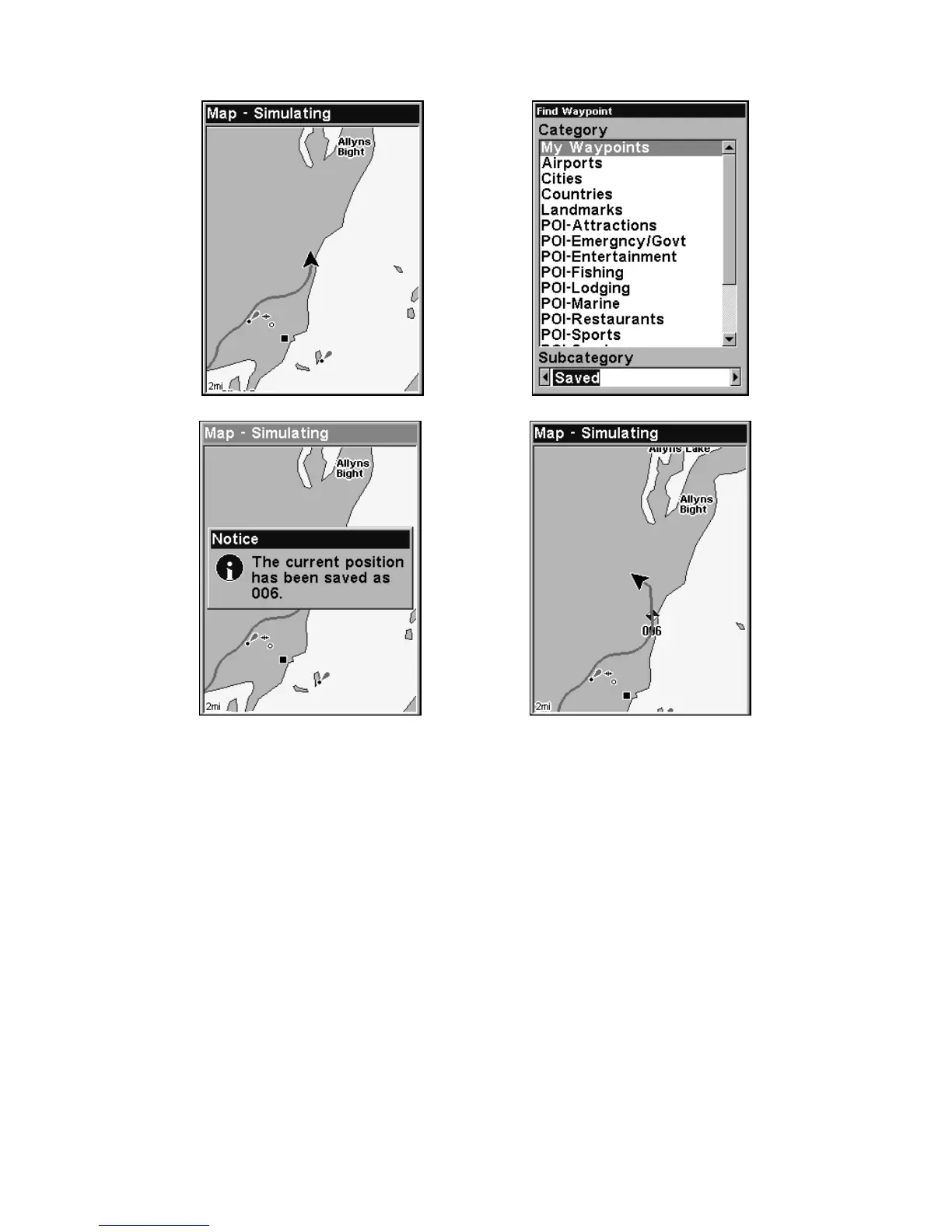
Sequence for setting a waypoint. Step 1: while traveling, quickly press
WPT twice to call up Find Waypoint screen (seen in Step 2) and set a
point. Step 3: a message says the waypoint has been saved. Step 4: ve-
hicle continues on its way; number waypoint symbol is visible on map.
Create Waypoint on Map
1. Use the arrow keys to move the cursor to the place where you want
to make a waypoint.
2. Press
WPT|WPT. The waypoint is saved and automatically given a
name with a sequential number, such as "waypoint 001." The waypoint
symbol and number appear on the map.
Create Waypoint by Entering a Position
1. Press WPT|↑ to MY WAYPOINTS|→ to NEW|ENT.
2. Press ↓ to
ENTERED POSITION|ENT|↑ to CREATE|ENT.
3. Press ↓ to
LATITUDE|ENT. Enter the latitude by pressing ↑ or ↓ to
change the first character, then press → to the next character and re-
peat until the latitude is correct. Press
ENT.
Step 3.
Step 4.
Step 1. Step 2.








 To Next Page