176
In search results, the distance and bearing to the selected item will
be calculated from the current position. In the case of a cursor
search, the search results show distance and bearing from the cur-
sor, but an individual waypoint's information screen shows distance
and bearing from the current (or last known) position.
Find Addresses
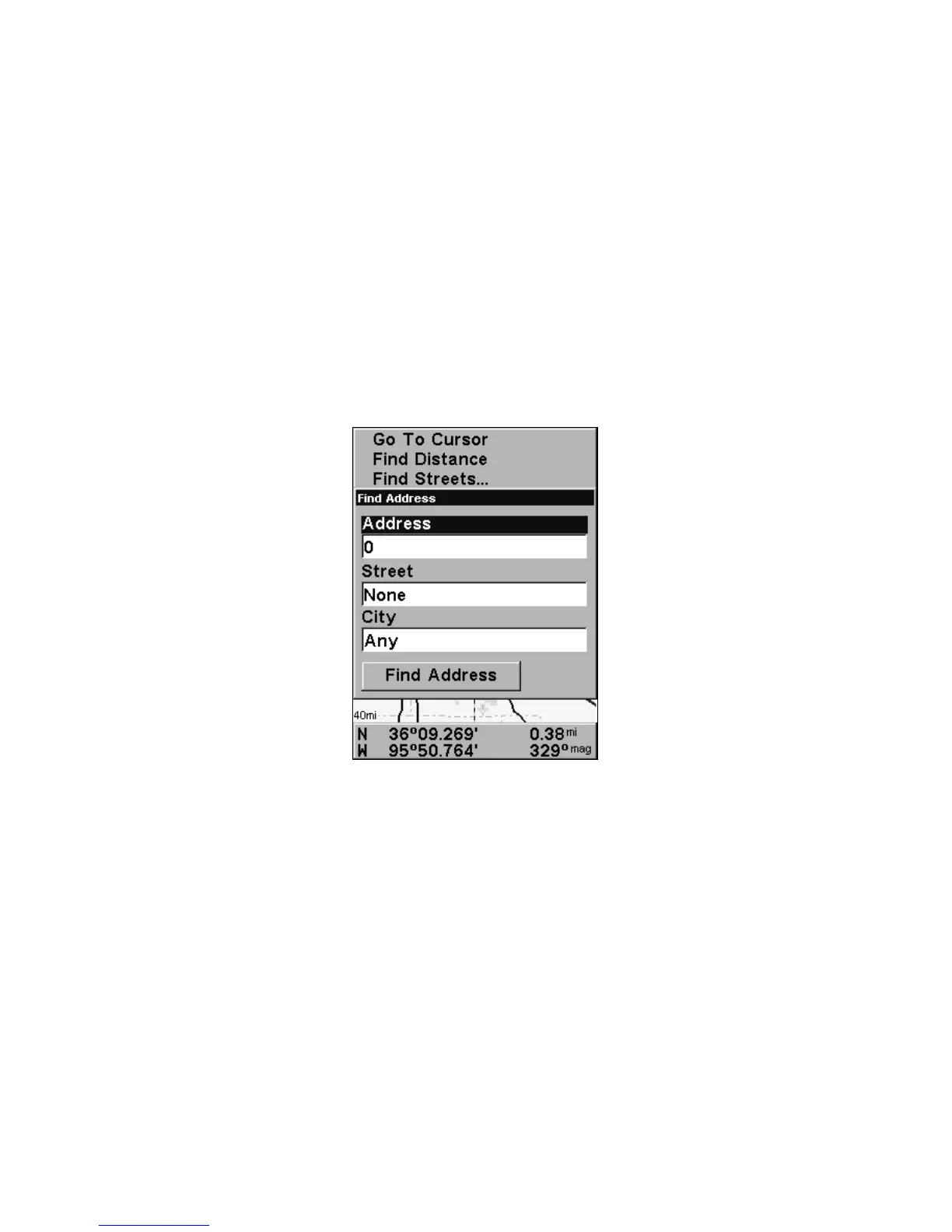
1. From the Map Page, press MENU|↓ to FIND ADDRESS|ENT.
2. Press
ENT to search in the Address field.
3. To enter an address number, press ↑ or ↓ to change the first
number, then press → to move the cursor to the next number and re-
peat until the number is correct, then press
ENT.
Find Address Menu.
4. To enter a street name, press ↓ to STREET|ENT. There are two op-
tions: A. You can spell out the name in the top selection box. Press ↑
or ↓ to change the first letter, then press → to move the cursor to the
next letter and repeat until the name is correct, then press
ENT|ENT. B.
Jump down to the lower selection list by pressing
ENT, then press ↓ or ↑
to select a street name from the list, then press
ENT. The street name
you selected is now in the street field.






 To Next Page