171
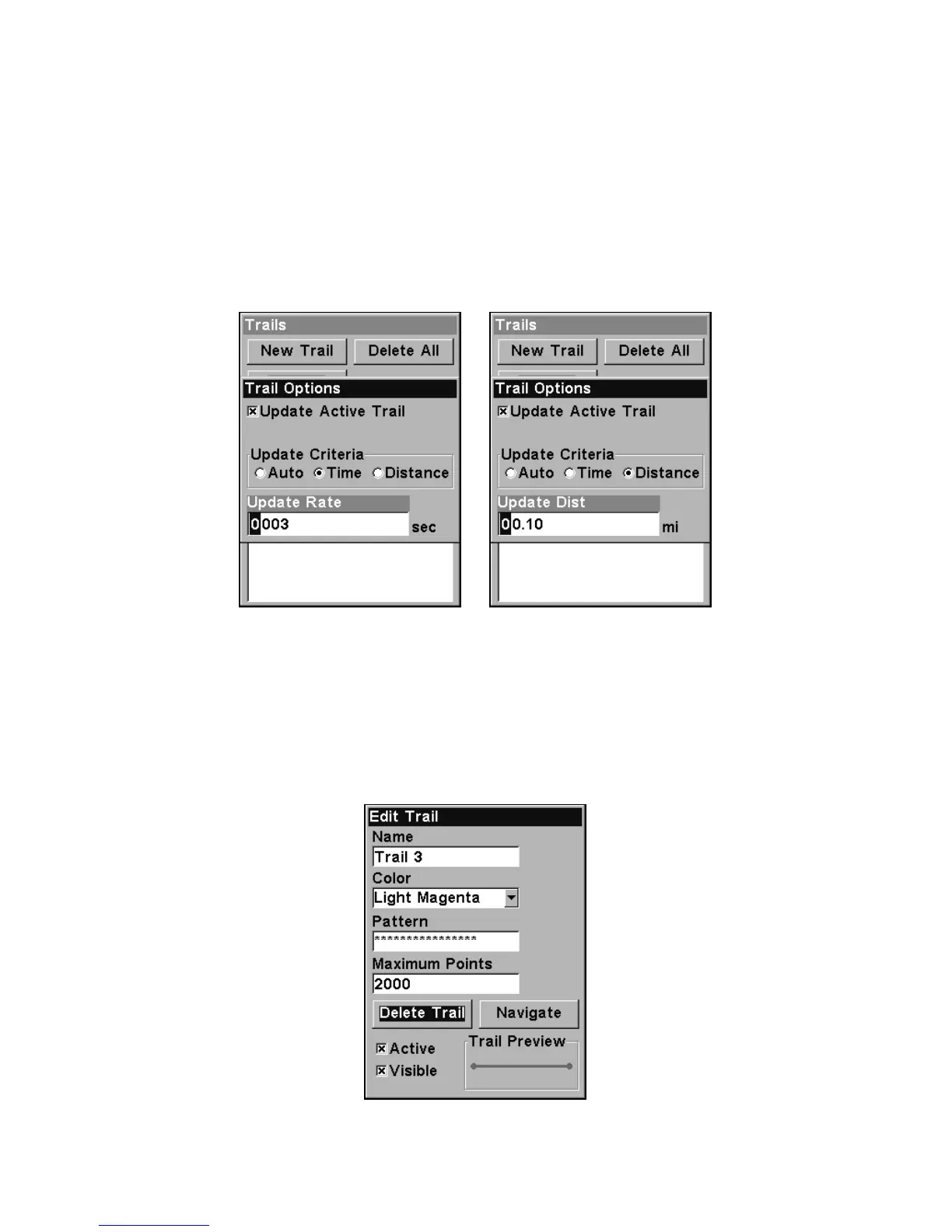
Trail Update Rate (Time, Distance)
You can update a trail by time, with a range from 1 second to 9999 sec-
onds; the default is 3 seconds. You can update by distance, with a range
from 0.01 mile/nm/km to 9.99 mile/nm/km; the default is 0.10 mi.
With one of the Update Criteria selected, use the cursor arrows to
highlight either the
UPDATE RATE or UPDATE DISTANCE data entry boxes and
press
ENT. Press ↑ or ↓ to change the first character, then press → to
the next character and repeat until the entry is correct. Press
EXIT to
return to the Trail Options Menu.
Trail Options menu: Update Time Rate setting, left, and Update Dis-
tance setting, right.
Specific Trail Options
Delete Trail
To delete a specific trail: From the Trails Menu, press ↓ to Trail
Name|
ENT. The Edit Trail menu appears as seen in the following fig-
ure. Press ↓ to
DELETE TRAIL|ENT|← to YES|ENT.
Edit Trail menu.






 To Next Page