156
All datums are named. The GPS system is based on the WGS-84 da-
tum, which covers the entire world. Other datums may also cover the
entire world, or just a small portion of it. By default, your position
shows using the WGS-84 datum. However, it can show your position
using one of 191 different datums. Different datums can be selected; to
change the datum:
1. Press
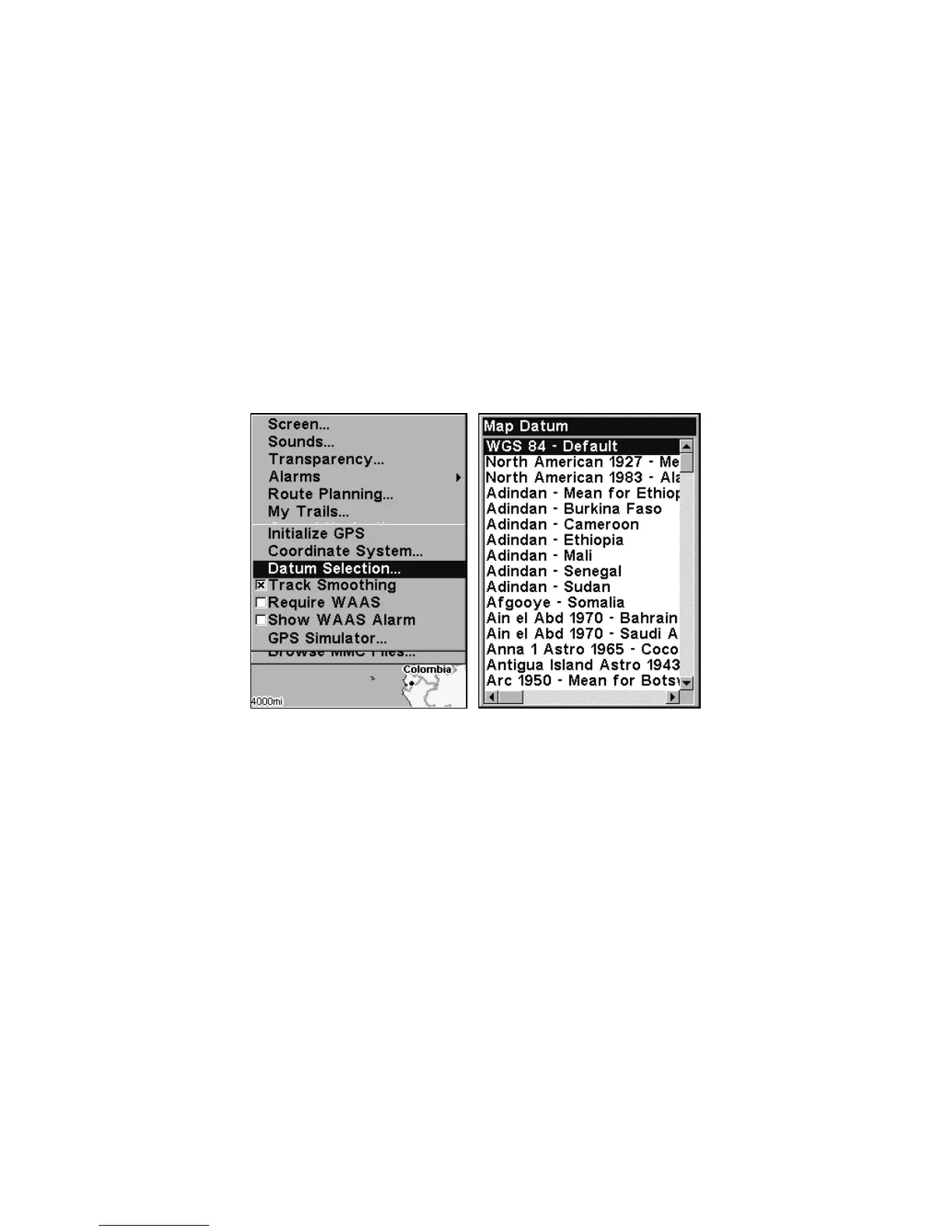
MENU|MENU|↓ to GPS SETUP|ENT|↓ to DATUM SELECTION|ENT.
2. Scroll ↓ or ↑ to select the desired datum, then press
ENT.
3. To return to the last page displayed, press
EXIT|EXIT.
A list of the datums used by this unit is in the back of this manual.
GPS Setup Menu, left, Map Datum Menu, right.
Map Detail Category Selection
This menu determines which of the mapping features are shown on the
screen. This includes, waypoints, trails, icons, cities, highways, etc. You
can selectively turn on or off any of these items, customizing the map to
your needs.
To get to Map Categories:
1. From the Map Page, press
MENU|↓ to MAP CATEGORIES DRAWN|ENT.
2. Press
↑ or ↓ to select a category or press → or ← to select a subcate-
gory. Press
ENT to turn it off (no check) or on (checked.)
3. To return to the last page displayed, press
EXIT|EXIT.







 To Next Page