ODK4 QUICK REFERENCE GUIDE
Luminator Technology Group
23
7.4.2 Load Message Listing from Device
A Message listing contains the actual route data displayed on the head signs. Only one
message listing may reside in ODK4 memory at a time. To transfer a new message
listing into the ODK, access the Maintenance Menu see Figures 7-5 through 7-8.
From the Maintenance Menu (see Fig. 7-8) press the USB Key to access the USB
Operations menu. Remove USB port cover and insert the Config & MTU Flashdrive into
the USB Port.
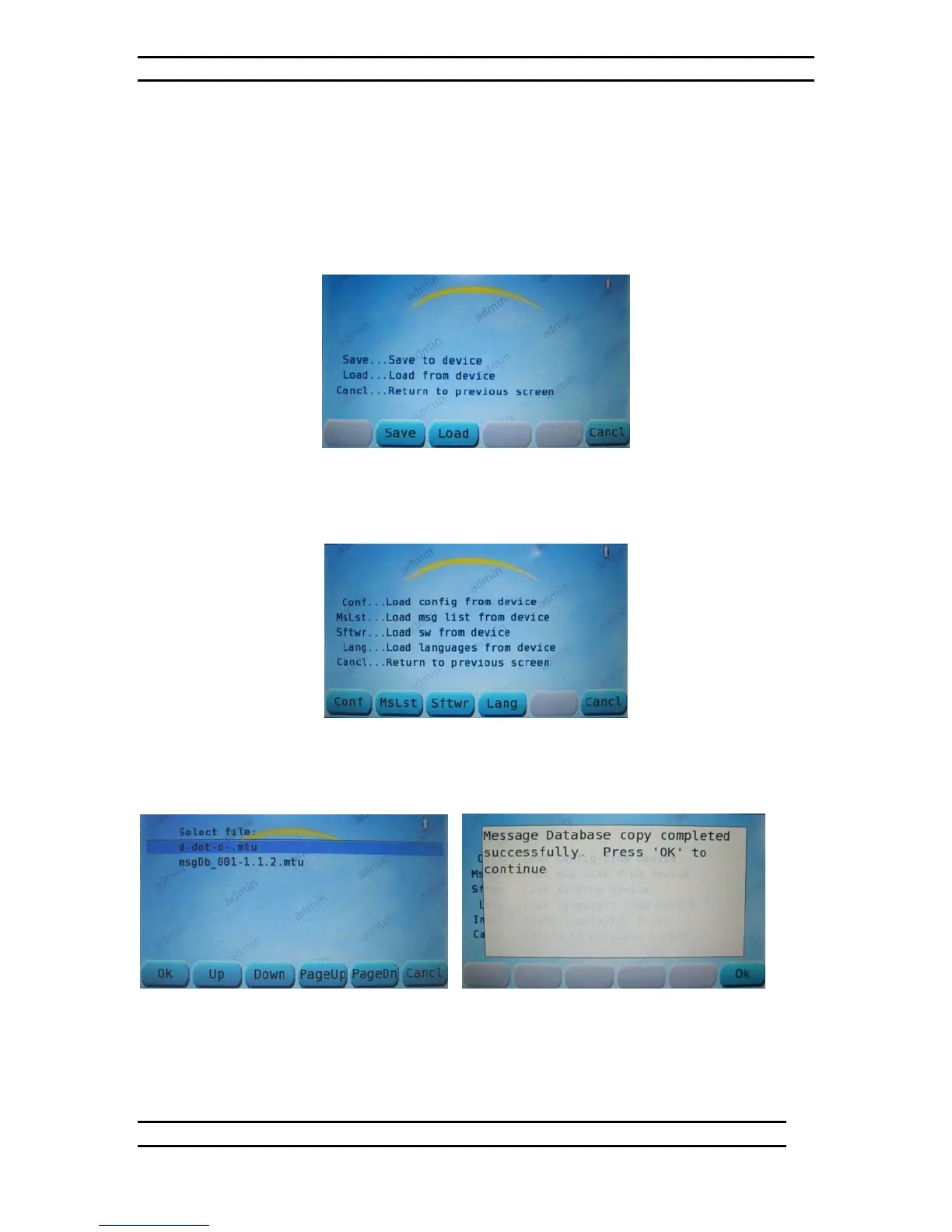
Figure 7-21. USB Operations Menu
From the USB Operations menu (see Fig. 7-21) press the LOAD Key to access the Load
From Device menu (see Fig. 7-22).
Figure 7-22. Load From Device Menu
From the Load From Device menu (see Fig. 7-22) press the MSLST Key to initiate the
Load Message List From Device command (see Fig. 7-24).
Figure 7-23. Load Msg. List From Dev. Figure 7-24. Load Msg. List Complete
Immediately after pressing the MSLST Key (see Fig. 7-22) the ODK will begin loading
the new Message Listing. (If there are multiple listings to choose from, use the
UP/DOWN Keys to choose the file you want to download [see Fig.7-23] and press OK.)


 To Next Page