214683 80 Revision A
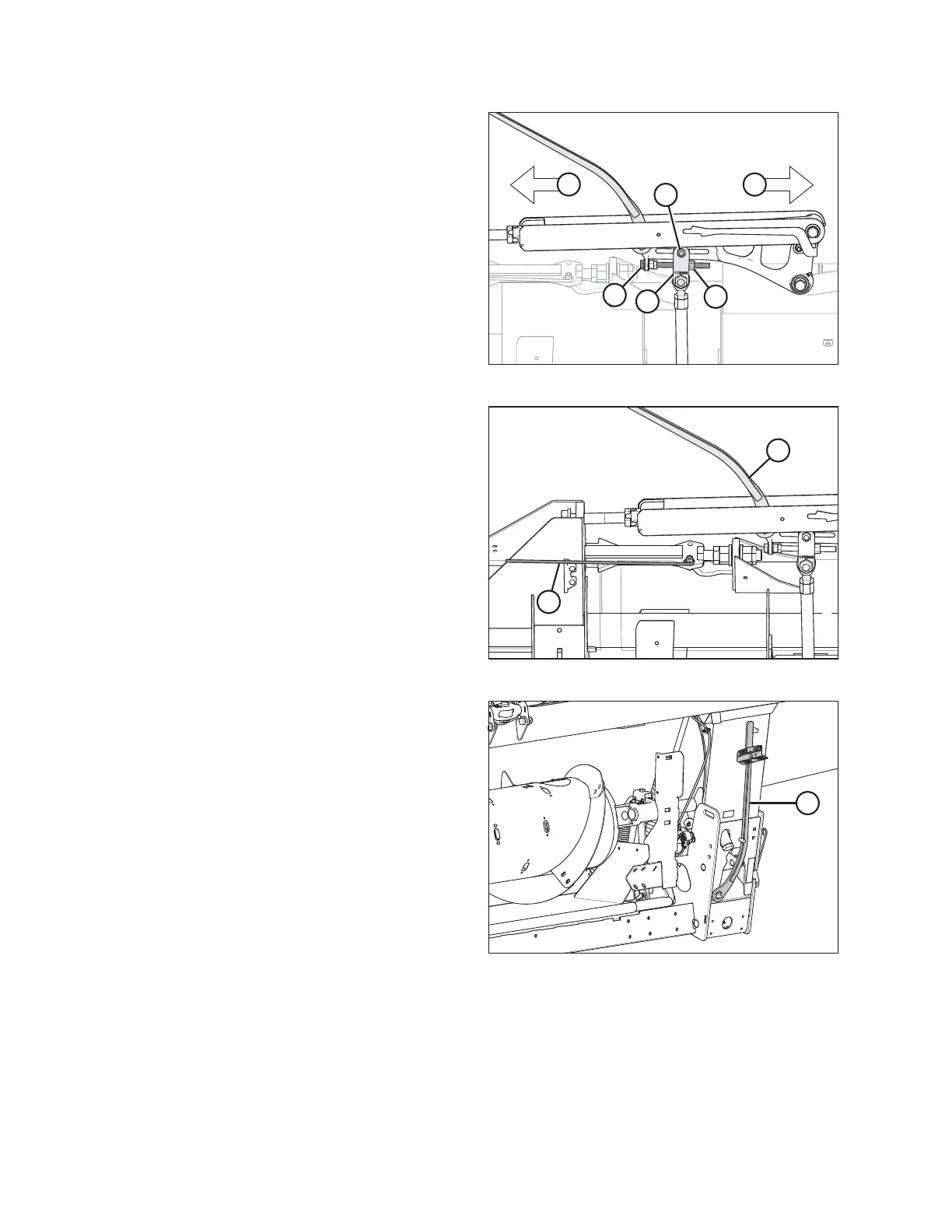
Figure 3.70: Balance Linkage (Left Side)
4. If necessary, perform the following adjustments:
• If the wing is too heavy, turn adjuster bolt (B) to
move clevis (C) outboard (D).
• If the wing is too light, turn adjuster bolt (B) to move
clevis (C) inboard (E).
5. Adjust clevis (C) position if necessary until indicator
readings on torque wrench are within 1/2 increment.
6. Tighten nut (A) on clevis bolt.
7. Torque jam nut (F) to 81 Nm (60 lbf·ft).
Figure 3.71: Wing Lock in Lock Position
8. Move handle (A) to the upper LOCK position.
9. If lock does not engage, move the wing up and down
with torque wrench (B) until it locks. When locked, there
will be some movement in the linkage.
10. If the cutterbar is not straight when wings are in lock
mode, then further adjustments are required. Contact
your MacDon Dealer.
Figure 3.72: Torque Wrench
11. Return the torque wrench (A) to its storage location on
the float module frame.
OPERATION









 To Next Page